Add Items to Windows 7 Send To Menu Without Third-Party Tools
You must be familiar with Send To Toys, a freeware to add items to Windows right-click Send To menu, which was reviewed by Usman just a few days back. It is a nice tool which makes adding and removing items from Send To menu quite easy. But how many of you know that items can be added and removed from Send To menu without using any 3rd party tool?
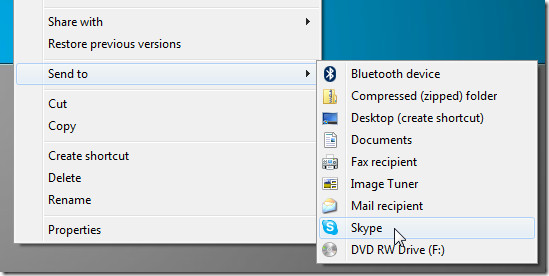
There is no magic formula or trick. To remove or add your own items (shortcuts) easily, simply navigate to the following directory to find all Send To items.
C:\Users\{YourUsername}\AppData\Roaming\Microsoft\Windows\SendTo
Navigating to this directory can be a headache for some, this is why we will use a quicker method.
Type “shell:sendto” in Start Search without the quotes and hit Enter.
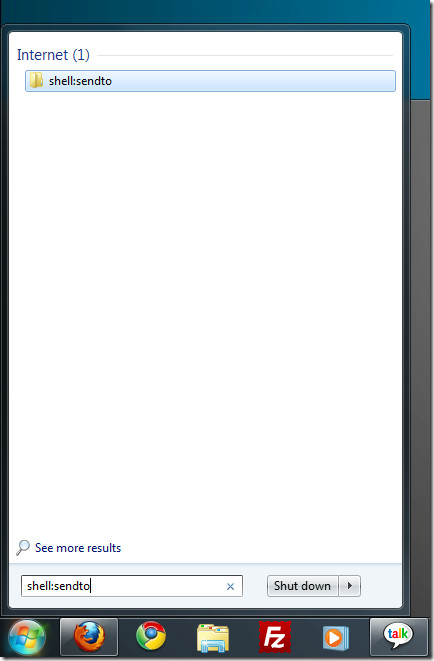
The above method is for Windows 7 only. If you are using Windows XP, use the same command in Run dialog box to navigate directly to Send To folder.

Thanx for the easiest way!!!! 🙂 : ) 🙂
Thank you! Just what I needed.
I added some folders on network in send to menu, It takes some time to pop up ?
Help me so that i can access these folders faster Thanks In advance….!
I need to get rid of an item that no longer exists in the menu that CONTAINS the send-to option. Anyone know what that menu is called? It’s the one you immediately see when you right-click, say, on a text file. The list starts with Open, Print, Edit…
Thanks much in advance!
Add items to Right Click Context Menu
**Applies to XP, WIN 7
(Be careful with playing with your Registry)
Regedit
HKEY_CLASSES_ROOT
*
shell -right click on shell and click on add new key and
Type whatever you want appear in right click menu
-right click on the New Key and click on add new key and
Type “command” without quotes
double click on command and change/set/type in Value data wherever (full path and name) the program you want executed.
Exit Regedit
Go and right click on a file. Your enrty will be in the pop-up menu.
I don’t know what I’m doing wrong but I created shortcuts to MS Access, Word and Excel and NONE of them show up. The only choices I have are the ones MS put there. I am using the 32 bit version of Win 7 on my desktop as it is an older machine. Could that be the issue?
wow..i’ve been going round the web searching for a while trying others’ tips until i come across this, this is so simple for me, thx a lot!!
Thanks a lot because of it! I have not been that relocated by using a net for an extended time! You need this, regardless that implies in blogging and site-building. Well, You’re undeniably somebody that has a thing to state that others might read. Keep up to date the excellent work. Keep on inspiring people!
It looks like the default action is to copy the file to the SendTo destination. Is there a way to change the default to move the file?
Just press shift when you select the destination folder.
@William You can drag the shortuc of any particular program to that folder and it will appear on the send to menu.
OK, with these directions you got me here but I guess I’m less than on the ball. How do I add the new destination once I have this folder open?