Download Norton AntiVirus 2010 Free
If you’re looking for a norton antivirus free trial to test before committing to a purchase, Norton still offers trial access across several of its current products. Personally, I am a huge fan of Avast 5 Free Antivirus because it is technically free and up to par with all paid antivirus software out there. I dumped Norton Antivirus way back in 2005 because it ate too much system resources and crashed my computer all the time. The product has improved dramatically since then, and today Norton offers trial options through its modern lineup — primarily Norton AntiVirus Plus and various Norton 360 tiers.
What to Expect from the Norton Antivirus Free Trial
Norton’s current free trial gives you hands-on access to one of its active products — most commonly Norton AntiVirus Plus or a Norton 360 plan — so you can evaluate real-time protection, scanning performance, and additional features before you pay anything. The exact product available for trial can vary depending on your region, platform, and whatever promotional offer Norton is running at the time, so it is worth checking Norton’s official site for the most up-to-date options.
Trial lengths vary by product and platform. Desktop trials are typically 30 days, though some regional offers differ. Mobile trials can be shorter — sometimes as little as 14 days. In all cases, you will need to provide a payment method and agree to an annual subscription before the trial begins; if you do not want to continue, you must cancel before the renewal date to avoid being charged.
No antivirus solution is perfect, and running a trial on your own hardware before buying is always a smart move. Norton’s independent test scores from labs such as AV-TEST and AV-Comparatives have been consistently strong in recent years, but testing it yourself is the most reliable way to see how it performs on your specific system and workflow.
Note: You can try out the Norton Antivirus free trial for up to 30 days on desktop (mobile trials may be shorter). After this period, the trial will expire or automatically convert to a paid subscription if you do not cancel. This is for testing purposes only, and the antivirus is not free as a whole.
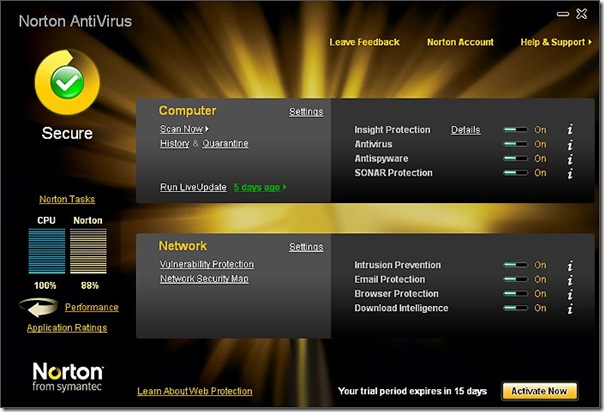
Key Features Included in the Norton Antivirus Free Trial
What you get during the trial depends on which Norton product you sign up for. Here is a breakdown of the two most common trial options and what each includes:
Norton AntiVirus Plus trial features (Windows and Mac):
- Real-time malware, ransomware, and virus protection
- Phishing and web protection to flag malicious links and dangerous downloads
- Smart Firewall (Windows) to monitor and block suspicious network traffic
- Password Manager to store and manage login credentials securely
- Cloud backup (Windows) — 2 GB included — to protect files against ransomware and drive failure
- Automatic threat removal for viruses, spyware, Trojans, and bots
- Single-device coverage
Norton 360 trial features (available tiers vary by region):
- All of the Norton AntiVirus Plus protections listed above
- Secure VPN for online privacy on public Wi-Fi (included on most 360 tiers)
- Dark web monitoring to alert you if your personal information appears in data breaches
- Parental controls for managing screen time and filtering content on children’s devices (higher tiers)
- Multi-device protection covering Windows, Mac, Android, and iOS under a single subscription
- Expanded cloud backup storage depending on the tier
- SafeCam PC (Windows) to alert you when applications try to access your webcam
Features marked as included in the trial reflect what is active during the free period — nothing is locked or restricted while you are trialing. Keep in mind that trial inclusions and product availability can vary by region and by which offer appears on Norton’s site at the time you sign up, so always review the product page carefully before starting.
System Compatibility
Norton’s current trial products support modern platforms across desktop and mobile. Here is what you can expect:
- Windows: Norton AntiVirus Plus and Norton 360 support Windows 10 and Windows 11. Norton no longer officially supports Windows XP, Windows Vista, or Windows 7.
- Mac: Norton 360 is available for macOS, covering real-time protection, web safety, and VPN where included in the plan.
- Android: The Norton 360 app for Android is available through the Google Play Store and typically offers a free trial period of around 30 days, though shorter 14-day mobile trials are also common depending on the offer.
- iPhone and iPad: The Norton 360 app is available on the Apple App Store for iOS and iPadOS. Mobile trials on iOS may be 14 days and require activation of an annual subscription through the App Store, with a payment method on file.
Mobile trial terms often differ from desktop trial terms, so check the specific offer in the App Store or Play Store listing before you start. If you are trialing on multiple devices, a Norton 360 multi-device plan will cover all of them under one account.
Is the Norton Antivirus Free Trial Worth It?
The trial period gives you ample time to evaluate whether Norton meets your security needs. During the trial, you get access to the full suite of features for your chosen plan — nothing is locked or restricted. This means you can test real-time protection, run full system scans, and see how the software handles actual threats on your machine.
One of the standout improvements in Norton’s modern lineup is its dramatically reduced system footprint compared to older versions. Earlier Norton products were widely criticized for consuming excessive CPU and memory resources. Recent releases have addressed this directly, and independent lab results back up the improvement — Norton consistently scores well for both protection rates and system performance impact in current AV-TEST and AV-Comparatives evaluations.
If you have previously avoided Norton due to performance concerns from years past, the free trial is a low-risk way to see whether those issues have been resolved on your own hardware. Many long-time critics of the brand have been pleasantly surprised by how much the product has improved. Running the trial yourself is the most reliable way to judge whether it is the right fit for your system and workflow.
For users who are undecided between Norton and free alternatives, it is worth noting that the trial provides protection features — such as a Smart Firewall, Password Manager, dark web monitoring, and VPN on 360 plans — that most free antivirus tools simply do not offer. The trial is a genuine opportunity to experience premium, multi-layered security at no cost before you commit.
How to Download and Start the Norton Free Trial
To get the Norton free trial safely, follow these steps through the official Norton website only. Do not download security software installers from unofficial mirrors or third-party download sites — antivirus software should always come directly from the publisher to ensure the file is authentic and has not been tampered with.
- Go to Norton’s official website and navigate to the Free Trials or Antivirus page.
- Choose the available trial product — typically Norton AntiVirus Plus or a Norton 360 plan.
- Sign in to an existing Norton account or create a new one.
- Review the billing terms carefully, including the trial length, renewal price, and cancellation policy.
- Enter your payment details to activate the trial (required by Norton to start).
- Download the installer directly from Norton’s site and run it on your device.
- If you decide not to continue, cancel before the trial period ends to avoid being charged for a full subscription.
Enjoy!
