Completely Remove Ask Toolbar From Your PC
Most internet users would be familiar with Ask Toolbar. It is infamous for bundling and opting in with third party software. It also tries to set the homepage to Ask.com automatically replacing Google and forces you to make it the default search provider! It clings with the system so strongly that you can’t even get rid of it using Windows default Add/Remove feature in Control Panel.AutoClean has created a little application to remove every last trace of Ask Toolbar from your system. Ask Toolbar Remover, as the name says, completely removes Ask Toolbar and files associated with it.
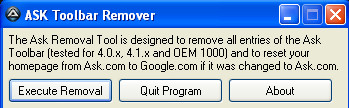
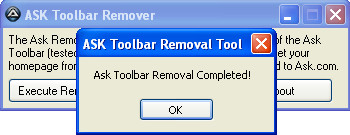
It does the trick using the following steps:
First, it checks for the Ask uninstaller, after that it executes the uninstaller with a silent switch, and then finally removes the install directory for the toolbar for a thorough deletion. For added assurance, it checks for “Ask” in your IE homepage URL, and if found automatically changes it to Google.com
The Ask Toolbar Remover works for the 4.0.x series, 4.1.x series, and OEM 1000 series ASK Toolbars. It is portable and weighs only 285 KB!
This tool can be used for both Internet Explorer and Firefox (all versions) and is specifically designed to remove Ask Toolbar. If you’re looking for something that removes other toolbars as well, try Toolbar Uninstaller.

I still can’t get it out tried everything
Don`t download this remover its trojan
Yes Jesse you are right what a waist of time this software is
You can remove the Ask toolbar from the Windows Control Panel – Programs and Features.
the ask toolbar isn’t there as an option to remove and you can’t even key it in to be found but the toolbar is still there
the ask toolbar isn’t there as an option to remove and you can’t even key it in to be found but the toolbar is still there
Are you using Firefox or Internet Explorer?
Contol Panell does not remove program, you get a log file error.
However, enable the toolbar and click “options” at the righthand side.
You can then click “Uninstall” and follow directions and that should do it.
It did for me!
Got it. After much struggle! First there is a little arrow in a tab to the right of your browser. Click on it and a list a of homepages come up. Choose google or whatever you were using before Ask. Then click on tools at the top of your browser – tools>options. Tap your cursor in the column allocated for homepage – a list of homepages comes up again. There you will see the terrible “ask” and whatever you’ve used as home page in the past – . Select the one you want and under that don’t forget to click “use current page”, then click okay. Tada..
Its a trojan
I’m a little bit weary about this program and not too sure whether its done the trick. However, it does seem the Ask toolbar is no longer hanging in firefox. It does seem a bit weird how a box just appears and says its removed. I’m not too sure whether its because I went into internet options and adjust my home page as the desire- search engine- google and thus the ask toolbar no longer is the main one. I hope it has removed it! Thanks a lot to the creators of Ask toolbar who gave my PC a vicious spyware and virus! You guys have truly got your heads in hot water!
Haven’t tried any of these yet, but I now have 2 ask.com’s on my toolbar. It could be that my teenager likes to use MSN for her homepage, where I prefer Yahoo. Just easier to get to my email this way. We both have noticed a major “slow down” with out internet. Not to mention we run more than 10mg for speed….not good.
This software does absolutely nothing. As far as I can tell, it’s a stupid little thing that just shows a popup that says “Ask Toolbar Removal Complete” but it doesn’t actually do anything to your computer. I still have every single file and folder for the ask toolbar and it still appears in add/remove programs (but I can’t remove it this way because it just says file not found when clicking uninstall like it always did)