Cookienator Removes Evil Cookies From Firefox, IE, Safari, Chrome, And Flash

Most users believe that all cookies are evil, which is not true. There are some cookies that are useful while others are evil, this post will focus on removing the evil cookies only.

Useful Cookies: Contains information for automatically logging you in, contains important preferences that you might have set in any website, etc.

Evil Cookies: Tracks user activity and behavior. They are mostly from sites such as, Google, AOL, Yahoo, MSN, Webtrends, Omniture, Doubleclick, Intellitxt, Advertising.com and others.

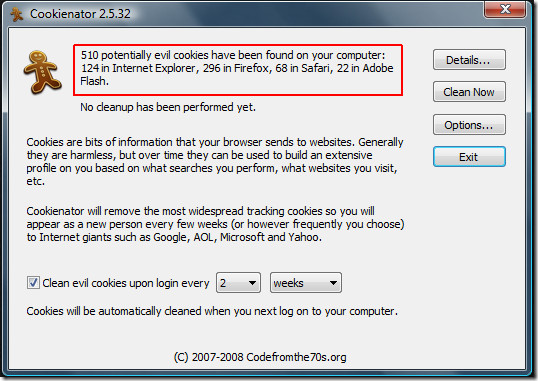
Marton Anka got fed up with all the evil cookies that are stored by web browsers. In order to save his privacy he sat down for a weekend and coded away a quick program, thus Cookienator was born. It is a simple cookie remover that automates the entire procedure of removing the evil cookies. All you need to do is run the program and you will be shown the number of potential evil cookies detected by the program.
cookienator

You have two options here, either you can click Clean Now to clean the cookies instantly or click Details to find further information about the detected cookies before cleaning them.
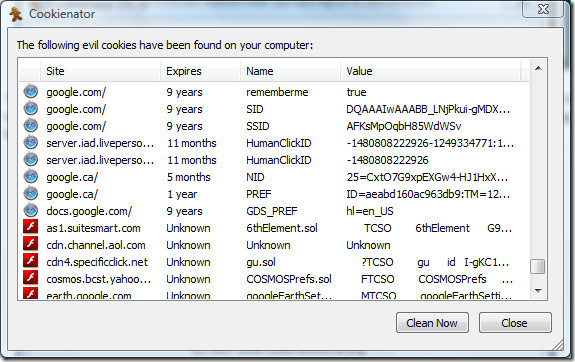
cookienator evil cookies details

You can also select when to remove the cookies, every specified day, week, or month. Or you can simply uncheck the option and remove the cookies manually whenever you feel comfortable.

If you don’t want to remove evil cookies from a certain browser or from flash, you can uncheck it from Options. By default Cookienator is configured to remove cookies that arise from certain websites only, you can see the complete list in Options. You are also free to add more websites to the list if you like.
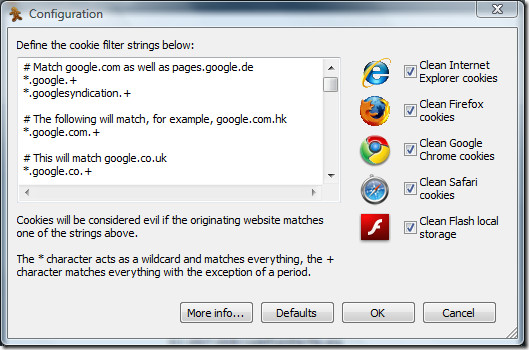
cookienator configuration

Overall it is quite a unique program because it focuses mainly on removing evil cookies, unlike other tools which try to remove all cookies(including those which benefits the user).

Download Cookienator

It works on Windows XP, Windows Vista, and Windows 7 only. Enjoy!

  • Share this article!

    • Digg this!
    • Bookmark on Reddit
    • Bookmark at Delicious
    • Stumble this!
    • Share this post at Facebook
    • Tweet this!
    • Share on Yahoo! Buzz
    • Add AddictiveTips to your Technorati favorites
    • Share on Friendfeed
This entry was posted in Windows and tagged , , , , , , . Bookmark the permalink. Post a comment or leave a trackback: Trackback URL.

One Comment

  1. Shreela
    Posted August 14, 2010 at 5:54 pm | Permalink

    This is great, thanks! FF hasn’t been playing nice on my win7 laptop recently — not sure if it’s something with win7, FF, or the combo. So I’ve spent a lot of time recently learning privacy measures with Chrome and even IE8 (using IE7 pro just so I could stand IE haha). But if this program works well, I’ll be covered better, especially if it’s true that Chrome’s super-cookie remover thingee in options doesn’t remove all super-cookies like someone commented on another blog.

6 Trackbacks

  1. [...] Cookienator is a free download for Windows only. If you’d like to just opt-out of the tracking mechanisms, you can use previously mentioned PrivacyChoice, which works the opposite way—it adds a cookie that tells advertisers not to track you. Cookienator [CodeFromThe70s via Addictive Tips] [...]

  2. [...] Cookienator is a free download for Windows only. If you’d like to just opt-out of the tracking mechanisms, you can use previously mentioned PrivacyChoice, which works the opposite way—it adds a cookie that tells advertisers not to track you. Cookienator [CodeFromThe70s via Addictive Tips] [...]

  3. [...] C&#111&#111kien&#97t&#111r is &#97 &#102ree d&#111wnl&#111&#97d &#102&#111r Wind&#111ws &#111nly. I&#102 y&#111u’d like t&#111 just &#111pt-&#111ut &#111&#102 the tr&#97cking mech&#97nisms, y&#111u c&#97n use p&#114eviously mentione&#100 P&#114ivacyChoice, wh&#105ch works &#116h&#101 oppos&#105&#116&#101 wa&#121—&#105&#116 adds a cook&#105&#101 &#116ha&#116 &#116&#101lls adv&#101r&#116&#105s&#101rs &#110o&#116 &#116o &#116rack &#121ou. C&#111&#111kienat&#111&#114 [Cod&#101FromTh&#10170&#115 v&#105a Add&#105ct&#105&#118&#101 &#84&#105p&#115] [...]

  4. [...] that tells advertisers not to track you. Cookiena&#116&#111&#114 [CodeFromThe70s via Addictive Tips] Share and [...]

  5. [...] [CodeFromThe70s via Addictive Tips] [...]

  6. [...] Cookienator is a free download for Windows only. If you’d like to just opt-out of the tracking mechanisms, you can use previously mentioned PrivacyChoice, which works the opposite way—it adds a cookie that tells advertisers not to track you. Cookienator [CodeFromThe70s via Addictive Tips] [...]

Post a Comment

Your email is never published nor shared. Required fields are marked *

*
*

You may use these HTML tags and attributes: <a href="" title=""> <abbr title=""> <acronym title=""> <b> <blockquote cite=""> <cite> <code> <del datetime=""> <em> <i> <q cite=""> <strike> <strong>


More in Windows (5 of 5 articles)