Driver Sweeper: Delete Files & Registry Entries Left by Drivers
Almost everyone removes old drivers so that they can be replaced by new ones, some people remove drivers because they don’t use the device anymore, and some remove the drivers because they are corrupt and need replacement. Whatever is your case, when you remove a driver it is never completely removed, some always leave few files and registry entries behind called leftovers or junk traces.
DriverSweeper is a free utility for Windows that lets you remove all driver leftovers. Please note that this utility does not remove the driver itself but will only remove the leftovers, which means that you will have to manually remove the driver first which you don’t need anymore by going to Add/Remove Programs Menu.
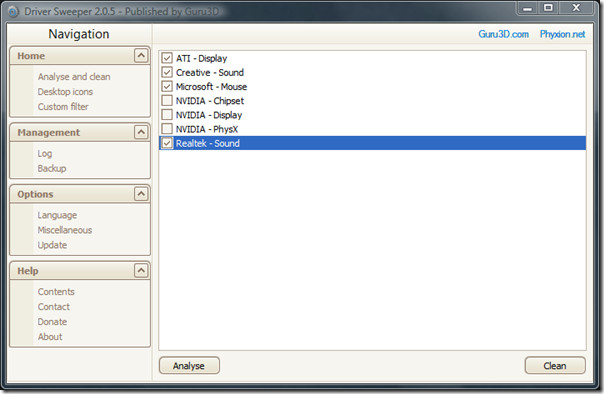
Use this utility only when you have removed the driver and restarted your computer. Then select the driver from this utility and analyze the files to check the leftovers. Click Clean to remove all selected leftovers.
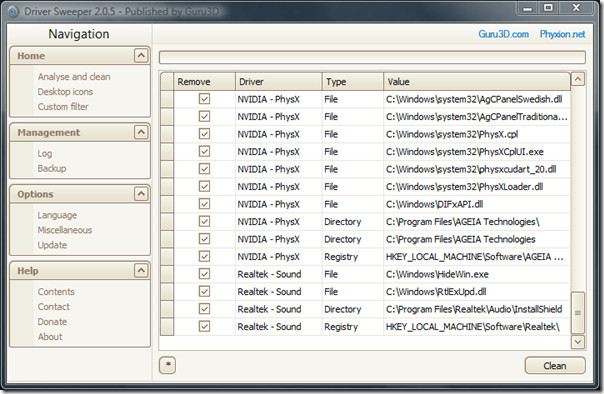
So why should you remove the driver leftovers? Because it helps in the overall speed and stability of your system. This utility is not new, but according to the developer the most important change in the latest version is, “….that it restores the manifest file for automated UAC prompts for Windows Vista and Windows 7.”
It requires .NET Framework 3.5 and works on Windows 2000, Windows XP, Windows Vista, and Windows 7. Enjoy!
