How To Disable IPv6 In Windows 7
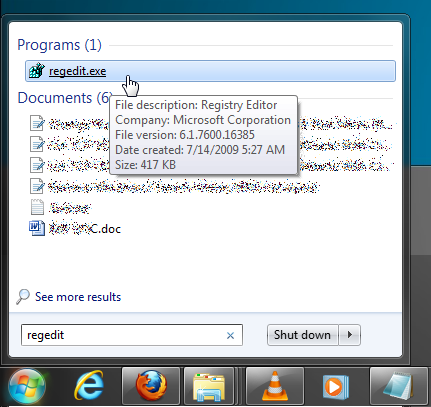
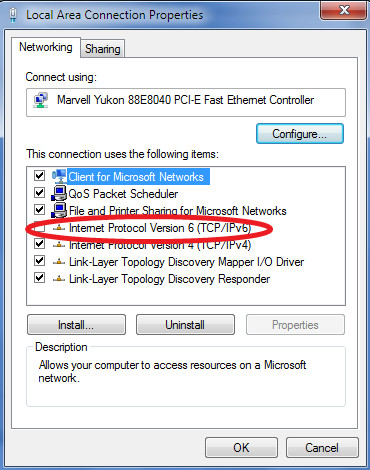
You might have heard about IPv6, it is the latest address protocol that will eventually replace IPv4. From Windows Vista onward it has been kept enabled by default, but it is also a fact that IPv6 is not yet common and many software, routers, modems, and other network equipment do not support it yet. If you need to fix invalid Wi-Fi IP issues, disabling IPv6 can also be a useful troubleshooting step. So it may be a wise approach to disable it for now. We can also disable it by simply unchecking it from the Local Area Network Properties window, but this is not a permanent way to get rid of it. It gets enabled again once the system is restarted, so in order to permanently disable it, open the registry editor in Windows 7 & Vista by clicking Start, then type regedit and hit Enter.
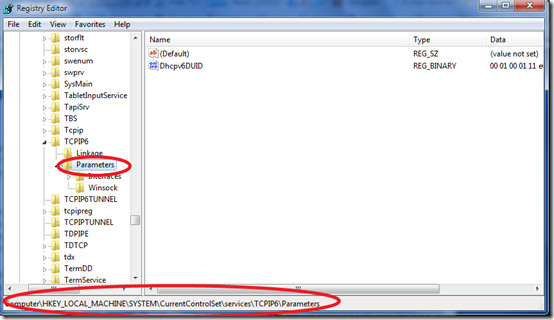
Once it is launched, navigate to HKEY_LOCAL_MACHINE > SYSTEM > CurrentControlSet > services >TCPIP6 > Parameters key.
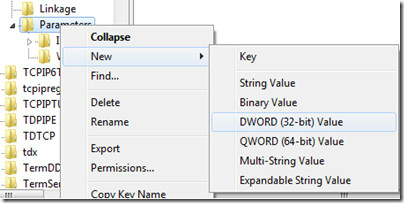
Now right-click Parameters in the left sidebar and choose New > DWORD (32-bit) Value
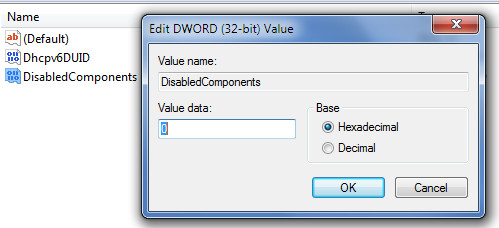
Here name it as DisabledComponents, set the value of DisabledComponents to 0 and click OK.
That’s it, now restart your computer and IPv6 will be disabled permanently.

Best plan= Kick your windows p+os to the trash bin and go find a real operating system
Incorrect tutorial.
Zero(0) is the default value of any Windows registry, which denotes ENABLED state.
For disabling the registry specify its hexadecimal value to 0xffffffff
Enabled or disabled state of a registry can be checked through “ipconfig” command in Windows Command Prompt. If an IPV6 address is listed in teh results, it is enabled. Disabled otherwise.
this doesn’t work. ipv6 is still enabled.
I dislike disabling a protocol, but from what I’ve seen, there is no other way for me to logon locally to my game server for in-game configuring and administration duties. Yes, it’s a rather old game, 8 years old, but still fairly, if not wildly, popular.
Here ‘s something to contemplate. Upgrading to Win7 64bit from XP we discovered that leaving IPv6 enabled on Win7 randomly registers the v6 but not always the v4 on a 2008 DNS. We only use v4 which poses a problem especially when we are trying to do a remote install of Win7. Sure you can disable v6 via the registry but when you can do that the computer has already communicated out it’s v6 address and is recorded in the DNS table.
The problem is you are using Windows (2008 or other) Server. Drop it and go for Linux Servers!
Thanks for the guide and the required comments below regarding putting FFFFFFF instead of 0.
I had to disable Ipv6 because symantec end point kept blocking all traffic to and from router. working now 🙂
i’m using PPTP-based VPN + Windows 7, since i heard that there is security flaw that make it possible to find out a user’s real IP, when you using IPv6, i disable it, disable IPv6 to be safe, if you asking why you using VPN on the first place?! i will tell you that i’m from Libya. is this Enough!!. Gaddafi will kill me if he saw what i’m saying about him on the internet on last 10 years 🙂 + the internet is still IPv4, no prb at all if you do it right now, IPv6 need to wait 2~3 years to become the main internet protocol.
Set it to FFFFFFFF to disable:
http://support.microsoft.com/kb/929852
To those IPV6 fans, I turned off IPV6 immediately after I installed Windows. I had no problem about that and I was very happy.
If home group or any other shit must require IPV6, then f*ck them, f*ck MS.
I’ve identified a fairly serious problem with leaving IPV6 enabled, when using only IPV4.
Yes I know, get with the times cause time is money etc. I’ll tell you a secret Mama Africa owns time, and here in Africa most of us still use IPV4 stuff happens.
I’m in a large enterprise with over 6000 (yep six thousand) users, almost 1000 of them are Mobile, relying on 3G with and without VPN when out of office, and LAN when in office.
Every time the users switch from 3G to 3G with VPN, or back to 3G only, or between 3G and LAN Win7 created a new 6 to 4 virtual tunnel adapter. When the connection type changes that tunnel adapter is abandoned and a new one is created.
After maybe 6 – 8 weeks a laptop is sitting with 200+ unused virtual tunnel adapters, hidden in device manager under network adapters. Imagine trying to use a computer with 200 NICs with the cables unplugged… when the count reaches about 200 unused TAPs most network functionality eg Internet and network shares stop working, and since the core tools are web based DB queries my users can’t work.
Disabling IPV6 and the IPHelper service is the simplest method of prevention.
I’ve not yet tested disabling of tunnel adapters only. This can be done with the following netsh :
netsh interface ipv6 6to4 set state state=disabled
netsh interface ipv6 isatap set state state=disabled
netsh interface ipv6 set teredo disable
That aside it must also be remembered that the unused TAPs still need to be deleted and the local DNS resolver cache flushed, a fun adventure in itself, and the greatest fun is in the discovery 🙂
ive tested ipv4 and ipv6,ipv6 is 4 times slower so unless you want dialup stick with 4
i work with C#,so i never desable ipv6 for recuparate ip of hostadress ipv4 BUT NOT IPV4,help me plz
i work on C#,so i need desable ipv6 for recuparate ip of hostadress ipv4 BUT NOT IPV4,help me plz
hi,plz where’s “Local Area Connection Properties” because i have the laptop french.
thks alot 🙂
DO NOT disable IPv6 unless you are a competent admin, and keep abreast of the tech press. I appreciate that this post was written in 2009, but now IPv6 is upon us, and very soon anyone with IPv6 disabled will begin to lose access to new content. The switchover will be messy enough. It would be irresponsible to recommend this to some poor sucker who will have no idea why his internet is broken in the back half of 2011…
Xaneth, you killed a whole posting with your nonsense, ask your users if they care about your two reboots when they wait for their Google page to load….Mapped drives snappy with 6 versus 4, your bullshi**ing us right…
Typical Microsloth move… ‘enhance security’ with Windows 7, and then enable IPv6 by default and open another barn door in the rear of Windows. One of many pointless services using resources.
Frankly, it’s frightening how many useless (aka unnecessary for basic installation) services are enabled by default in Windows 7… have they not learned anything?. Let ME decide what to use!
And of course, there is yet another obscure service somewhere which causes periodic disk thrashing. Superfetch? nope Defrag scheduler? nope MP3 sharing library? nope What is it!
I beg to differ with a lot of you on this. We are UNFORTUNATELY running Windows 2008 SBS, a network I inherited from an incompetent consultant. The money has been spent, and we will upgrade to standard Windows open licensing, but as it stands we still have less than 75 users. So, that said on to how IPv6 relates to SBS. When connecting a workstation to SBS, you have to go to http://connect and connect with the proprietary SBS software. It reboots the computer of course as expected, but with IPv6 disabled, it has to reboot twice. Then you start seeing all kinds of event log messages on the server:
Event 10009
DCOM
DCOM was unable to communicate with the computer computername.domain.local using any of the configured protocols.
Enabling IPv6 on the named workstation resolves the issues. Also when joining the SBS network with IPv6 enabled, it reboots only once, and no errors.
ALSO. We are running Sharepoint Foundation 2010. Some employees access the folders by using “network locations” mapped as a set of folders under “Computer”. Access is waaaaaay slow when IPv6 is disabled, and snappy as hell when it’s enabled. Dumb idea to disable IPv6, get used to it, it will eventually be used, and just bite the bullet and come up to speed with any issues it has and sort them out.
You can leave both ipv6 and 4 alone,if you only use ipv4 no reason why you should disable the 6 since it’s not using any resources ipv6 it’s in idle state,unless your router supports ipv6 connections,so no harm done having it enabled.
We had lots of problem with IPV6 enabled on our domain… Outlook 2010 was freezing all the time with this. Not to mention countless slowliness and hiccups while using Wireless, VPN, etc. And don’t count on M$ for respecting standards, on the contrary, they do their best to exclude others…
This is what i hate so much about Micro$oft: They just decided to enable all this without asking to anyone… As a SysAdmin, i find this approach totally irresponsible and stupid… We have the habit of disabling all we don’t need. M$ thinks the opposite! They’re just playing back the big book of errors that one should avoid…
In Windows 7 using C# and admin account(using manifiest file) we have changed registry key to disable IPV6. But after that a system restart is required. My client dont want this system restart. Can any one please tell me is there any way to do this? Can we restart any service(s) that can be used to avoid system restart? Thanks in advance.
No you cant. At system restart there are several things that are restarting and not only includes windows services. Also we dont have windows code we can never knew whats going while restart. One more thing its better to restart to avoid unnecessary behaviour of windows 7 later.
Microsoft “recommends” enabling IPv6, okey. Well Microsoft recommends may other things also. If you dont need (corporate network) functions that IPv6 provides, why the hell enable?
its stupid to have it on if its not being used jdrickard, direct access???? to what?
Disabling IPv6 definitely solved my slow loading problem with using Google Chrome on a Win7 64-bit machine. I am on a T1 connection as well. I recommend doing so if you are having the same problem.
Can someone tell me how to re-enable IPv6 once it has been disabled (on windows 7)?
as E-mannen stated above, just change the DisabledComponents to 0 to reinable the ipv6 interface/s.
Or if you go to the Microsoft site that was already posted you will see:
“Type any one of the following values to configure the IPv6 protocol, and then click OK:
1. Type 0 to enable all IPv6 components.
Note The value “0” is the default setting.
2. Type 0xffffffff to disable all IPv6 components, except the IPv6 loopback interface. This value also configures Windows Vista to use Internet Protocol version 4 (IPv4) instead of IPv6 in prefix policies.
3. Type 0x20 to use IPv4 instead of IPv6 in prefix policies.
4. Type 0x10 to disable native IPv6 interfaces.
5. Type 0x01 to disable all tunnel IPv6 interfaces.
6. Type 0x11 to disable all IPv6 interfaces except for the IPv6 loopback interface.”
Help! I have tried to disable IP6 following these Microsoft instructions… the problem I’m having is that the key resets to the default 0 (enable all components) when I reboot. How do I get the registry change to stick?
The horror the horror!
This page is one of the first to show up when one searches for how to turn of IPv6 in Windows 7 and it seems the tutorial is WAY wrong!
The Dword shouldn’t be set to 0, it should be set to FF or FFFFFFFF . .
PLEASE change the page so not to fool anymore people with false instructions.
A good way to turn of ALL IPv6 is super-needed since this came to everymans knowledge:
http://torrentfreak.com/huge-security-flaw-makes-vpns-useless-for-bittorrent-100617/
I haven’t had to edit the registry to perminately disable IPv6 on my machines, — at least.
I simply uncheck the box, and to date haven’t had any issues. — course my ISP is still giving me a v4 Address, and I have a v4 (only?) home router.
I’ve also read a little bit about advantages to disabling v6 in Linux machines, and again have left v6 out of the kernel, or disabled it without issues.
Leaving this enabled will cause DNS query’s to attempt to use the IPv6 transport. As there will be no IPv6 response for 99% of your queries (June 8 2010) it will time out and can cause a delay of up to a few seconds while it fails and then successfully resolves using IPv4.
Does it take a few seconds before you web page even starts to load?
Nslookup query timing out for a couple seconds and then resolving?
Thank Microsoft and then disable IPv6. (unless your dumb like jdrickard)
i am haveing problam with win 7 brodband eror 651 help me
Ipv6 does cause problems! I’ve seen so many ‘strange’ behaviours indeed fixed by shutting Ipv6 down for good. I knew how to disable it on Unix (and Unix-like) machines. Now I know how to kill it on Windows 7. Thanks a lot.
Yes I find that if I install the Cisco VPN client when IPV6 is enabled sometimes I have issues with the workstation not being able to “see” the rest of the network. The client connects just fine but is useless without being able to see other devices (like the Exchange server!) Everytime I encounter this I have to uninstall the VPN client, disable IPV6, reinstall the client and low and behold the problem vanishes. It’s one of those gotchas I always forget to check before deploying a machine.
There are indeed concerns with Windows defaulting to IPv6. As stated above, being IPv6 compliant entails a number of technologies from the end users to the content origins. Having IPv6 as default in Windows is like the tail wagging the dog – but we can feel comfort in the fact that Windows has planned for some of the issues, right?
Not many organizations have begun provisioning IPv6 AAAA DNS records yet, meaning that even if a Windows client and all the routers & firewalls from points A to Z provide layer 3 via v6 the client would still not have a v6 IP Address to establish connectivity to.
Oddly enough, Windows clients actually query for these DNS records by default. Based on a lack of significant adoption, the vast majority of these clients are told they don’t exist which results in Windows querying for a standard IPv4 A record. So, only a few milliseconds here or there – right? Think again.. Clients query DNS constantly – adding milliseconds to every single DNS transaction can certainly cause issues.
Even if you have an ISP and router capable of supporting IPv6, how about services which rely on IPv4 addresses for mapping? You may not care about the ads which talk about ‘HOT WOMEN IN [your local area]’ – but how about the thousands of websites which rely on CDNs for pumping out data from their closest edge servers? We’re talking downloads, media, Web 2.0 style applications, etc.. If their ability to target your location is based on an IPv4 address only, then users in Europe may end up getting streaming video from servers in East Coast US.
Lastly.. What happens if a AAAA record exists and a Windows client tries to establish IPv6 connectivity over a route that is not suitable for such routing? Could it be responsible for all of these sites which suggest you turn off that default IPv6 behavior? Could it be responsible for all of these reports of slow responses & stalling/ pausing?
If anyone has the answers to these questions, I would be extremely interested in the response..
Its turned off with all the Fs, not zero. Also in some environments, having IPv6 turned on will cause issues with dns records as it can try to register IPv6 instead of IPv4. Turn it off if you have problems losing your dns record as I did for a couple of weeks at work.
Most networks has public and private component. We will need long time to run out of private IP's. They can be multiplied by public IP Times. To enable IPV6 on home/work network is hassle. Imagine extra car you have to maintain but you can use it after 5 years! What if car is having cruise problem like Toyota and you need to fix it even if you don't drive it!! Bad move from MS to force users to use it on home network.
It is my understanding hackers can enter your machine with way and take over. Yes it true that this is the new way, until there are applications that require it adds over head to your CPU and network.
See Microsoft KB929852 for all values for DisabledComponents.
Set it to ffffffff to turn it off.
Set it to ffffffff to turn it off.
Set it to ffffffff to turn it off.
One of the major issues IPV6 causes in Windows 7 machines when you are in a support environment is that any VPN connections you establish also has the IPV6 enabled. This causes general slowness and also machine freezes. One way to fix it part of it is to manually remove IPV6 from every company's VPN connection properties but if you have a large number of them, it is a problem. Second way to partially alleviate issues is to open command prompt and “cmdkey /del /ras” but that too comes with its own set of issuesI'd be interested to hear any opinions/ solutions on this issue I have been havingMy thanks to the author of the how-to as well
Disabling IPv6 is usually a dumb idea. There are a bunch of reasons why you should not.First off, IPv6 is the new protocol. We will run out of IPv4 addresses in a couple years, if not sooner. So ISPs will be forced to provide IPv6 service.IPv6 is a necessary component for some Win7 functions, like direct access, homegroups, and remote assistance. So, kill IPv6, and you lose that. But biggest of all, every product MS tests on Win7 gets tested with the IPv6 stack in place. Microsoft intends and encourages all users to leave it alone.Just because it is not currently supported by most ISPs, routers, etc. does not mean that it isn't used. Read up. It gets used extensively, and preferentially on your local network. And it will become the new standard for the internet sooner than you might think.IPv6 is coming. It is unusual for IPv6 to cause problems (yes I have seen one problem but it is rare). But most of the time I hear about people wanting to disable IPv6, it is because if ignorance. IPv6 is new. So it is scary. But saying it “may be wise to disable it” is not logical. Disabling IPv6 in Win7 or Server 2008 is a risky proposition that will buy nothing of value.
IPv6 is a necessary component for some Win7 functions, like direct access, homegroups, and remote assistance. So, kill IPv6, and you lose that. But biggest of all, every product MS tests on Win7 gets tested with the IPv6 stack in place. Microsoft intends and encourages all users to leave it alone.
WOW, really? You don’t what you are talking about and are an absolute idiot. Turning off IPv6 will not “kill” anything on your network. You should actually read about what you claim to know.
Please do not listen to this guy!!!!
Actually, he’s entirely accurate. Some features of Windows 7, such as homegroups, require IPv6 and do not work when it is disabled.
Actually, he is /not/ accurate. Research.
Microsoft tests all their products? Obviously not a developer. ASP.NET on Internet Explorer (7 or 8) crashes quite often, with no explicable reason whatsoever, with IPv6 turned on.
There is still a lot of testing to stabilize IPv6 before we can all use it satisfactorily. Until then, disabling it is the way to go.
Wrong as you can be. You need to read about IPv6 before posting stuff. IPv4 and IPv6 are ships that pass in the night and they never touch each other. The only place that IPv4 and IPv6 touch are in 6to4, 4to6 tunnels as in the stack. Another reason to disable by default would be that on DNS quad A records (AAAA) are the preferred records, meaning if IPv6 is enabled it will look for quad A records first then switch to A records.
“We will run out of IPv4 addresses in a couple years, if not sooner”.
[5 years later…]
We still run IPv4 🙂
but does disabling (or enabling) ipv6 have any effect at all? coz were not using it.. and therre is no extra process or app thats using up memory..