How To Enable Windows Task Manager When Disabled By a Virus
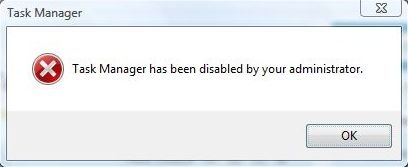
Let’s face it. All of us have been infected by virus before. Even if you have anti-virus installed, you can still be infected by a new or custom virus that is not recognized by your anti-virus. Sometimes after removing the virus completely from our system, you’ll face new problems such as you can no longer bring up Windows Task Manager from CTRL+ALT+DEL. You get the error message saying “Task Manager has been disabled by your administrator”. This post will help you to re-enable the Windows Task Manager as long as it cannot open normally. Just follow these steps.
Disabling Task Manager is one way viruses try to make it harder for you to deal with their infections. Before proceeding any further, you should run a complete and up-to-date anti-virus scan of your machine. It’s possible, perhaps even likely, that you’ve been infected.Once you come back virus-free, you can proceed with the fix. If you want a more advanced way to inspect running processes, Sysinternals process explorer is also worth a look. Usually when you try to run taskmgr.exe manually, you get this message:
If you have Windows XP, Click Start, then click Run and type in gpedit.msc and press OK.
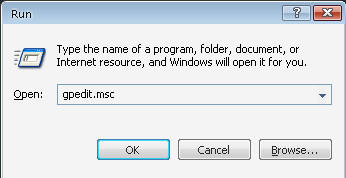
Once in the Group Policy Editor, expand in turn:
- User Configuration
- Administrative Templates
- System
- Ctrl+Alt+Del Options
You should see something much like this:
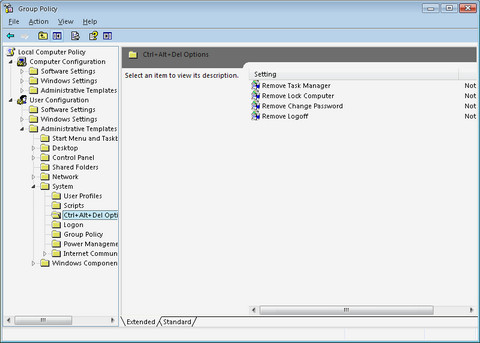
Double click on Remove Task Manager to change its setting:
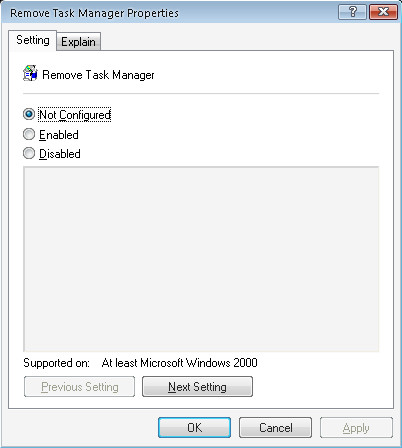
Click on Not Configured and then OK and Task Manager is available once again.
Using Software Method
If you don’t want to apply these settings yourself, here is a software utility that will let you do these settings. Remove Restrictions Tool (RRT) (Update: Here is an earlier version in case the latest one has restrictions) allows you to re-enables all what the virus had previously disabled, and gives you back the control over your own computer, it even lets you re-enable the Task Manager, Registry Editor, folder options and Show hidden files and folders.
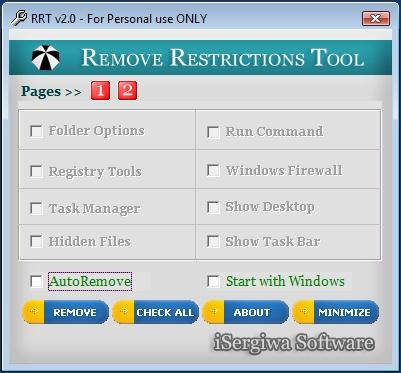
I hope this post will let you re-enable your critical system components, don’t forget to leave your comments and suggestions.

its very helpful thanks
not work!!!!!! please help
Thank you man , thank you , thank you =D you really helped me =D
good it works
this is not working……………………………………………………..
Thanx a lot bro.. It worked..
Thanks alot man.
thanks it works now
Thanks Thanks Thanks. Very nicely explained. The screen shots make it extremely to follow.
THANKUUU, ma desktop saw task manager after soo many months
Thanks to this website
Thanks its worked..First select disabled and apply it and then again open it and select
Not Configured and OK
Helpful! I had a virus that disabled task manager, then i came across this 3 months later and i did it the manual way.
Helpful! I had a virus that disabled task manager, then i came across this 3 months later and i did it the manual way.
thanxxxxxxxxxxxxxxxxxxxxxxxxxx mannnnnnnnnnnnnn!!!!!!!!!!!!!!!!!!!!!!!!!!!!!!1
Its worked thanks………………………
Thank’s…..
Thank man it realy works
Or u can just select disable in the Remove Task manager setting… Worked for me.. 😀
thank you very muchh……
thanxxxxxx aa lottttttttt…… it reaaly helpful
my is Williams u are doing well.
i have an anti – virus with me. but i can;t do this procedure because i dont know where to find that installed ant- virus program. please help me. anways, thanks for the help.
Am still unable to see my task manager
this was the easiest toll to re-enable the task manager! Thanks a lot!
thanks for Ur valuable information.
Praveen
thank you so much
thanx sir
tnx.. a lot
At my computer it works just 2 time in a row but than disabled again….why this happen i don’t understand…please help me someone
really works! useful thanks.
thanx.
My task manager is not opening in windows 7 . What to do can you tell please?
If it is a Windows XP Professional then Just press Crtl + Alt + Delete or twice and you may get the window where you need to type in the Username as Administrator and password for that if password is set.
If the operating system you have is a Windows XP home edition then you need enable the task manager by entering into the safe mode. For that restart the computer and then tap the F8 key at the time of loading and then you need to enter into the Safe Mode. In safe mode just click on Start and then on Run.
In Run type in as gpedit.msc. You may see a window opened with a list of contents in it .
techyv
it will run but it will be disable again after some time so what should we do?
But i cant able to enter into the gpedit.msc.Give me an idea please.
Regards,
Kannan
http://www.brokenglass.co.in
really works dude, thanks for the detailed explaination on how to enable windows task manager.
Thank you very much, its really helpful.
I am unable to open anything like Run and explorer.exe, So how can I open gpedit.msc to enable task manager.Please suggest me if you have any command to open Run or explorer.exe.
The virus also disable RUN and lots other things
thank you bombays! haha tangnang mga bumbay to gagaling mag english baho nman kilikili! 😀
hey guys read this ——————————-
Method 1 – Using the Group Policy Editor in Windows XP Professional
Click Start, Run, type gpedit.msc and click OK.
Under User Configuration, Click on the plus (+) next to Administrative Templates
Click on the plus (+) next tSystem, then click on Ctrl+Alt+Delete Options
Find Remove Task Manager in the right-hand pane and double click on it
Choose the option “Not Configured” and click Ok.
Close the Group Policy Window
Method 2: Change the Task Manager Option through the Run line
Click on Start, Run and type the following command exactly and press Enter
REG add HKCU\Software\Microsoft\Windows\CurrentVersion\Policies\System /v DisableTaskMgr /t REG_DWORD /d 0 /f
Method 3: Change Task Manager through a Registry REG file
Click on Start, Run, and type Notepad and press Enter
Copy and paste the information between the dotted lines into Notepad and save it to your desktop as taskmanager.reg
————————————
Windows Registry Editor Version 5.00
[HKEY_CURRENT_USER\Software\Microsoft\Windows\CurrentVersion\Policies\System]
“DisableTaskMgr”=dword:00000000
————————————-
3. Double click on the taskmanager.reg file to enter the information into the Windows registry
Method 4: Delete the restriction in the registry manually
Click on Start, Run, and type REGEDIT and press Enter
Navigate to the following branch
HKEY_CURRENT_USER \ Software \ Microsoft \ Windows \ CurrentVersion \ Policies\ System
In the right pane, find and delete the value named DisableTaskMgr
Close the registry editor
Thanks so much!
i follow the steps successfully but no result and new browers are also not worked .please reply
with the help of this task manager enables tempararly how should i enable the task manager
permanently
Thanks A lot…….My task manager was’nt working…………… its now working well after appling the methods…..
WOW! It really worked You are awesome . Thanks Alot
thank u for the remove restriction tools
What can you do if your computer has an older version of Windows? Not windows XP.
Thanks for the solution.. It really worked. I tried 2-3 websites before this but couldnt get the solution but this was very fast and easy…
When i type things like these:
Regedit.exe, it opens and dissapears again in 0.1sec.
When i type msconfig.exe my computer can’t find it.
and when i want to open task manager.. it just doesnt show up.
wtff is wrong with my comp?
dont type the .exe thats a windows run file already bein done
i tried the gpedit one. it worked for a minute. after a while it went back to the same “your taskmanager is disabled by ………..” state
Thanks a lot………………….
It really works
good job….
thanks this is really a good idea and now my task mngr is enble…………..thanx Addictive Tips
thanx a lot !
Thanks it is helpful as it is a free ware
Hi,
Thanks buddy.I got my Task manager back…..
my screen is completly taken over i cant do anything and of course cant get to the task manger so wat do i do
Use Combofix https://www.addictivetips.com/windows-tips/virus-and-malware-software-removal-with-combofix-windows-download/
great dude. . . thanx a lOt it did realy wOrk fOr me. . . thanx a lOt dear. . . .
i perform all the steps through gpedit.msc but the task manager is still disabled. The RRT Software is not register and it could not enable the task manager. please do some more help in theis reagards. Waiting for your kind reply thanks.
thanks man i did it only with ur help thanks ….
Great Job!Thank you so much for your help!!!
Thank youIt was “not configured” for me. I had to first click “disable”. Then only task manager was enabled. Then i changed it back to “not configured”
Thank youIt was “not configured” for me. I had to first click “disable”. Then only task manager was enabled. Then i changed it back to “not configured”
thank you!!it will help me a lot..=)
it works but after a minute again taskmanager diabled.
give me a complete solution please
Hey my task manager goes to a grey color whenever I try to change a selection in the Processes option how do I get it back to where I can delete processes that I donot want running while I use the system.
i will use your instruction and thank u
thank you very much
Hey nice tip but still not working for me, I tried many things like registry mechanic, registry booster and CCleaner but to no avail
Although I did managed to enable the task manager but when I open it, it immediately disappears!
I dont know what the **** should I do!!!
I believe your windows is corrupted, reinstalling it might help.
thank’s
thnk u for ur information greaaaaaaaaaaaaaat
Hm.. i’ve tried it, but once i type in gpedit.msc in the run box and click ‘ok’, this window comes up and says:
Windows cannot find ‘gpedit.msc’. Make sure you typed the name correctly, and then try again. To search for a file, click the start button, and then click search.
I believe your Windows installation is corrupted, the only way to repair this is to reinstall Windows.
thank you so much
Hi Asad, great post, nicely written…. enjoyed it….
THANKS! It was REALLY helpful, Since i use the TM a LOT.
Thanks again 😀
thanks alot
thank u
These type of things not only help in solving system problems but are a big help in preparing assignments for our graduation degree also.
Thanks to the writer of this e-article.
Thats Really Very good for those who are using LAN networking and their Administrator are not giving this rights for attempting Taskmanager but in this case you should have Administrative Rights on that computer or if you havent rights so kindly you will Logon from your local Administrator than you’ll Run from that Account or after you can use or Manage Group policy Impliment
Thats Really Very good for those who are using LAN networking and their Administrator are not giving this rights for attempting Taskmanager but in this case you should have Administrative Rights on that computer or if you havent rights so kindly you will Logon from your local Administrator than you’ll Run from that Account or after you can use or Manage Group policy Impliment
Fantastic!!! This really works.. My Task Manager has started working after so long!! thank you so much!!
Thanks a lot. It helped immediately. Registry editor is still not enabled. I would seach further on that. Thanks again for sharing the info
Awsome! My task manager FINALLY works! Thanks so much!
This really helped me though! thank you!
…or you can just use linux and not worry about the viruses in the first place. 😉
That’s truly a good idea. Microsoft windows are real crap.
People using windows for a reason.there are so many things that we cant do in linux based OSes.And Windows is more user friendly.
the reason that linux dont have viruses is because no one would bother to make one for it since only a few people use it. I mean Linux users is like only 10% of how many Windows users there are.
The only people who say “Windows is more user friendly” are people who have spent years learning how to do everything the least intuitive way possible. This was an intentional move that Microsoft made after capturing the majority of the desktop market to make transitioning from Windows to any other OS as difficult as possible.
The only thing that Windows does that other OSs can’t are run programs that developers have intentionally made for Windows only (IE, by writing it in C# rather than any other programming language, a rather retarded move given that C# doesn’t offer anything particularly special that couldn’t be found in most other languages).