How To Update Device Drivers In Windows 7
Just like software, the device drivers are updated by their manufacturers. These updates are made to remove any bugs or to add some additional functionality to the hardware. Thus in this way the manufacturers try to improve the performance of the devices. It is always recommended that you should update your drivers regularly so that your system devices can work flawlessly. Here are the steps which you should follow to update your device drivers in Windows 7.
Note: This is a very basic post targeting towards those users who are upgrading from Windows XP to Windows 7.
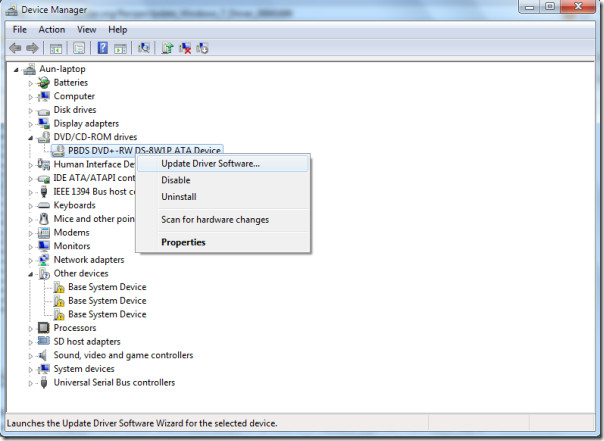
Click Start, type devmgmt.msc and press Enter.

Device Manager will be opened, and list of all devices will be displayed, now right click on the device and choose Update driver software in the context menu. Alternative way to open Device Manager is to right-click Computers, click Manage, and then select Device Manager from the left sidebar.
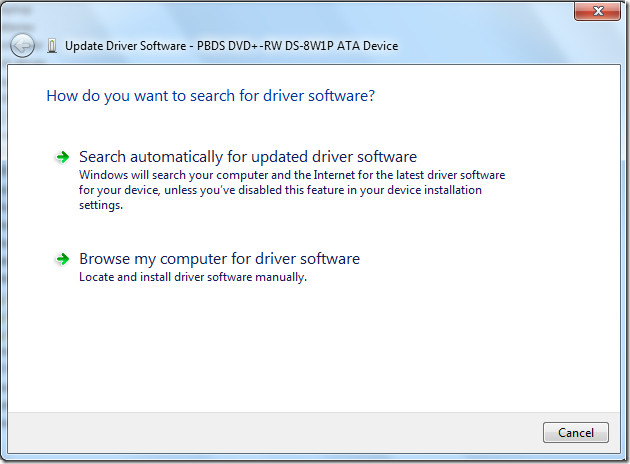
Now, select Search automatically for updated driver software if you don’t have offline copy of the driver(in this case it will search for the driver’s updates from the internet), or you can use the drivers you backed up on your computer by clicking on Browse my computer for driver software.
Thats all. Enjoy!

when i connect my Hi-Ti 640 id printer to my Lenovo G560 intel Pentium laptop window 7 home basic in the install box it show install device driver software Hi-TI 640 ps searching for window software update and then it show device driver software was not not successfully install Hi-Ti 640Ps install fail and my software is upto date please pelp me as soon as posible
i tried by search automatically for update driver software..i am using card reader in which i kept CF card(ATP of 512mb)..the problem is th(at it was not detecting and was coming as insert a device ,i actually tried in other laptop it works with the same card reader.And in the same card reader i kept in other slot for SD/MMC/TF card it works,but i dodnt know y it cannot detect CF card only..MULTIPLE CARD READER
I'm so thanks, i was so bored when the wireless didn't work
I'm so thanks, i was so bored when the wireless didn't work
I'm so thanks, i was so bored when the wireless didn't work