Microsoft Office Outlook 2010 Backup
Outlook 2010 is the next big desktop mail client from Microsoft. It has been vastly improved and is faster, more feature-rich than before. The basic design of Outlook profile is however the same when compared with Outlook 2007.
This basic infrastructure allows users to export Outlook 2007 profiles to Outlook 2010 easily. Another benefit is that you can make a backup of Outlook 2010 just like you can make backup of Outlook 2007 quickly using various tools.
Recently in my last post, I reviewed MailBrowserBackup. A free utility that allows users to make backup of various desktop mail clients, such as, Windows Mail, Windows Live Mail, Mozilla Thunderbird, and Outlook 2003/2007.
What I discovered was that you can also make a backup of Outlook 2010 as well, by selecting Outlook 2003/2007 profile.
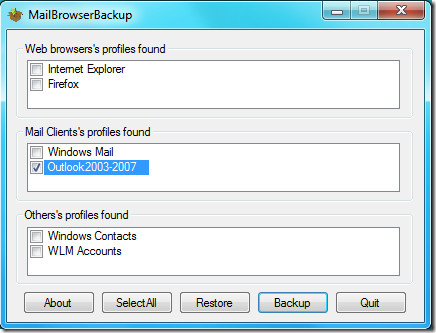
To test it, I first saved a draft mail in my default Outlook 2010 profile and then used this tool to make a backup. Later I removed the draft and used this tool to restore the backup. Lo and behold the draft was back in it’s full form. Go ahead and give it a try, kudos to the developer for making an awesome utility.
Update: You can also make a backup by using default Export functionality. To learn more about Importing And Exporting Outlook 2010, go here.
Enjoy!

Beside saving pst files I use an external Backup tool to save my Outlook 2010 (http://www.lookeen-backup.com) Ok it is not for free, but it has the advantage that you can save everything with it even outlook option and it is very easy to use.
I think this solution is not for everybody, but for those who wanted a save and easy backup solution I can recommend a backup tool like this.
@Anupam – Try free EZ eMail Backup 2.0
It works for me. Backup everything in outlook. Great for OS reinstallation.
Sir, Thanks for this wonderful article but my problem is I manage 22 email accounts (all in different pst files) via MS Outlook 2010 and every time I change my OS or setup my windows from scratch I hv to save each pst in safe place and write down each a/c password…
and while restoring , i hv to create each account manually and connect each pst file to its corresponding account… which takes a lot of time…
I’m still in search of a solution (rather free or cheap) which can do all that for me in just two clicks (one for backup and the other for restore)
Can u suggest one….
Please ask this question over at Office 2010 Club and the experts will be able to help you out: http://www.office2010cub.com/
@Anupam – Try free EZ eMail Backup 2.0
It works for me. Backup everything in outlook. Great for OS reinstallation.