PowerPoint 2010: Compress Pictures To Reduce Size Of Presentation
You often need to compress PowerPoint presentations when sharing it via email. If your presentation is full of images, you can try compressing these images to reduce the overall size of the presentation.
Once the picture is inserted in the Presentation then click the Compress Pictures option under Format > Picture Tools.

Now be sure to check the Delete cropped areas of pictures option to reduce the overall size of the presentation. Also select the appropriate target output.
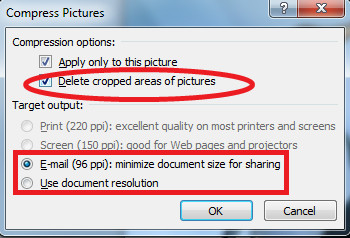
Click OK to complete the configuration.

Reduced my ppt from 19.6MB to 6.6MB. Good tip – thanks
Picture heavy presentation reduced from 55.6MB to 13.1MB. Great tip, thanks!
Great comment, very informative and helpful.
That aside, I would advise you use OpenOffice or LibreOffice, they work much, much … did I say much ? better than MS Office by now and you get “convert to PDF free”, make good looking PDF’s that look crispier than MS Office + Acrobat, a 120 page presentation with big images printed to Acrobat Distiller takes the best part of an hour, compare that to the best part of a minute it takes with OpenOffice and the result looks better (and the file is smaller) …
+ OpenOffice supports PNG (the full standard, not limited to the subset MS supports), SVG (vector graphics like WMF, only you do not need expensive software to make ’em) …. and SVG is just about supported by any company that deals with graphics in the industry, except … you already guessed.
I can’t unchecked the use document resolution while I need to check Email (96 ppi) what gives.
Thanks, this compressed my 41 MB PPT to 7.7 MB! Note: in the prompt that shows up it asks you if you want to compress all images or just the one you selected – which saved me lots of time.
Gets my file size down from 251MB to 250MB, doesnt seem to be working…
Minskade från 251 till 250 MB, känns inte som funktionen fungerar så bra?
I was trying to compress a 26 MB file to send as an e-mail, using this method, I was only able to easily compress it to 21 MB. I was getting ready to go through all 190 slides an replace each picture with compressed images when a smart Architecture student walked by and said, “why dont you just save it as a PDF?” She has to do it for her porfolios all the time. It took out all the functionality, but got it down to under 2 MB so I could e-mail it.
Great suggestion Nyager, very helpful!
I have a 70Mb presentation, which the worthless default compression option did almost nothing to. By combining PDF and 7-zip, I was able to crunch it down by ~90%, with very little visible quality loss.
It reduced the size from 8.8MB to 8MB.
Very helpful. Thanks!
I have powerpoint 2010. When I try to compress the pictures the target compression options “print,” “screen,” and “email” are gray and cannot be selected. What gives?
I think, your presentation has images at 72dpi @ 100% zoom, which is less than even “E-mail” option (96dpi).
Office has no upscaling option, so it ‘greyed out’ options unavailable for you.
Does this compress ALL the photos in the ppt.?
Yes
this actually increased the size of my ppt, if i use the same image on many pages, does it count as 1 image space wise or many copies of the same image?
many copies. You should include the image in the Master instead, so it is stored once.
You insert it once, then copy paste it 10000 times, it will only take up one single image.