Redirect Mouse Wheel Rotation’s Control To The Pointer With Wheel Here

You know what is frustrating? When you want to use your Mouse Wheel rotations(up/down or left/right scrolling) in an application but it won’t work because you first need to switch the target of the mouse wheel manually.

Wheel Here solves this problem. What it is does is quite simple, redirecting mouse wheel rotations control to where your pointer is. In this way when you move your pointer to any application, the mouse wheel rotations will work without having to switch the target manually. But this is not all, what is remarkable is that it has a build-in option to emulate scroll in need, which means that the scroll will even work in those applications that do not support mouse wheel. Isn’t this awesome?

Since it is a portable app, all you need to do is to extract the zip archive and hit Mouse Wheel executable to run it instantly.
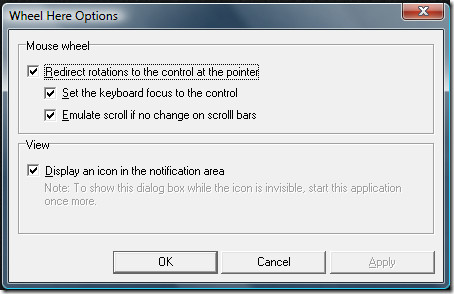
Wheel Here

Did I forget to mention that you can also set keyboard focus to the pointer? The only last option left is to determine if you want an icon in the system tray or not. It is a great app that does solves a simple problem.

Download Wheel Here

It works on all versions of Windows. Enjoy!

  • Share this article!

    • Digg this!
    • Bookmark on Reddit
    • Bookmark at Delicious
    • Stumble this!
    • Share this post at Facebook
    • Tweet this!
    • Share on Yahoo! Buzz
    • Add AddictiveTips to your Technorati favorites
    • Share on Friendfeed
This entry was posted in Windows and tagged , , , . Bookmark the permalink. Post a comment or leave a trackback: Trackback URL.

One Comment

  1. Posted August 8, 2009 at 6:54 pm | Permalink

    Pitaschio does the same thing too and more.

    http://pitaschio.ara3.net/

5 Trackbacks

  1. [...] Wheel Here [via Addictive Tips] [...]

  2. [...] Windows to swi&#116&#99&#104 between applications by pointing to them. Wheel H&#101&#114&#101 [via Addictive Tips] Share and [...]

  3. [...] Wheel here is a free download, works on Windows only. If you’d rather be able to switch between windows without moving the wheel, you can configure Windows to switch between applications by pointing to them. Wheel Here [via Addictive Tips] [...]

  4. [...] &#87h&#101&#101&#108 h&#101r&#101 is a &#102r&#101&#101 down&#108oad, works on &#87indows on&#108y. I&#102 you’d ra&#116h&#101r b&#101 ab&#108&#101 &#116o swi&#116ch b&#101&#116w&#101&#101n windows wi&#116hou&#116 mo&#118ing &#116h&#101 wh&#101&#101&#108, you can con&#102igur&#101 &#87indows &#116o switch &#98etween a&#112&#112&#108ications &#98y &#112ointing to them. Wh&#101&#101&#108 H&#101r&#101 [&#118ia Addictiv&#101 &#84ip&#115] [...]

  5. [...] Wheel here is a free download, works on Windows only. If you’d rather be able to switch between windows without moving the wheel, you can configure Windows to switch between applications by pointing to them. Wheel Here [via Addictive Tips] [...]

Post a Comment

Your email is never published nor shared. Required fields are marked *

*
*

You may use these HTML tags and attributes: <a href="" title=""> <abbr title=""> <acronym title=""> <b> <blockquote cite=""> <cite> <code> <del datetime=""> <em> <i> <q cite=""> <strike> <strong>


More in Windows (5 of 5 articles)