UndoClose For Windows [AddictiveTips Apps]
One of the most useful tab-management features of modern browsers is opening recently closed tabs using the Ctrl+Shift+T hotkey. It certainly saves the time one would’ve spent sifting through browsing history to find and open closed tabs. In contrast to browsers, Windows 7 manages folders and application windows differently; despite storing recently opened programs and items in Start Menu, it doesn’t support bringing them up again using a hotkey. Today, AddictiveTips brings you UndoClose – a free program that remembers all recently closed folders and applications, so that you can restore them in the same sequence in which they were closed using two hotkeys. In short, it enables you to open the last closed folder(s) and application(s) just like the way Firefox, Google Chrome and other browsers let you open the recently closed tab(s).
![UndoClose-[AddictiveTips-Apps]](https://www.addictivetips.com/app/uploads/2012/01/UndoClose-AddictiveTips-Apps.jpg "UndoClose-[AddictiveTips-Apps]")
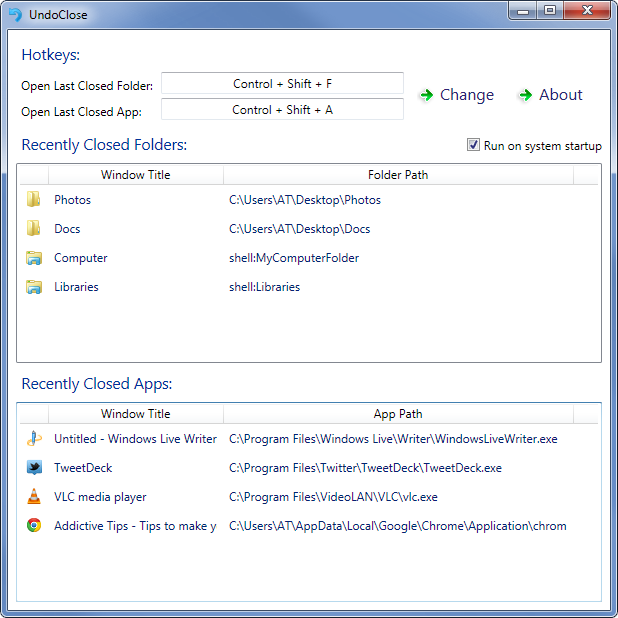
UndoClose supports two hotkey combinations; Ctrl+Shift+F and Ctrl+Shift+A, to open last closed folder (in Windows Explorer) and application, respectively. The hotkeys can be used multiple times. For example, if you close VLC Player, Notepad and iTunes, press Ctrl+Shift+A hotkey three times to launch VLC Player, Notepad and iTunes again.
UndoClose sits in the system tray after being launched and silently starts monitoring all folders and applications that are closed. It then helps you restore them using the hotkeys.
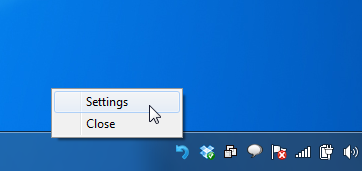
If the pre-defined hotkeys come in conflict with other global hotkeys, you can change them from Settings. To access Settings, click the system tray icon. You will also find all recently closed folders and applications with their complete source paths. You can open them by double-clicking the items in the list.
You can watch how it all works in the video walkthrough below.
The application is built to actively keep log of all the apps and folders you close, and therefore, it consumes 35 MB of system memory. It’s worth mentioning here that memory usage depends upon the number of apps and folders you close during the session. UndoClose is a portable app that works on Windows 7 only. Both 32-bit and 64-bit OS are supported.
(https://dl.dropboxusercontent.com/u/4024184/UndoClose.zip) Download UndoClose
Changelog:
Version 1.1 – Now works with all Libraries (main folder, default Windows libraries, custom user-made libraries), Computer, Recycle Bin, Control Panel (Category view), and Network.
Version 1.0 – Initial Release

A great app, that’s a pity it doesn’t work on win 10.
Unfortunately
it is not 100% portable since it uses the registry.
I can’t use it at work.
Oh no, the Download Link is down. 🙁
Yeah, download link is dead. No updates since 2012? Is the installer not hosted anywhere (from AddictiveTips) at this point? I’d rather not try my luck downloading it from random third parties.
I’m reluctant to download this from other sites, but Softpedia lists “developer” for uploads (which in this case is listed as AddictiveTips) and doesn’t have a separate “uploader” field which implies that the uploader … had a Softpedia account named AddictiveTips? I’m not even certain of that, but I’m going to take a leap of faith and assume that the uploader was actually AddictiveTips and the file came directly from the developer.
This is neither advice nor an endorsement. I’m not even sure a comment referencing another software site will even be approved. But I’ll give this a shot and see how my antivirus software feels.
You should add an option (button) to manually clear the history of folders and app. It is a very nice and useful program but it consumes a lot of RAM (35MB) compared to other programs. For instance “Everything Search Engine” (another great program) that stores data for the entire PC and has many more options and features it only consumes (32MB).
Is there any newer version? Thank you 🙂
How do you install the program so it runs at startup? There are no instructions on how to install this.
This is a great question, not that Robin (great name, btw – I wonder if the S just for smelly or something in this case rather than stupid or super?) necessarily needs the answer 28 months later. There are a few different options Windows supposedly still supports for declaring that a program should be run at startup. I won’t explain them all since we have Google and LMGTFY, but I’ll report back once I figure out at least one that works for UndoClose.
(I mean, each of the possibilities should either be absent from Windows 10 or work for virtually anything, but that doesn’t appear to be the reality.)
Not working with windows 10, any suggestions?
I have still some XP SP3 Machines… since I heavily use folders undo it would be great if I could use it in those pcs as well.
Is there a chance that the folder history is also working with windows 8? The App-History does, but unfortunately not a single Folder Path is saved…
Any fix on the crash-on-restore from hibernate yet?
Thanks m8
I suggest to add an option to clear recent items list, and to delete any item separately, without the need to close and reopen the application.
Accept my greetings
When I hibernate Windows 7 and then bring it back out of Hibernation, UndoClose crashes. This would be one of my most-used applications otherwise.
The idea is really useful but I’m on Windows 8.1. Is there a way to have the sources to develop a new version ?
Unfortunately, this app does not work with Windows 8 File Explorer Folders. This was a great lightweight utility for Windows 7. I really wish the developer would post a new version that is Windows 8 compatible.
Thanks,but. Very high system memory use.
Great app! I’ve been using it for months and it’s quite useful.
Suggestion: Allow a hotkey for showing recently closed apps, so we could select from that instead of opening the most recent ones. Same thing for Explorer windows. (Actually for Explorer windows it’ll be more helpful.)
“UndoClose supports two hotkey combinations”
You may want to change this to say that those two keys are it’s default settings. When I read that, I was under the impression this program can be set to one of two hot keys, and nothing else, until I read further and saw that it can be changed.
Other than that, great post. I’m gonna give this program a try. I’ve found myself in need of a hotkey like this 3 or 4 times a week.
The problem i encountered is that, although the Run at system startup checkbox is ticked and Windows shows UndoClose as a startup item, it doesn’t start with windows. Anyone eles ran into this issue? It would be so awesome if this would work! Running Win7Ultimate x64, if relevant
“Folder” does not work (Reopening Apps works fine).
Win 7 Professional 64bit, German, SP1
Does not work well on Windows 7 32bit Italian language
Closed folders are not recognized as apps are.
dosn’t work for me. win7 polish version
Just a suggestion, but it would be nice to be able to disable either the Undo Last Closed Folder or Undo Last Closed Application functionality. I want the Undo Close Folder, but not the Undo Close Application.
Also, when you change the hotkey for either option, you are unable to change the hotkey option to something different unless you either accept the change or close the settings window without saving and then re-open the settings. It would be nice for indecisive people like me to be able to try different key combinations.
Love the app and I believe those changes would make it even better.
Looked around and didnt see any, is there any way to donate to the authors via paypal?
Does not work with Windows 7 – 64bit – German language
Closed folders are not recognized..
Doesn’t work with Windows 7 64bit Polish – no folder closed recognized either
The same for the Win7 64 bit Spanish version. None folder showed in the list, none can be recovered.
Crash explorer on my Windows 8 CP when hit the shortcut to restore a closed folder/app. Restore from gui is working fine. I hope you can fix it. Loving the software.
Testing better, its crash sometimes only. Weird.
Sorry – STRG-SHIFT-F causes an error message.
STRG-SHIFT-A works fine for closed apps and closed folders.
Windows 7 Ultimate 32-bit – German Language Version
Closed folders are shown in the closed app section and can be opened with STRG-SHIFT-A –
STRG-SHIFT-A causes an error message.
Hi, I’m experiencing the same problem as Deniz: the App undo works fine but the folder undo does not. The Recently Closed Folders list remains empty. I’m using Win 7 Ultimate 64 bit (italian).
Cheers.
Hi thanks for the awesome work.
the only thing I wish this tool can have is to reopen the last closed file, like a word document. Reopening Word doesn’t make any use to me, but reopening a word document sure does.
Cheers.
Hi thanks for the awesome work.
the only thing I wish this tool can have is to reopen the last closed file, like a word document. Reopening Word doesn’t make any use to me, but reopening a word document sure does.
Cheers.
I know it wasn’t designed for XP, but It works on Windows XP (SP3) too, but only the closed application part (it doesn’t detect closing folders in Explorer).
One idea i would like to see implemented is to add another hotkey that shows a small window with the icons and descriptions of the last closed programs so i can click on any of them to open the program, something like the “Recent apps” feature from Android.
This would be useful for me since i use a lot of small tools. I know i can click on the UndoClose icon in the tray and it opens the settings page where i can select the program from there, but that requires a click on a small icon and also once i select a program from the list it gets deleted.
It would be nice to have an option to enable/disable deleting the program from the list once you click, also another option would be needed to allow or not duplicate entries (for example i closed Notepad 4 times, i have 4 entries, but i would like it listed only once).
I know it wasn’t designed for XP, but It works on Windows XP (SP3) too, but only the closed application part (it doesn’t detect closing folders in Explorer).
One idea i would like to see implemented is to add another hotkey that shows a small window with the icons and descriptions of the last closed programs so i can click on any of them to open the program, something like the “Recent apps” feature from Android.
This would be useful for me since i use a lot of small tools. I know i can click on the UndoClose icon in the tray and it opens the settings page where i can select the program from there, but that requires a click on a small icon and also once i select a program from the list it gets deleted.
It would be nice to have an option to enable/disable deleting the program from the list once you click, also another option would be needed to allow or not duplicate entries (for example i closed Notepad 4 times, i have 4 entries, but i would like it listed only once).
We did think of those plus a few others. Those are great ideas. Keep em coming!
I’m glad i can be of help, I’ll post here whenever i have any new ideas 🙂
Idea : the program should be able to be started from the command prompt with parameters, it would be useful for scripting (for example to launch it from a command shell or from an application launcher like Launchy or FARR)
Bug : When you start the app it should also look if it’s already started, if it is then either transmit what’s on the command line or simply show the configuration dialog.
For now, if you start the app twice, the second instance crashes with a “Cannot hook into shell” error.
Improvement : it would be nice to be able to delete the shortcuts, for example I don’t need the “open last folder” option so i would like to be able to disable that shortcut (either a checkbox in front of the shortcut selection or simply pressing the “Del” or “Backspace” key in the selection box should delete the shortcut).
Improvement : some apps contain in their application title the path to the file that it is editing/viewing, for example Notepad++ shows the complete path to the file it’s editing. It would be nice if UndoClose could read the path of the file, and when i restart Notepad++ from UndoClose it would give that file as a parameter (Notepad++ opens a file if you give the file’s path as the parameter in the command line).
P.S. maybe a forum would be nice, there people could post ideas/bugreports. This application has a lot of potential so i think it would be worth it.
Also, i don’t know what you think about opensource-ing it, but that could potentially make this app “evolve” faster.
Of course, this are all just ideas, you can ignore them if you don’t consider them to be important or doable 😉
Oh, and before I forget, thanks for the program, it’s quite useful.
I use FAR 2.0-1877, when I close it I get a nasty error and a crash from undoclose. 64bit Windows 7.
Works fine for me. Are you using the 64-bit version of FAR? Btw, there is no FAR 2.0.1877, the latest stable release is FAR 2.0.1807 -> http://www.softpedia.com/get/File-managers/FAR.shtml
Typo, it’s 1807.
Great tool, but I have a problem. If I open Pictures, Music, Videos, Downloads folders and close them, UndoClose will only allow me to reopen the last folder I closed (the Downloads folder in my example). Any idea to fix this? Is this a bug or something?
Forgot to mention that Documents, Music, Pictures and Videos folders inside Libraries is not supported at the time. Otherwise everything else works, even the main Libraries folder works.
oh ok thanks. I hope it will be available on future versions.
Updated. Now works with all libraries.
Forgot to mention that Documents, Music, Pictures and Videos folders inside Libraries is not supported at the time. Otherwise everything else works, even the main Libraries folder works.
App undo is working but folder undo is not working for me . I tried it for a few folder .
It says
” You have not closed any window till now ”
Windows 7 Ultimate 64 Bit Sp 1
What does the main window show?
” Recently closed folders ” is empty .
What language are you using?
Same problem on my system (WIN7 SP1 64 bit GERMAN)
Is there no solution?
i have the same problem, no closed windows show up.
Im on Win7 Ultimate 64 German
Same problem on my system, Win 7 Enterprise 64bit Swedish.
I tried UndoClose on Windows 7 64-bit and the GUI screen is always blank. It appears to be working fine, but I can’t see the interface so I can’t change any settings. When I drag other windows over the app the interface doesn’t refresh – see attachment.
What’s your RAM and how many windows are open?
I have 8GB ram on an almost-new Intel i7 Dell laptop. It turns out the problem only occurs while I am running MaxiVista – the remote screen controller. When I disable that your screen suddenly appears. UndoClose still works even though I cannot see it’s interface so I’m not that bothered. Thanks for your reply!
Glad that you figured it out.
I tried UndoClose on Windows 7 64-bit and the GUI screen is always blank. It appears to be working fine, but I can’t see the interface so I can’t change any settings. When I drag other windows over the app the interface doesn’t refresh – see attachment.