Windows 8 Start Menu Toggle – Enable / Disable Metro UI Start Screen
We covered a simply registry hack that disabled the new Windows 8 Start Menu (Metro UI Start Screen), Explorer Ribbon, and Task Manager. Going to Registry every time to enable back and disable Start Menu is both dangerous and a headache. Windows 8 Start Menu Toggle is a small 3rd party tool for Windows 8 that can enable or disable Start Menu (Metro Start Screen) in just one click. Of course this will also toggle Explorer Ribbon and Task Manager. If you prefer to sometimes use the Classic Start Menu, i.e, Windows 7/Vista Start Menu, then this tool is for you.
Just launch Windows 8 Start Menu Toggle and click Use Metro Start Screen to toggle between the Metro Start Menu and Windows 7 Classic Start Menu.
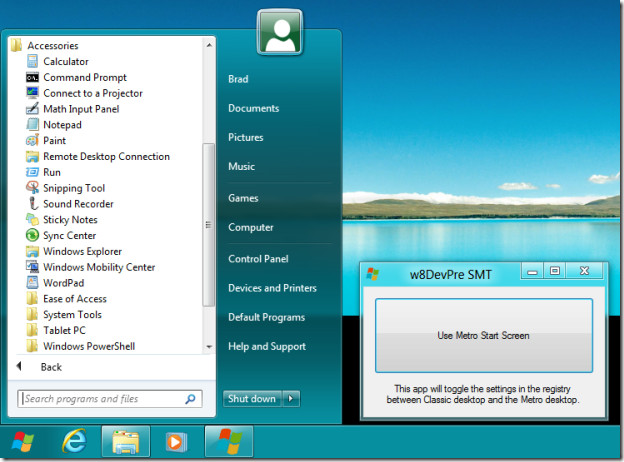
Note: Make sure that you run this application as an Administrator. You will be prompted to download install .NET 3.5.1 runtimes before being able to use this application.
Download Windows 8 Start Menu Toggle
Update: This app has been discontinued, it is no longer available on the DeviantArt website. If you are looking to disable Windows 8 Start Screen so you can jump directly to desktop, check out this guide.

Guys, does “Metro” or the start screen with all the apps on it use tons of resources? I suspect this is why new comp’s disk is running off the charts. I hit task manager and see DISK and it sometimes tops 99%. It only does it while I am playing World of Warcraft, or any game for that matter, but looking at the task manager, WoW is not pulling much in the way of resources. I suspect its Metro. Is there a way to completely turn it off today? I say “today” because the article is a little old now.
where is download?
apps on start of window8 no work
The link for “windows 8 smart menu toggle” does not work. It takes me to an “Oops” page on Deviant Art, and states that the link is dead. This is the 2nd time I have seen this article on your site,
with a dead link. If you have an active link for it, please post it, otherwise, take the article down.
This tool just toggles a reg value. That’s it. That reg value is no longer valid in Win8 CP. This article should be removed entirely.
Better yet, simply avoid using Windows 8 (aka Vista 3) in the first place. Why is anyone even bothering with Windows anymore? These days it’s all about Linux and Mac. Anyone still using Windows in this day and age is a throwback to the bad old days of win32 lockdown.
Vista 3 it is NOT. And I suppose Win 7 is Vista 2. Most of the industry disagrees with you. Win 7 is a solid OS and you don’t know anything about 8 yet. I guess you also refuse to be bullied into having an open mind.
You, my Windows-using non-friend, are a racist. You should be ashamed of yourself. Please turn off your computer and go back to whatever cave you crawled out of.
You are living in a closed eco system, AKA, Apple, Matrix….
LOL @ how people us the term racist… shows nothing but ignorance.
Funny how you can say OSX is better than Windows when OSX just got an update to allow resizing a window from all corners and the Finder is still a piece of crap.
I think we can both agree that you are wrong. By the way I’m not a Mac user but it’s still a better environment than Windows.
Lots of people use Windows because they feel “they have to” for some misguided reason. Anyone who uses Windows by choice is suffering from obvious brain damage.
Why don’t you go play with your toys and come back here when you get a real computer, ok?
Hahahahaha!!! You sir, are a moron!
All you can come up with is name calling? I suppose it’s typical for a Microsoft fanboi to not be able to think for himself.
may i ask why your brain lacks so much capacity. i would use linux if it wasn’t for program compattiability(Cinema 4d) and i would never use mac os X just because steve jobs died evryone thinks mac is supreme you sir will soon be stuck in the overpriced impractical apple loop.
@IGnatius Linux is about choice, and yet you insult those who make a different choice than you.
I use Linux, and love it. However, your statement ” Anyone who uses Windows by choice is suffering from obvious brain damage.” is one of the stupidest things I have ever heard. There are some real advantages to Windows, and besides that, people can make their own choices.
You are the kind of embarrassment to the Linux community that keeps Windows strong. Bigot.
Thanks for the pointless flame, it has been noted and ignored. You’re obviously a racist.
You’re an ignorant, all-around bigot like the last guy said. I use both Linux and Windows for my work and each have their own benefits from which I take advantage of completely. I thoroughly enjoy and appreciate both as user-friendly, stable, and all-around great operating systems.
If Apple wasn’t so self-absorbed and downwardly spiraling into an endless chasm of commercialism and proprietism, I’d happily use a Mac. That’s not to say that Apple sucks–they do make excellent, stable products, and I’m not denying that. I just have my pride, and I don’t like blindly throwing my hard-earned money at shiny, round things. (And that’s how you flame.)
You, sir, are undoubtedly a wholehearted Apple aficionado with unflinchingly bitter buyer’s remorse. You only mention Linux because somewhere you probably read it’s an OS for intelligent people; I doubt you’ve used it or even have the mental capacity to do so. Why even bring up racism when it’s not pertinent in the least? Whatever race you are, you’re obviously against multiculturalism and diversification. Stop bothering people with your insecure, histrionic, brainless trolling, and go live in a cave somewhere in the Himalayas.
att fuck you.
Here is my workaround to get both the metro style start menu and a classic one side by side. I didn’t really like those toggle apps, so this is what I did:
http://wugfresh.com/windows/windows8beta/
I’m going to stick with the new stuff, the main idea of this dev phase is to try out the new layout. It looks interesting so far though.
So far I think that there isn’t enough touchscreen interface options that are present for a stylus interface. Let’s face it most people aren’t going to be doing a physical touch, so unless you have multiple stylus pens, it probably won’t help to pinch-zoom.
Fantastic article. I’m struggling with several these issues.
not a very good app, windows 8 start menu switcher is better.