Fix Your Graphics Card By Baking In Oven
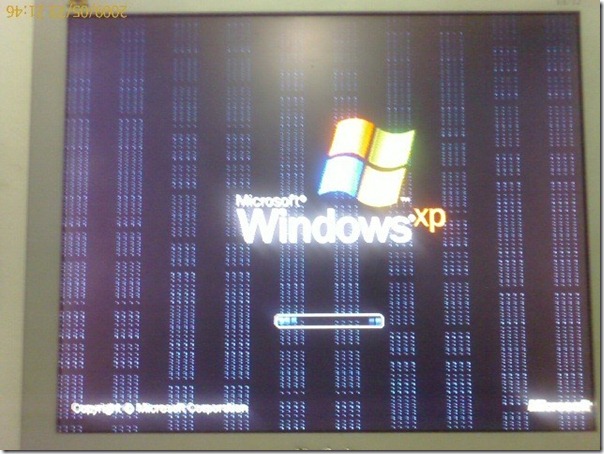
A few years back while using Windows XP, I was seeing weird red lines across my monitor, the same happened with Vista. At first I thought it is an issue with my monitor but on further research it was revealed that the graphics card has gone broke.
What happens when your graphic card stops working? Either you will throw it in the trash, save it for ‘old memories’ or sell it on eBay, but it turns out most of them can be fixed by simply heating in the oven.
The small micro-connections between the chip and the board gets fractured over time by constant heating and cooling. By heating it in the oven, they will expand until they reconnect and then upon cooling they will be permanently reconnected again.
Reader Cod3r explains,
The concept behind this method is simple: Reflow Soldering.
Commercial Electric circuit boars are made of SMT IC’s (Surface Mount Technology). These IC’s are soldered on the board by placing a layer of solder on the board, placing the ic’s and then passing the entire thing through a Oven or a hot air blower. The places of electrical contacts get attached, while the rest of the solder melts and flows away.
Over time, these electrical contacts may develop “HairLine Fractures or cracks” that are not visible to the naked eye. If any such crack disconnects a electrical line or a chip’s pin, then errors occur, depending on the place/chip on the board.
Graphic cards, and Laptop Motherboards are very prone to this, because of the stresses they take, but this can happen to any electrical item. The constant heating and cooling cycles that graphics cards endure are similar to the thermal stress that CPUs experience, which is why investing in quality cooling solutions like premium CPU coolers can help prevent hardware failures in the first place.
By “Baking” the card in the oven, all u do is to remelt the non-visible solder, in the hope that it would automatically reflow and repair the connection. (its still pure dumb luck, but with an educated style 8) )
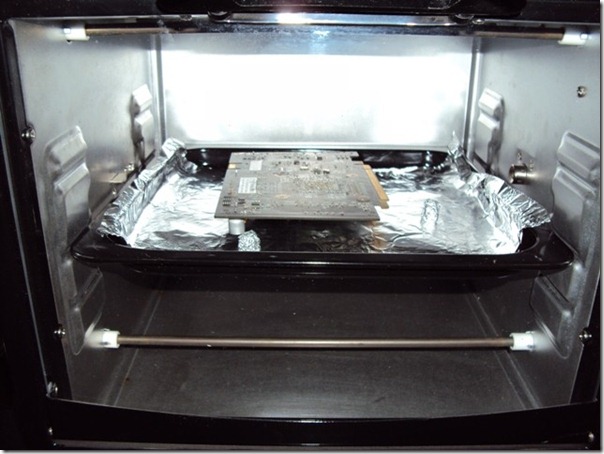
Please note that the cooking oven(NOT the microwave oven) has to be preheated at 385F before putting the card in it. Recently, my friend over at MBL forum baked the cards for 10 minutes before taking them out, but the time can vary. According to most users 8 minutes will do the trick.
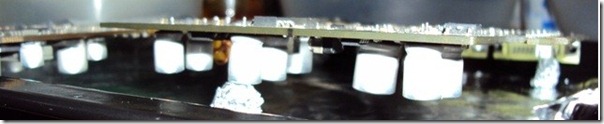
The procedure requires you to lay an aluminum foil beneath the card so that heat can be reflected, also make sure the card is raised using small aluminum balls. Aluminum foil keeps the oven safe in case anything goes wrong.
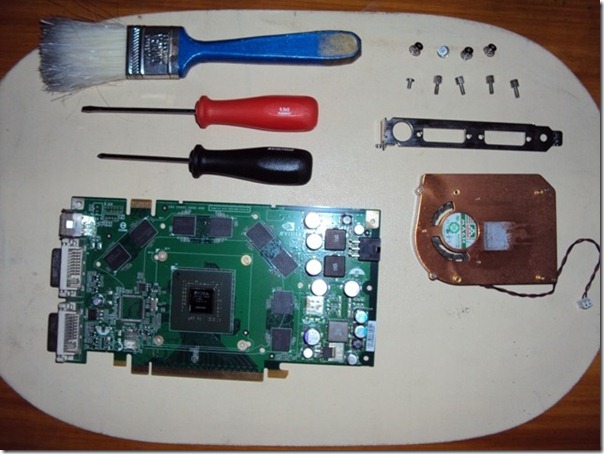
You need to disconnect everything from the card and clean the dust before inserting it in the preheated oven. Head over to MBL Forum and Hard Forum for full screenshot tour and details. This method can be applied to fix your Laptop as well by baking it’s motherboard.
Editor’s Notes: This guide is for those who have lost all hope. Do not try it unless you know the risks. Many users in various forums have had success with this method. If you are having any other problem, make sure the drivers are updated and the card is not defected on purchase.
It turns out this method is quite popular, one person has made the whole video guide on YouTube(embedded below).

used this method on my gtx 560ti once and i never had any problem after that except for the few graphical anomaly in the top corner of my screen like a little dots of RGB selection but unnoticeable unless you open a program with a dark background, but this issues isn’t visible in programs that run in fullscreen mode like games so i don’t really see it as a big problem.
I fight with my girlfriend yesterday, then I bake her in oven, it works! She being nice again..
I once baked an infidel in an oven but it did not fix his “hair-line” fracture I gave him for insulting Islam.
That was almost funny mate… almost! may have to go back to the drawing board. Also I find it interesting that you would reply on such a ancient post, more amusing than your reply.
Jewlian
Your comment was a blatant insult against us Muslims. I still have the oven and perhaps you’ll be the next infidel that finds out the penalty for insults is the “Flames of Justice”
I wonder if this method could speed up my old Samsung Galaxy S3… if I disassembled it and only baked the board of course..
does this work for gtx 780 ti
Thanks. i will try this on my evga 9500GT. yeah, i know it a POS.
this worked on an ATI X1950 that would not even POST. Now computer boots into windows and everything works fine. Only time will tell how long this will last but just wanted to share this is legit.
Yup worked for me. Did it with an (quite) old nVidia 8400 GS mobile. Laptopscreen was black, after unplugging the connectorcable and connected a VGA monitor I saw the startup logo with artifacts. Removed the card and baked it at 195C, 8 minutes. Let it cool down for about 10 minutes in the oven and 10 minutes outside the oven. Works like a charm after the baking 🙂
worked like a charm…thanks a lot !!
Thank you for the idea. It worked and saved my 7950GT.
Recently baked a 8800gt that wasn’t working properly.
… It now works.
385 for 10 minutes worked like a charm on my Nvidia 9800GT. Being cautious I tried 200 degrees first but that was not hot enough to reflow the solder as stated above.
iv used this method on two 9800gt, 6800 and about 6 Xbox 360 motherboards and it worked every time, you can also use heat gun.
Worked for me 8 minutes at 382 degrees here’s hoping it lasts
It work for me! Thanks a lot for the method!
This works ! Confirmed testing on my broken 8800 gt.
Well 🙂 My 8600gt works again! But, listen >The capacitors will fall out!! bake the card like the instructions say but with the card “Capacitors” facing up.. I had to solider all of them back in..Blew 1 cause I put it in backwards..Only .99cents .fix..
So don’t do what I did, I’m just kinda surprised this actually worked,
My son’s back to MW3 !
Tried this with a dell studio with no luck, it might be too far gone or maybe I didn’t heat it long enough. I still think the idea looks good and I will be re-trying it again at some stage but for now no luck for me 🙁
After my success earlier in the year with my 8800gt using this guide i decided to use the exact same process for my broken compaq presario v3000, i striped it down to just the motherboard removed all stickers ect placed it on foil balls i didn’t even bother with the foil lined tray come to think of it i forgot to do that with the graphics card, then gave it a bake for 10 minutes @ 170 degrees celcius (video card was 8 minutes @ 190 degrees celcius) to my complete surprise it was a sucess i am very glad i attempted this on the graphics card because now i have my laptop back too. Thanks a lot for this saved me some money.
It worked! Can’t believe it! It actually works.
my old nvidia geoforce go 7800 died during a particularly vicious game of Age of Empires. My beloved dell inspiron 9400 had finally died. With nothing to loose – I followed the instructions – and the gpu works again!!. 8 minutes at 200 deg C (pre-heat the oven). MAGIC!
This absolutely worked for me! Especially with my aging 32bit EFI card on this mac pro! Awesome!
Hi.. May I know how about the plastic socket on the PCIE power? Bake it in the oven also? Will it melt?
Nah won’t melt, did this with my 8800GT all i removed was the cooler (obviously) and the stickers was all good. The plastic is very resistant to heat from what i saw ;P
I have a iMac 24″ late-2006 with a completely broken video card. It started (past-tense!) with green bars in the apple logo, and then ended in a totally white screen.
Reading this page, I found out about the ‘oven method’ of fixing video cards. That can’t be right but a old replacement card costs over $400 so I had nothing to lose. I took the card out, cleaned it with alcohol and baked it in an oven set at 400 degrees for 6 minutes. It’s a chore to get it out and back into a late-2006 iMac, but I got through it.
The first time turning it on, the green bars were missing and eventually I got to the desktop. All fixed. Nakodari – thanks for writing this and everyone else for commenting.
Yes – IT WORKS!
My Nvidia Geforce GTX 260 died on my trip to the states from Germany. I tried everything I knew and eventually gave up on it. I just recently remembered that I heard of this before, but I wasn`t sure if it was just a dumb joke or something (it sure does sound like it lol). Didnt have anything to lose, so I baked it like in the description at 385 degrees for 8 mins, let it cool off and put it back in, and BOOM it works awesome just like it did before. Im so glad I kept it and didnt just throw it away. I recommend trying this with any broken graficcard before getting rid of it – it definetely works 😉
ITS ALIVE!!! 😀
I have a Dell XPS M1730 laptop that stopped working some time ago. I did a couple teardowns and rebuilds trying to spot something obvious, but no go….
Researching tech forums online, I was able to get some tips in narrowing down the problem. Unfortunately, I had it narrowed down to either a motherboard issue or a bad video card. Mainboards could be found for $60 while to replace the 9800 GTX SLI 2 GB card ran into the $400 to $600 dollar range.
Considering the cost of the laptop when I purchased it, it seemed a no-brainer to try a new motherboard first and hope that was it.
It wasn’t.
I was ready to give up and buy a cheap 256K replacement video card just to see if that was the problem when I came across this article.
I thought – what the hell!
I stripped the entire card, removed traces of adhesive and thermal paste, cleaned it carefully with gentle brushes, all the while being careful not to touch any components with my fingers, only the edge of the board.
I preheated the oven to 200C and used some screws in the mounting holes of the board to prop the board up above a baking tray with foil on it.
10 minutes later, I opened the oven, turned it off, and allowed the card to cool with the door open. after 15 minutes I removed the card and let it cool for another 10 in the open air.
Installed new thermal tape, artic silver thermal paste on the heatsink, reassembled it, and put the computer back together again.
Works perfectly now!
I just ran an extended system diagnostics and then a stress test, and all is well.
Can’t tell you how happy this makes me!
I have a MSI desktop motherboard that stopped working and a GTX280OC that I converted to watercooling and bricked in the process. I am ready to try this on both of them.
Just wanted to say thanks, this actually worked on my nvidia geforce 8800 GTX. One day it started malfunctioning and nothing would show up on my screen at all during boot and when using the computer. I tried the baking thing today at around 350 – 365f in my oven on top of aluminum foil and it worked. I also took the heat sink off and unscrewed all the major parts like they did in the link. If you’re off warranty and your card’s broken, give it a shot
thanks for the idea
Took me a lot longer than the hour and half, had a few screws left over however my Toshiba P100 works perfectly. It started as an ebay purchase where I was gypped. Skipped the aluminium balls just put the card on aluminium foil and a cool tray then into the oven for 12 minutes – outstanding result. Great tip.
Was working great until…. I started hearing clunking noises… as the capacitors starting falling off! Gravity works great, maybe I’ll try turning the video card the other way around (next time), component side up instead of down… beware! Took less 5 mins at 200 degrees celcius to destroy the 9800GTX. (pic on my facebook… missing capacitors and all)
Just did this on a BFG 8800GTX OC2. It had EXACTLY the same dotted blue strips down the screen as the image above in the article. WORKED 100%, which is good because I have six of these exact cards in my house!! Fantastic! Saved me $100’s.
Is it possible to use a heat gun (hot air) if you identify the chip?
Yes, it is. I have heard about some people just using a heat gun for this purpose, and it worked for them as well. Give it a try, it might fix it!
really does work amazing trick
Thanks 🙂 seemed to have worked on my GTX 260 😀
Just baked my 8800gt with success, i preheated the oven to 196c faced the card upward and cooked it for 10 minutes, then left it in the oven to cool with the door open for 1 hour all is good playing risen for 40 minutes now.
thanks. this saves me a lot of money. i was thinking of buying a new one when my 8600gt nvidia card just “died” on my windows xp box last week.
I have a Dell Inpiron 7505 with the video problem. How do I cook the card with out take the whole board out of the laptop. I have been searching online for a fix for hours. The only thing that looks like it will work is to heat it up with a blow torch on light heat obviously. Any other way to fix this?
I just did this with my 9800GT which started to crash when in games and eventually prevented Windows from booting and showed artefacts on the BIOS screen. Followed the instructions, baked in a semi-pre heated oven at 195 degrees C for 8 minutes, let it cool for a few hours, repeated again for good luck.. let it cool for an hour. Installed into my PC and bingo! she’s working again! Ran a full run of 3Dmark and temps were very good. Hopefully this will last as I don’t really have the $ to spare on PC gear right now. Does anyone know if doing this emits anything toxic? It kinda smelt bad even after I opened up all the windows and turned on the exhaust fan. Would hate to think I had breathed in toxic fumes..
Reflow Soldering: Brings burned laptops back to Life XD. I was sceptical about this method but my laptop works like a charm after this.
I tried it on my 8800gtx card and it worked a treat. Is now running like new. I baked it in the oven for about 10mins den let it cool down, installed it back onto my pc and wa la its working.
Insane… After no other options with my GeForce Go 7950 GTX 512MB NVidia card, I thought why not try this. Before trying I did attempt to clear out all the dust in the heat sinks, fans, and new thermal paste. No improvement. So, I proceeded with baking. Heated oven to 395 F, baked for 8 minutes, let cool for 50 minutes, reapplied thermal paste Artic Silver 5 Thermal Compound.
To my shock and amazement, my video card worked in full resolution mode. No more boot up artifacts either. Only time will tell how long this lasts.
can oven roaster do the job?? please i need reply please please anyone
will oven roaster do the job?? please i need reply please please anyone
worked great! after being told by everyone else that it was a simple heat issue, I was glad to find this page. I knew it wasn’t heat by the fact that it would crash while sitting on ice, outside at 16 degrees F, with the heat sink completely exposed(by way of cutting away much of the underside case) and in direct contact with the ice. And this was not for a moment but for weeks on end. So having read this page I took this nasty old Toshiba satellite A75 apart and cooked the mother board in a gas oven at 375 for 15 minutes. I ended up re-soldering the volume knob and it did melt melt the media card ejector and wifi switch, but once stuck all back together it hasn’t crashed in 30 hours. Whereas before cooking it, 30 minutes was the best I could hope for.
Thanks so very much
I used this process on a geforce 460 that went dead after about 1 year of use. Before I did this, I did a little research on the solder. The card was identified as No Lead Solder (circle slash with PB inside). The melting point for this solder is typically around 380 degrees F (180c). I placed a small piece of solder near the processor (safely on the solder mask) as an temperature indicator. When the solder balled up, I timed the process for 1 minute then turned the oven off to let it cool (slowly) with the door open. BTW I placed the board in a cold toaster oven for 2 reasons, 1st the thermal shock going from room temp to 300+ degrees would be bad, and second its much easier to position the board in the oven and make sure everything is stable before turning on the heat. End result, it worked. Saved me $200 on a new card. 😀
9-dec-11 8800GTX had blue lines on boot, wouldn’t go into windows. Cooked it @ 395oF for 9 minutes and…… IT WORKS! WOOOOOOOOOOOOOOOOOOOOOT!
My two and a half year old Sapphire Technology HD4830 video card would have a hard time starting. The monitor would always say check video cable. I didn’t have any lines or bsod’s when it worked. I think i jumped the gun baking it because now the display is all screwed looking and the computer blue screens. I baked it at 385 for 10 minutes on each side. After i baked it i realized all i probably needed to do was replace the 3 bulging capacitors on it that are most likely bad and preventing the video from starting all the time. I will replace the capacitors and rebake it for 30 minutes if i have to.
My two and a half year old Sapphire Technology HD4830 video card would have a hard time starting. The monitor would always say check video cable. I didn’t have any lines or bsod’s when it worked. I think i jumped the gun baking it because now the display is all screwed looking and the computer blue screens. I baked it at 385 for 10 minutes on each side. After i baked it i realized all i probably needed to do was replace the 3 bulging capacitors on it that are most likely bad and preventing the video from starting all the time. I will replace the capacitors and rebake it for 30 minutes if i have to.
I don’t believe it: Baked my GeForce 8800 GT last weekend and it WORKED LIKE A CHARM! Still running perfectly 6 days later. The lines across my monitor had been similar to what is pictured in the article.
Took it apart and cleaned off all dirt and heat transfer paste
Lined a cookie sheet with tin foil and put the card in, sitting up on tin foil balls
Baked it at 385 degrees farenheit for 9.5 minutes
Let it cool and reassembled
Voila!
Awesome!!
I was shocked but it worked for my dead video card in my HP Touchsmart computer.
Lol theres a much easier though “unethical” way to get you card back to normal. Buy a new card of the exact same model and send your old one back to them for a refund. This works if your old card had wear and tear or was fried altogether. You can do it to sites like newegg but they charge a 15% restocking fee if your card was not fried.
thats alright until they realise your warranty sticker doesnt have a matching serial number?
I had a problem with my HP Touchsmart TX2 (and my TX before it). I tried the copper spacer trick and the heatlamp over the (NVIDIA) Northbridge chip of my TX several times but this didn’t work. Sold it on ebay for parts and bought a TX2 (yes I didn’t learn from the mistake that myself and thousands of other people have made).
Then I saw this post after the same thing happened with my TX2 a month after the warranty ended AAAARGH! Blinking caps lock and number lock lights, Blinking HP.
I stripped the motherboard of foam and the lithium battery only, then put the motherboard on three balls of aluminium foil (one of which was supporting the heatsink over the ATI Northbridge chip) on a flat tray and stuck it in the convection oven for 8 minutes preheated to 200 degrees Celcius. I then let the motherboard and oven cool with the door partially open for ten minutes then took the tray out to cool for another 15 minutes (the smell was not good, and the fan wires had melted). Otherwise the board looked fine.
I put the board in the computer and fired it up and WOW it worked!!!
Well,ok, it worked for 6 months of hard use then the black screen of death reappeared. I’ve just repeated the process again which takes about an hour and a half each time. I also take the opportunity to clean the crapoff the fan and heatsink.
If you’re considering selling a knackered HP laptop (that has the black screen of death) for parts I would have a go at the above. Remember to let the board cool slowly to avoid stressing the parts and soldered joints. What have you got to lose apart from an hour and a half of your time and a kitchen smelling of melted plastic? :o)
I ‘m also have the problem.. but how long hsould i put in microwave?
Never use a microwave.
Fucking idiot
i love this guide man.. You really saved my day when the hope was over and i was just gonna throw my Graphic card in the trash.. A friend send me this guide and i was like wtf what do i have to loose?..
Thanks Again!!
@cybik: I’m guessing the guy who did it in the microwave was just joking…no one can be that stupid right? I laughed like hell when I read it though. Good sense of humour.
I have an inspiron 9400 with a…I can’t remember what it is. 256 megs ram. Anyways, I got it off ebay, everything’s cool until a few weeks later the vid card fries. I managed to somehow get another replacement vid card sent to me. 8 months later it fried bad too. I put both identical vid cards for the laptop in the oven tonight, and they both work! Pretty cool if you ask me. (actually, hot.) I’ll probably end up selling one of those cards. Ha ha ha!
the idiot who did this with a microwave should be shot on sight.
I just tried this today on my HD4850. It had previously been giving me odd characters during boot and would never get past the Windows loading screen. The card was literally on it’s last day of warranty (assuming I had even registered it when I bought it) so I figured, what the heck, why not. Put it in my gas oven at 385 deg F for 8 minutes. Let sit for about an hour afterwards. Plugged it in and everything is golden. I can turn some graphics back up now!
@ coil
onzin ??? haha dit werkt gewoon idioot, heb er al over de honderd gemaakt op deze manier !
Jij snapt er niks van he ? 200 graden na 8 minuten doet solderingen smelten ? is dit moeilijk voor jou ?? LOL !
It worked for me on a 8800GT in a MacPro. I baked it at 200 degrees C for 10 minutes, reassembled with thermal paste and the card has been working for weeks. I tested it running games on high for extended periods with the fan kicking in and all is fine.
Great tip!
As someone who has spent 3 years involved in SMT PCB manufacturing, all I can say is, this is only a last gasp idea. In theory, yes you can resmelt the solder, but what the author doesnt include is how to use anti static wristbands etc, to prevent damaging the (hopefully) working components on the board. If, you do try this, never ever handle the board by the components, always grip it on the edge of the pcb to prevent static discharge, or if you can, get a wristband and earth it.
Yes!!!!!!!!!!!!!!!!!!!!!!!!!!!!!!!!!!
It worked!!!!!!!!! thanks a lot for tut.
8600 GTS
Just tried it yesterday with my NVIDIA 9800GT and it worked! Cant believe it I was going to buy new card after weekend… This just blowed my mind 😀
I need help with this, I did the same oven trick with my Nvidia 8800 GTS…. It worked fine but for a week…. Should i redo the whole process again… how to fix this issue permanently…
I tried this experiment with my *LATE* beloved nVidia Geforce Fx 5200+ (128 MB, 128 BIT) and guess what!!!!!!!?????
All the components attached with the graphics card came down and pop as if im preparing Pop-Corns =p
Yeah!!!!!
Now it’s time to trash the card with coca-cola cans. Hurrrrrrray!!! =D
I just resurrected my HD 4870.
It was displaying artifacts, some vertical stripes and Blue Screen of Death when it tried to boot.
I’m so damn happy, thanks to the guy that discovered this.
And for the others, don’t doubt to do it, I researched all over internet to see if this was safe, I admit I was scared but at the end I did it and worked.
I USED MICROWAVE OVEN THIS DID NOT WORK IN FACT YOU OWE ME A NEW MICROWAVE OVEN YUO BASTARD
I’m sorry…this is just too funny!
u dumbass u used a microwave.
Worked for me as well. Have an 8800 GTS that I was having similar issues with, such as:
1. POST screen contained garbled characters/verticle lines consisting of garbled characters.
2. System would not boot into windows, would go to either a black screen and do nothing (monitor wouldn’t be asleep) or would get a BSOD and restart (BSOD was too quick, I wasn’t able to catch what it said).
3. I could, however, boot into safe mode… but because I was installing windows on a formatted drive, setup could not complete. The initial setup went fine though.
Cooked in regular old oven. I did 390 degrees for about 9 minutes. Let it cool for about 15 minutes and put it back together. Boots into Windows now and I’m completing my setup.
Just a note, if you disassemble your card and find it has thermal pads, don’t tear them off. Reuse them if possible. I was going to take mine off and replace them with thermal grease, but different cards have 1-3mm clearances (particularly between the memory chips and heat sink), so it’s best to reuse them (or buy new ones) as thermal paste cannot fill such a gap and work as intended.
BTW, I didnt even use a real oven, I used one of those little toaster ovens that sits next to the microwave! LOL
and i was baking bread just an hour before reading this. i would have done it then. shucks! will do it tomorrow.
So I read this yesterday and thought, who in their right mind would do something like this, got to be kidding me! BTW I was searching for video card on a Dell Laptop as one of our employees laptop would not even flicker, just black screen. Nothing to loose as it didnt work anyways, sure enough, removed the video card placed in the oven for 7 min and re-installed the card. Holy HELL! AMAZING! Like nothing was ever wrong! thanks all!
I really didn’t belive the whole thread… All my options had gone, i had nothing to loose and so i tried this by myself. My loved lenovo R61 got an BlackScreen while using it. First i thought it was an Driver-Error, but after rebooting, the Device still left black.
Yesterday, i disambled my R61 and stored the Mainboard in the Oven. After 8 minutes backing in the oven, i left the mainboard cool down on my balcony.
After half an hour, i put all the parts togheter again. The result was amazing! My Notebook work again! Thank you so much for giving the information of backing some Hardware!
There’s nothing else to say! I’m speechless!
“i really love the smell of burned mainboard in the morning” 🙂
Thanks for this great and amazzing info. Had been having problems with these video cards for last 6 months. Had spent around 600 dollars just on buying new cards. I dont know how come I dint come across this method before. Fixed my 2 cards (DG005 – 256MB Dell Insprion XPS M2010 ATI Radeon X1800 Video Card DG005) for my Dell XPS m2010. Its unbelievable. THIS METHOD REALLY WORKS. Now I have 3 working video cards in great condition. Hope they stay like that for a long time. I think I wont need a video card for next 10 years 🙂 I baked a bad mother board too but havent tested it yet.
Baked at 385 F for 10 minutes in a pre heated oven. Kept it high using 4 aluminium foil balls. Just let it cool down for atleast 30 minits.
Thank you man for this you saved me like a $1000 bucks. Excellent idea! Cheers! God Existsss!
Sal,
are your video cards still working? Just wondering because I have been down this road many times with my xps M2010 peice of shit edsel laptop junk box. I bought new cards, refurbished cards and even bought small copper shims for the gpu and heat sink. If I could just get the fan to start at a lower temp, I think it would be just fine.
My 8600m GT died a couple of day ago; Laptop would boot but nothing on screen etc. I managed to remote in and the OS showed that no graphics card was installed.
So I baked the video card for 10 minutes at 200 degrees celcius and am happy to report that it worked a treat!
Disregard the scare-monger above; nothing fell off the board, nothing melted, the world didn’t end, and my caps-lock key did not get stuck either.
🙂
My 8600 GT died in August, I wish i knew about this then 🙁
My 8600 GT died in August, I wish i knew about this then 🙁
@ anyone doing this: Yes, parts can fall off the board, if you do it upside down. The point is to melt the solder. If the part is hanging by it’s solder joint, it will fall off. So make sure you put the side with almost weightless SMD components face down, and the heavy parts (like the caps and the GPU) face up.
DO NOT DO THIS UNLESS YOU HAVE ABSOLUTELY NOTHING TO LOSE. THIS IS N OT A SERIOUS FIX FOR YOUR VIDEO CARD. IT DOES NOT WORK AND WILL CAUSE EVERY SOLDERED COMPONENT ON YOUR VIDEO CARD TO FALL OFF IMMEDIATELY.
only if you handle the hot card @ an angle. or touch stuff.
Hi, i’m arroplarl fresh joke, great site.
Hi, i’m Keepsyspego new one, great site.
I have a notebook computer with the famous nvidea bga chip problem. I temporarily fixed it with a heat gun by shrowding everything bit the GPU and heating for five minutes at 220 degrees (used a thermometer at the chip) and the computer came back… for a week. Tried it again and it lasted one day that time. This time I removed the mother board entirely, stripped it of everything that would come off of it, and “baked” it in the oven at 300 degrees for half an hour. Sound ridiculous but some random guy off the intenet swears by this procedure and says it’s a permanent solution. (it was a last resort since it would no longer come up at all). It worked. I’m typing on it now. If you think 300 degrees is kind of hot, consider that the paper label that I couln’t get off of it did not burn or even turn brown in the oven at 300 degrees, even after half an hour. We’ll see how long it lasts but I’m just really glad I’ll have a chance to transfer my files and settings after having resigned myself to the idea that it was a lost cause.
9800GTX+ here. Basically the same story, card developed weird artifacts and failure to boot into Win7. No wrranty left on the card, so tried this trick as a last-ditch-before-pitch and whaddya know, IT WORKED!
Molto Kudos to the OP for posting this! Stumbled across it while Googling about dead graphics cards.
Took off all the heatsink / fan parts and the chassis bracket hardware. Dusted it off really well with compressed air. Used Arctic Silver 1 & 2 cleaners to get off ALL the old compound.
I was afraid to use my regular oven (fumes and food = bad mix) so I used an old toaster oven we keep around for arts & crafts. Got a $10 oven thermometer from Target and used that to calibrate out the right thermostat setting to get about 375-400 F consistently in the middle of the oven. Like on the Youtibe video, we used a pan (actually, the little pan that came with the oven) with a matching grill rack and covered in foil, with four foil balls on the corners of the board. The pan made it easy to move the board in & out of the oven without upsetting it. Preheated, then popped it in for about 8-9 minutes (or so), with the GPU SIDE UP. Took it out (with oven mitts of course), then let the pan cool for about 20 minutes. Re-applied Arctic Silver 5 to the GPU (BB-sized dot) and heatsink (spread out thin & even), put it all back together (lots of screws!), popped it back into the PC, and VOILA’!!! Like nothing ever happened!!
I think as a side benefit, we may be getting lower GPU temps, because of the better thermal compound. THANK YOU THANK YOU THANK YOU
Just fixed my Precision laptop using this method. Removed the video card from it (this won’t work this easy on the laptops that have the video chip soldered to the MB, you’ll have to remove the whole thing) set the owen at 200 degrees celsius, let it cook for 10 minutes, carefully took it out and allowed to cool at room temperature, installed back in and bam: it worls flawlessly, even runs 3d mark and so on.
Prior to that, I only had a black screen.
A mention to those using this method: make sure you don’t grab the card when removing from the owen, or you might move the tiny SMD components. Keep it on the metal plate until it’s cooled off.
I will write on my romanian language blog and point people to your article, this is definitelly a VERY USEFUL read. Thank you
LMAO i just did this to my 8800gt and omg it worked, i have been playing battlefield bad company 2 for about 6 hours since i baked my dead card and no problems so far, thats crazy, the card was 100% dead before baking, put it into 3 diff machines and all had same problems,lines/pixels and what not…thank you for this article.
Sincerely Mel
well i baked my card dec 16th and it fixed my card,now dec 27th and still working great, the card runs alot cooler then it did before it died…i play battlefield bad company 2 on hi res all settings and still no probs yet,i will post here if and when it dies……
Jan 18th and still running strong, thats 33 days since baking and still running better then when was new.I still have NO heat from the case, and before i could use my pc as a heater while playing BFBC2…
My 8800gt is also back after baking!! I”m a little confident that it will work coz b4 it died, the temps used to average at around 90C but now its only 57C which is back to what it used to be when i bought it. have been using it for the past few days w/ good fps in gta 4, Assassins C 2, Battlefield bad company 2, etc…
Yes it works! Very pleasantly surprised.
My 8800GT just died on me. No signs or warnings. Just died. Couldn’t even finish booting before monitor went back to sleep. Booting in safe mode was fine, and using standby on-board vga port also worked fine.
So I baked the card about midday, and it is back alive! Lets see how long it will last.
Amazing!!
Thanks! Fixed my 2 year old GeCube HD3870 Turbo-III. Started with corruption/ lines on screen then total fail. Put it in oven for 8.5 mins @ 200C (not fan assisted oven), re-assembled and has been working fine for 3 weeks now. Thanks again.
IT WORKED!!!
IT FREAKING WORKED!!
Since i baked it, my 8800GT has survived 5 hours of non stop COD4 .
It was showing green lines across the screen before, but the baking fixed it.
Thanks
Did this to a 9800GT last week, i have a IR thermometer that i was using to gauge the temps, open oven door wider if it got up past 390 on the chips, close door if it got below 385. Total of about 8.5 minutes @ 385, reapplied paste (that guy up there that used 2 tubes is … not very smart. it only
takes a very small amount spread around so there are no bubbles or peaks in it to make the seal airtight)
it was either this or buy a new card for $150 – although the ati 6000 series came out shortly thereafter, so it would have been a wash either way.
My xfx8800 320 also had color lines in windows and in bios was some strange symbols,10 minutes and 200 c later work fine,but only in win 7 64,in xp load screen is totally mes-up and I cant install driver? any suggestions?
My 8800GTS died on me yesterday. The monitor displayed a series of colored vertical lines and the device could no longer be started. Additionally, the system either didn’t boot or crashed shortly after rebooting. Anyway, I came across a forum thread with some very enthousiastic comments about this ‘oven’ fix. I was extremely skeptical at first, and thought it had to be a joke. Having nothing to lose, I tried it anyway. Pre heated the oven to 200C and baked the card for +/- 8 minutes. I didn’t expect much of it, and I felt like a total idiot baking my card in the oven like that. Re-attached the heatsink and put it back in the system after allowing it to cool for about 15 minutes. I plugged in the monitor and behold, it actually works. 😀 I regret having used the kitchen oven though. Toxic fumes will be released and you better make sure to have good ventilation and clean it out before using it again. Or better even, do it outside using an oven that is used for this specific purpose only. Awesome trick though.
My Geforce 7950 GX2 started to display garbled lettering on boot and horizontal lines etc. Down dated the bios – no affect. Detached and baked both boards in the oven for 10mins (200C), put them back together with some new thermal paste and hey presto – it is working again. To think how many people have probably chucked decent cards away because of this fault and all they had to do was whack it in the oven – damn shame.
Just wanted to say I was having the same issues with artifacts on the screen with my
8800 gt oc after playing a round of Mafia 2 on high settings. I followed the instructions at 385 for 10 minutes and let it cool down a good 30 minutes. Installed it in my mobo and it worked! My wife was in disbelief.
Thanks for the great guide!
heloo, i have a Palit nvidea 8600 GT 512m ddr2 GPU my prob is when i plug it in motherboard it works fine, butttt when i install drivers , it work 15/20 min fine, after that it shows some colourful line on monitor , and system stop responding/HANG. I tried updated my driver dirctly from Nvidea, and i tried it on othe machines also. and my Card is Out of warranty can any 1 suggest me what to dooo???? should i go to Graphic card spcealist/engeenier,??? or i have to buy a new one, plz reply me on karankapoor2006@yahoo.co.in
bake it!
Baked a video card for three times and it worked every time perfectly.
But the baking trick can not fix the card permanently.
Three weeks ago, baked the card for the first time (10 min @ 380 Fahrenheit) . Then the card worked for about 5 hours, and died in two days.
Two weeks ago, baked 10 min @ 385 Fahrenheit. Then the card worked about 50 hours, and died again in two weeks.
Yesterday, baked 10 min @ 390 Fahrenheit. Now it is working. The question is — for how long?
IT WILL CONTINUE UNTIL YOUR GRAPHIC CARD TOTALLY FRIED. THIS HAPPENED TO GRAPHIC CARD WHICH TENDS TO BE EXTRA HOT WHEN OPERATING WHICH MELTING THE
LEAD WHICH CONNECTING IT, CHEAP LEAD WILL CAUSE THIS, YOU CAN CALL IT MANUFACTURING ERROR,
IF THE GPU HAVE PROBLEM, AND RUNS HOTTER THAN USUAL, THAT IS THE MAIN CULPRIT, BUT IF THE TEMP NORMAL AND IT HAPPENS AGAIN, THAT WAS POOR LEAD. YOU MIGHT WANT TO REBAILING IT.
@syke
man, my gc 4850 also get artifact when trying SC2 for d 1st time, and i get it during the 1st campaign movie…i was so surprise lol, a SC2 movie fried my gc ==”…will try to Rma 1st, if cant will try tis move =)
and thxs for tis great guide =)
This fix worked after having Starcraft 2 fried my Asus 320mb 8800 GTS and caused it to have blue vertical lines from boot up until windows in safe mode. The culprit is the new 258.96 beta drivers. I followed the instructions in this post and took the heatsink off the card and cleaned off the compound and dust on the chip. After 10 minutes of baking at 200Celcius, I removed the gfx and let it air cool on the kitchen bench for 30 minutes. I replaced everything back together and popped it back into the computer and the lines were gone. The reverted back to 197.45 and it is working better than ever! Starcraft 2 is looking gorgeous!
Hello,
that’s actually a good and inteligent fix;
however after trying that as described, it wont show anything now!
screen is black since i press power button, does it mean it’s really gone now? or i must’ve done some wrong? Everything else seems to be working just fine, though i can’t see a thing.
Really need it working again.
Thank you
do you have integrated video on the mainboard? use that.
Amazing! I tried it on my dead Nvidia 8800GT and it actually worked. I did 10 minutes at 385 degrees F and let it cool for 30 minutes. Before the bake, the machine wouldn’t even finish booting with the card installed, and would show screen artifacts while trying to boot. Now after the bake, everything works just fine, and passed 30 minutes of gaming stress testing. The card looked just the same before and after the baking.
I have a NVidia 9800gt and it had the same blue lines that was in the video. I installed the card and it wouldn’t install drivers or anything. The resolution was really low and it looked like crap. I thought that this was a joke, but I tell you what, this is the real deal. After I baked my card and installed it in my computer it installed drivers and started working like brand new. This is a really cool trick. Thank you for saving my a couple of hundred dollars.
You DON'T HAVE TO PREHEAT THE OVEN, is more safe to trow the board inside and then turning the heat on.The process has a maximum heat/time scheme of 3°C/sec for heating and 6°C/sec for cooling. If you don't respect this temperature/time scheme, the IC's can crack for the subit heating, the same way that if you put a hot glass dish from the oven directly on cold water.
Will this work with the XBOX360 red ring of death issue?
I am having this problem with my computer but I dont think I am ready to try this method, i think its complicated and can be risky if you dont know what youre doing. I think I will just buy a new PC…ha ha.
Derek A. Pascualy you are just being dumb. If you are going to buy a new PC why not just try this first? You have nothing to loose.
What do you have to lose if you’re going to buy a new one anyway…This trick worked for me perfectly
if it’s just your video card, why would you buy a whole new computer???
Angie, I have this problem right now. It’d be cheaper just to buy a new pc. the graphic card’s in my laptop broke, Yes I said cards, that mean 2, My laptop uses dual graphic cards and they both broke and it costs $450 each for new graphic cards for my laptop. thats about $900. Buying a new pc or laptop is cheaper in some cases
cheaper how? you are gonna pay over $900 to bake the thing?
I was sceptic too and not too techy but i tried this trick yesterday and it’s really simple and it works great. The only boring part is to buy thermal paste in fact 😉
what do you have to loose?
i tryed this trick but i heated to long and spent then next hour soldering back on the large capasitors on the back of a 7800gt when i finish i tested and wow it works but i seen a few videos on utube and i think place the graphics card gpu side up the next time i try lol but even the guy in that video places his in gpu side up too
Worked for me, my 8800gts died and started artifacting and causing my computer to crash. I still wanted to wait till the next generation of nvida cards came out before I upgraded, the warranty was expired and I had nothing to lose. So I removed the heatsync cleaned off all the themal paste with some paper towel and rubbing alcohol baked it at 385 for 11 minutes. Let it cool for 30 minutes and baked it again at 385 for 11 minutes. I ended up using 2 tubes of ocz freeze thermal compound between the gpu and all the ram its a good compound that is not metallic based and I figured if I did a sloppy job artic silver might cause some other problems.But now its working fine, even though I understood why it works, I'm still blown away.
lol in de backoven laat me niet lachen wat een onzin als die kaart het niet meer doet of raar doet gooi het gewoon weg en koop een nieuwe.
of eet je zulke kaarten soms?
yeah this true indeed, have been tried this teknik and it works, electronic parts in the board overtime will cause the solder to loose contact and with this teknik will solve those loose contact.
pinoy? hahaha
oo nga
@Coder, Why do you have to re-post the comments second time :S.Here is some more links on Youtube for the whole process.http://www.youtube.com/watch?v=1j7iJxDNasAhttp://www.youtube.com/watch?v=1ms9oy00zFQ&feat…
Note:The concept behind this method is simple: Reflow Soldering.Commercial Electric circuit boars are made of SMT IC's (Surface Mount Technology). These IC's are soldered on the board by placing a layer of solder on the board, placing the ic's and then passing the entire thing through a Oven or a hot air blower. The places of electrical contacts get attached, while the rest of the solder melts and flows away. Over time, these electrical contacts may develop “HairLine Fractures or cracks” that are not visible to the naked eye. If any such crack disconnects a electrical line or a chip's pin, then errors occur, depending on the place/chip on the board.Graphic cards, and Laptop Motherboards are very prone to this, because of the stresses they take, but this can happen to any electrical item. By “Baking” the card in the oven, all u do is to remelt the non-visible solder, in the hope that it would automatically reflow and repair the connection. (its still pure dumb luck, but with an educated style 8) )Hope i cleared all the dis ambiguities.
The concept behind this method is simple: Reflow SolderingCommercial Electric circuit boars are made of SMT IC's (Surface Mount Technology). These IC's are soldered on the board by placing a layer of solder on the board, placing the ic's and then passing the entire thing through a Oven or a hot air blower. The places of electrical contacts get attached, while the rest of the solder melts and flows away. Over time, these electrical contacts may develop “HairLine Fractures or cracks” that are not visible to the naked eye. If any such crack disconnects a electrical line or a chip's pin, then errors occur, depending on the place/chip on the board.Graphic cards, and Laptop Motherboards are very prone to this, because of the stresses they take, but this can happen to any electrical item. By “Baking” the card in the oven, all u do is to remelt the non-visible solder, in the hope that it would automatically reflow and repair the connection. (its still pure dumb luck, but with an educated style 8) )Hope i cleared all the dis ambiguities.See this for full details: http://en.wikipedia.org/wiki/Reflow_soldering