Access Any Website Or Forum Without Registering
Visit any forum or website to find something useful and they will ask you to register. Every time a forum asks me to register, I simply close the site. You would probably do the same. But this time, lets face it.
Before I begin, you should know how things work. All websites and forums will block unregistered users, but they won’t block Google Bot. What we will do is to switch our User Agent to that of Google Bot and freely browse any website or forum without registering.
First grab the add-on for Firefox called ‘user agent’ here and install it. Now go to Tools > User Agent Switcher > Options and then again to Options.
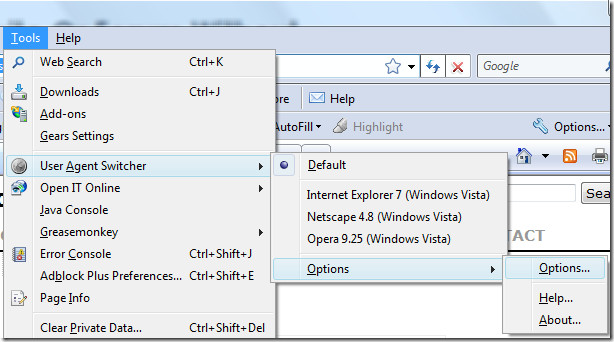
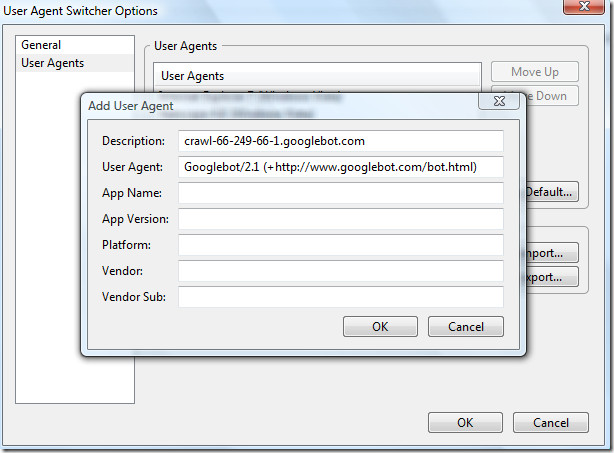
Select User Agent from the left sidebar and click Add. Now in the description field type:
crawl-66-249-66-1.googlebot.com
and in user agent field type:
Googlebot/2.1 (+https://www.googlebot.com/bot.html)
as shown in the screenshot below.
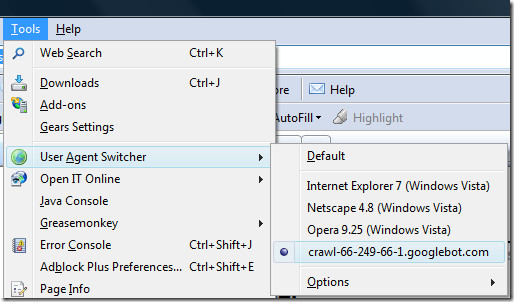
Select Google Bot as your User Script by going to Tools > User Agent Switcher.
Now browse any website or forum without registering. Alternatively you can also check out BugMeNot, it is a free online service where people share login information of thousands of websites and forums. Enjoy!

Good tip, thanks! 🙂
If you go the trouble of loading and setting this up would yo ube able to browse without registering and comment or ‘contribute’ as well?
There are lots of newspaper or general news articles I would comment on if I could but I’m not signing up to anything else.
Nor BTW do want or need any increased provision to enable access to porn or the dark-web, each to their own but they are not for me thanks.
can i do the same on chrome?
porn is not knowledge of digital world. Porn is time pass only
Expressing Yourself With Color
Expressing Yourself With Color
In this example, the background is black and the text is
yellow. Links are red, visited links are white but turn green when first
selected.
why its not working for enotes ? still asking for registration and “payment” for unreservedly use … :l
501 779 1465
That’s really useful, thanks!
i wonder if you can post a comment here wifout registring…
yp… but stilll gotta drop a mail….
Haroldcarter@reconncs.com I need emails to test email address
Why the hell is he using Internet Explorer?
“grab the add-on for Firefox”
FIREFOX
😛
Thank you!
thanks a but it does not work.after all the steps
is there a similar tool for chrome?
Can u give an example of a website that worked please. I can’t seem to log into any forum for free
Very detailed procedures, I can do it by myself, thanks for this
how to make changes in i.e 8.
Likehttp://www.2deals.net/
help me, please!
Left with no money in a foreign country, I can not go home!
Make a translation of only 2 euros for webmoney E512026080453
and tell it to your friends
it is very little money, and they can help me
you forgot to add you are from nigeria. you give us a bad name. small scum
2 euros = deux euros
There you go, I made you a translation
now you can go home.
yes work 🙂
installed cleanly – no difference I’m afraid.Any examples that it can be used for ??
thanks but i dont get it
plz tell another method to acess coaching website
plzzzzzzz reply
I’ve known a few admins who actually restrict bot usage so they can get accurate numbers on just how many people (living) come to the forums. Having a thousand people per hour searching (for example “Anime”) can bring down a small server or forum in seconds. Classic attacks break things that are basically open.
Plus with big issues coming from malicious trolls more and more privatized forums are not allowing any bots to find them, and word of mouth or personal linkings are the only way to find them.
Just trying to explain why some are not accessible this way.
So for any forum admins with god complexes the best way to keep your forum safe, at least at first, is to block bots.
this site serves the same purpose online
http://www.smart-it-consulting.com/internet/google/googlebot-spoofer/index.htm
its not working for me
Hack again?!
порно ролики геев
Hi all, just wanted to add that the latest version of ‘User Agent Switcher’ appears to have googlebot built into it, as well as MSN and Yahoo.
Also, I’m guessing that archive.org would have similar permissions to the googlebot.
Hack again?!
Hi. See my new website -here.
This Works on all most all forums who allow google bot.
have you played SC2. I just started last month and I am hooked.
If you like playing games join us and become part of a family of gamers!
Last Game
Most forum systems have bot access built in to allow search engines like google to show posts and such in search results. This basically tricks the forum into thinking you are one of those bots thus allowing you to access certain forums. This can be easily changed in forum settings so some sites do not allow bots on some parts of the forum, especially private forums.
It does not work for all but thanks. It will help on the pages it does. Anyone know why it is so selective?
Thank a lot
Some sites dont give special permissions to google. It only works for sites that want google to crawl them, and get the entire site in the crawl
Been using this trick for a while now. Works on most forums, but not all. Not sure why.
doesnt work
insane
I have tried these types of sites with this info on before; it worked in one case, still I’ll give it another go
ya this really good it is working, anywaz thanks for shearing this wonderful tricks.
Works cool! rcspammer@gmail.com
it is not working
does not workdon't spend our time
doesnt seem to work with the online journal articles im searching…any suggestions
good…work…
good…work…
Sometimes it works, sometimes it doesn't. Welcome to the internet. If a forum wants to let search bots in, then they will (and many do by default), however, if they don't… then they don't. It isn't required of forums/websites to let GoogleBot (or any other bot, for that matter) within the site.
Any site that does not allow me to post is unworthy of my wisdom.
Works GREAT! Thank you! It is a neat little proggie, and it is easy as pie to use. I have been able to access technical information without having to register for these forums (expert-exchange in particular). THANK YOU again!Not for porn folks. Now, I like my porn just like the rest. If you're looking for spoofed porn, try sexdreams.2link.be, and save your negative comments for somewhere else.
http://www.youtube.com/watch?v=U4oYtZTBQTE
…
sounds interesting…
Yeah this doesn't work. Thanks for nothing.
if it works for google bot…the information you require is definitely available in google cache..most of the times I find what i wanted through google cache directly..you just have to put in right key words e.g. movie_name rapidshare.com/filesnice add-on though..
the new version of user agent switcher actually has this pre loaded! maybe they saw your blog.
THANKS FOR YOUR TIME FIGURING THIS OUT AND SHARING IT!! I WISH SOME PEOPLE HAD MORE CONSTRUCTIVE COMMENTS FOR YOUR EFFORTS THOUGH.cheers
works with some sites, like darcnetworkz.com but not all =(
Most of you probably familiar with Facebook – the unsinkable flagship, the mother of all social networks around the world, but it won’t be our focus today. Three years ago Russian comrades took a look at Facebook and decided that: “The hell with it…. We will build our own with “blackjack and hookers!” Three years went by, and a social network known as VKontakte appears with no less than 45 million users. Wait! Don’t discard VKontakte yelling who needs it if we have Facebook because I will explain why you do need it.
It is a known fact that on the streets of Russia there are bears roaming freely with balalaika’s and cap hats which is probably the reason why copyright fighters haven’t come to Russia yet… ATTENTION!!!! In VKontakte social network you will find multi-million library containing free mp3 files, you can listen on-line to whatever you feel like without any limitations, and believe me, there is plenty to listen to (take a look at the screen shot bellow). It is unbelievably simple – following the registration (absolutely free) in the search field simply enter audio files search, and VIOLA, you have found your happiness! I suppose advanced users don’t need an explanation as to how files are downloaded.
REGISTRATION : http://vkontakte.ru/reg6830985
I’m kind of against this since if it gets popular, it will screw up the statistics of a website.
If registration is in my opinion unnecessary , I’ll use bugmenot.
For the guy that says DCTorrents is not working… I tried and it actually works…
But why would you use that site anyway?… just use Qtorrents.com.
Anyway.. nice article.. it worked for me.. thanks!!!
This probably doesn’t work on many sites anymore. Read Google’s work-around for checking authentic user agent: http://www.google.com/support/webmasters/bin/answer.py?answer=80553
Thanks works great
should have work for porn too.
most people don’t see it beyond porn site.
Hi Landon,
I am new to this forum and just want to introduce myself.
Brad
Yeah but why can’t the passerby view your information resource without having to comment or register, if someone only joins to view one thing anyway they arn’t likely to return or add any value to your group. People are always holding the keys to education and information and forums do the same by making people register, this is a good idea which I knew about already but didn’t bother trying but thanks for sharing!
This is such a bad idea. Some forums are registration only for a very good reason. They require registration for privacy reasons, not just monetary or proprietary reasons. As a forum owner I weigh all the options and make the decision to have open or closed forums. I know that the membership is then a group of people who were quite interested in being there, not just some passerby that won’t add any value to our group.
As far as im aware you cant post as googlebot, thus unable to either positively or negatively add anything to your group. and if you dont want everyone seeing whats in there, then block googlebot, cause otherwise it will turn up on google.
thanks so much for shering this great blog with great information. it is working well
great blog.i like it. thanks for shering this blog
it was said this was ment to get into forums that require you to register to continue, and you cant use it to get into places to download if the site requires you to pay, because this is illegal, and doing said thing would make it illegal.. well, using this method to bypass a registery requirement is hacking.. and in most places hacking is illegal to do. but either way, this is a neat trick, personally, as long as i dont have to pay to register. i register anyways, never know when it might come in handy. ontop of that, i wont have to worry about any possible spyware or virus’s i get from a download to do this.
This is an old school trick that doesn’t necessarily work even if Google can index the site. If the site in question happens to allow indexing from Google and other search bots via IP address, the trick outlined wont work. On the flip-side, the same trick can be used to manipulate SEO. One can display keywords/spam pages to Googlebot to manipulate PR and traffic, but not display these keywords to normal users.
@Nakodari: I would recommend that you change the title to “Access Indexable Sites […]” to stop most of the “it doesn’t work” replies. Or at least explain in a little more depth as to how and why this trick works.
Hello everyone i am completely new to this forum. Interested in learning many new things. Hope we all will share our knowledge and talk about different concepts in this forum.
This is actually a blog, not a forum. We are planning to open a forum here by next year. You can browse latest tips and comment on this blog by going to the Home page.
deez you’re a dick. why do you have to stab at people behind an anonymous character.
i don’t even care if this is hypocritical. fool.
Generally works. Of course, there is no guarantee that a site or forum does not
block googlebot. In which case, this won’t work.
Sorry to be “that guy,” but I know Safari has a built in user agent switcher with an “other” feature, but it looks like it needs the code formatted in a special way (I’m guessing similar to what the firefox plugin does for you). Would anyone happen to know what this is?
Perhaps little Nakodari should learn more about computers before making tutorials to show off his huge epeen.
Perhaps, you should wear some glasses and read IrateGoldfish’s comment.
Your opinion? Is it dangerous?
Read This
WikiPedia
This is losing usefulness as more and more software producers wise up to this, and limit googlebot etc. not only by user-agent but by IP address as well. Meaning unless you can appear to be coming from google, on a lot of sites you’re SOL.
this works on experts-exchange.com if you disable css btw
You guys are missing the point. This works on sites which allow themselves to be indexed by Google, but require registration for a user to see. Like when you search a question, and you see a forum post which seems to answer with exactly what you need. Except when you click on it, it requires that you register.
Google read the info, but you can’t. Google didn’t register. So this workaround makes it so you have the power of Google.
It won’t let you download torrents, since Google doesn’t actually index the torrent file itself, just the summary page which links to it.
Thanks for clearing this up for the visitors. 🙂
hi nakodari..i just follow your steps but cant get to work to a site like this…www.itunes-card.com/forum..they disabled the login registration .I cant open any of those topics…plz help
Cool!!!
Thanks 😉
It does not work at all whether you go to forums or to other sites. It is a fake!
Ruby it certainly worked for me. Even Phill above said that it works for him too. Make sure you have followed every procedure correctly.
Don’t
It works! Thanks matey 😉
Well it’s not working for me. I went to dctorrent.com site and want to download some hindi movies dvdrip torrent file. The site does not allow u to download torrent until u r a registered user and for registration it requires u to pay. So I thought this method will work but the fact is that it’s not working at all. So please tell some other method. I really require some method for this kind of situation.
Amit I think you got it wrong. It won’t work on private torrent tracking sites. This method will work on those informative forums and websites which require you to register in order to access them, such as, if you want to read a computer forum and they ask you to register to continue. Remember since this method is totally legal, you cannot use it on torrent sites to download movies, since it becomes illegal.
Thats surely not for Torrent Tracker sites. Well, DCTorrent started using invites from this month only. Till Feb, registrations were open and you missed it.
Cool!
If it don’t work wit porn, then it don’t work wit me.
To be honest, most forums and websites are not about porn. There are many informative websites that require you to register just to read articles. You can bypass the registration using this method.
I beg to differ….
I deffer as well
porn…. um.um…..porn
cool according to this 4 of 5 people are most interested in porn! yay!
Exactly. Not everything online is about sex but I guess to most guys it is -.-
An angry Pornographic Is Suckker
yes it is right, To be honest, most forums and websites are not about porn.
asasd
asdas