Translate Menu: Translate Webpages & Terms via Right-Click Context Menu [Firefox]
Firefox is truly feature rich and while people who use other browsers will argue otherwise, it’s hard to deny that this browser isn’t good or that developers prefer it over most other browsers. While the browser is great, it’s ‘differentiated’ from others by the excess or lack of a few features. In Chrome, if you visit a webpage that isn’t in your local language, it automatically asks you if you want to translate it and works with Google Translate to give you a hint of what the page is about. Firefox does not have a translate option. Translate Menu, a Firefox add-on, translates text that you select to almost any other language. It supports a very large number of languages, which means people of different origins can use this add-on for a better browsing experience. Just select the Translate This Page option from the right-click context menu. With this add-on, you don’t have to copy and paste the text or link to any other website, such as Google Translate.
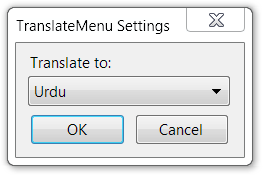
The add-on adds a Translate This Page option to the right click context menu, which you can use to translate the entire page. The extension will translate the text directly on the page, no pop-ups or anything. The add-on uses Google Translate to translate web pages. A popup opens and asks you which language you want to translate the text to. Once you’ve selected the language, each time you select and right-click text, it will be translated right there in the menu.
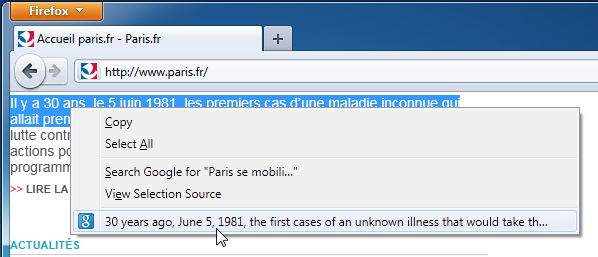
If you want to change the language or select it before you start using the add-on, you can visit its options and select it from there. This saves a whole lot of time, as you don’t have to search the term on the different websites. The downside of this add-on is that you can’t use it for long texts. It can be used for ten words or a short to medium sentence. When the text is too long, it trails off and clicking it doesn’t even open it in Google Translate. There are no popup windows or anything that will show you the translated text.
This is quite a handy add-on that allows you to quickly translate web pages to any language you want. You no longer have to go through a time consuming and tiring process to translate text to different languages. You can install this add-on from the link below.
Install Translate Menu Add-on For Firefox
