What is Opera Turbo Mode And How To Enable It?
Introduction to Opera Turbo Mode
Opera Turbo Mode is a new feature in Opera 10 Browser that allows a page to load much faster by compressing the image. When this mode is enabled, Opera’s servers will compress the images and other graphic elements from a webpage and send them to your browser, resulting in a faster load time. It is suitable for those users who are using a slow internet connection, such as dial-up or are using a crowded Wi-Fi connection.
How To Enable It
Enabling ‘Turbo Mode’ in Opera is a piece-of-cake. Go to Tools > Quick Preferences and click Enable Opera Turbo.
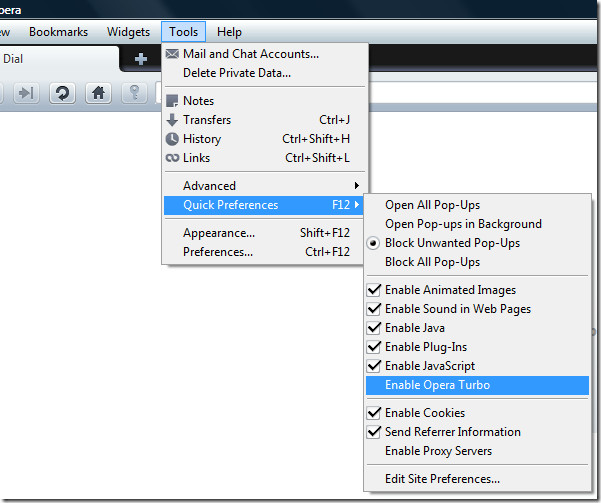
To go back to Normal Mode, repeat the same method again. Obviously the image quality will be reduced in Turbo Mode, so do not expect the same image quality that is in normal mode.
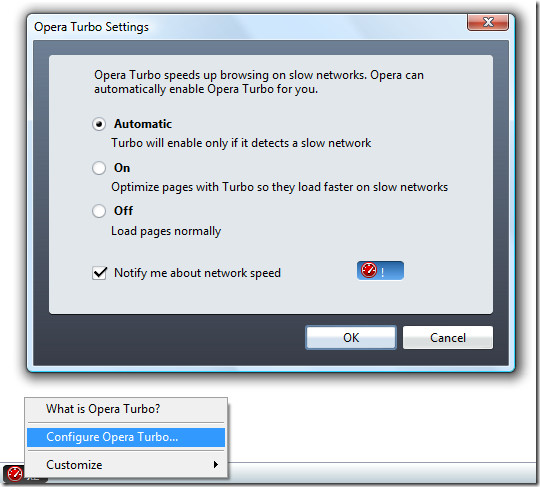
If you do not want it to be enabled, nor do you want it to be disabled, then there is a new option. You can set Turbo Mode to be Automatic, which means it will be enabled when a slow connection is detected and disabled when a normal connection is detected. Right-click the Turbo icon and select Configure Opera Turbo. Now under Opera Turbo Settings, select Automatic and click OK. It’s that easy.
Opera is cross-platform browser that works on Windows, Mac OS, and Linux operating systems. Enjoy!

Good to know. It’s sad no one talks about this feature.
This can be used to access some blocked sites ….
how is it useful? I guess most of the web servers send compressed data(using gzip,deflate,etc) to the browser
Thanks buddy I will try it and hope it will work.
thanks to this info… l will try it. god bless for you