How To Quickly Insert Horizontal Line In Word 2010 Document
Out of many ways to divide document into sections, you can simply make use of Word 2010 build-in horizontal line option to insert a divider.
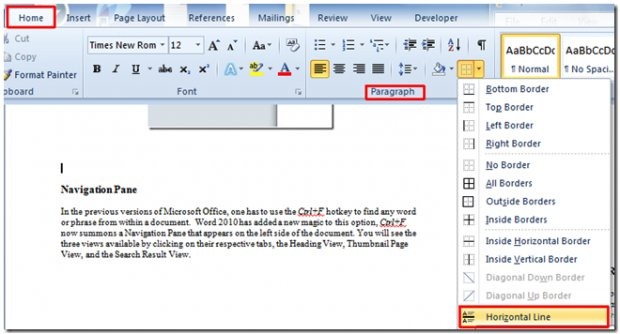
For inserting horizontal line, place the insert cursor where you want to insert it and head over Home tab, from Paragraph group, click drop-down button and select Horizontal Line as shown below.
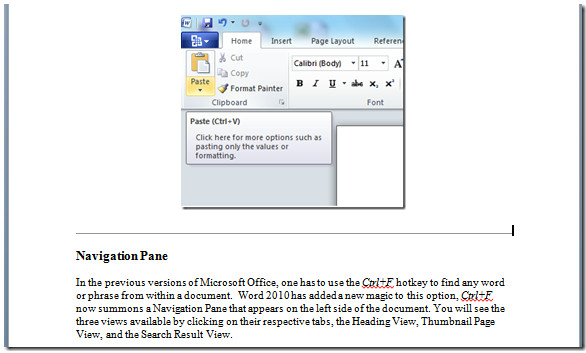
It will quickly insert a horizontal line in the document.
From the menu shown above, you can also box up any part of document by Outside Borders, use Inside Vertical & Horizontal Border, insert Diagonal Up Border, etc.

In WORD 2010 I have a saved alphabetical password list. Where and how do I set it so that at the end of a password, I hit enter and the cursor drops down a line to create space to enter an additional password? Thanks
Yap, thanks!
Thanks so much! it helps & exactly what I needed!!
nc
Thanks! It helped.
Perfect. Quick and precise.
called marketing 101
thanks for sharing
I have Microsoft Office 2010 for Home/Student, but I don’t have this feature. Can you explain this?
simple things are getting complicated thanks to microsoft
simple things are getting complicated thanks to microsoft
Indeed. Next try to format the line to make it thicker…there was a time when inserting a stupid horizontal line was a simple matter
Right click the horizontal line, then choose Format Horizontal Line.
It’s actually a pretty straightforward feature, but ms should have made it more prominent, since many users use something ugly like underlining if the horizontal rule option isn’t easy to find
worked
EXACTLY what I needed – quick and to the point. Thanks for your help!!