Word 2010: Insert Tables & Formulas
Word 2010 provides a great feature of using tables along with document content to complement and summarize it in a better way, but sometimes in tables we also need to write the formula for evaluation of values. Although it does not support a huge range of formulas, we can use basic formulas that will be sufficient for most users. This post elaborates how to create and apply new design over the table and how to get required results through formula with simple illustrations.
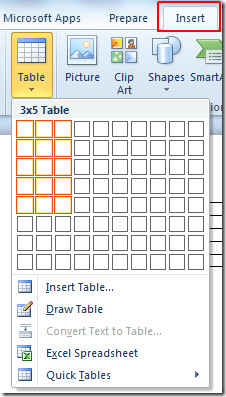
To begin, launch Word 2010 document in which you want to calculate values using formula. For instance, we have included a document, containing table. In order to insert a table, navigate to Insert tab and click Table. Now select the number of rows and columns, as shown in the figure below.
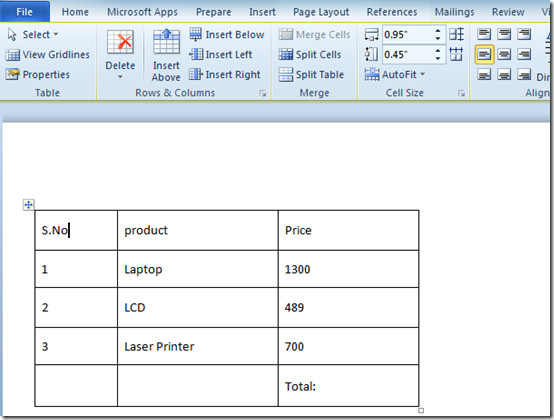
Once selected, start populating the cells with the data.
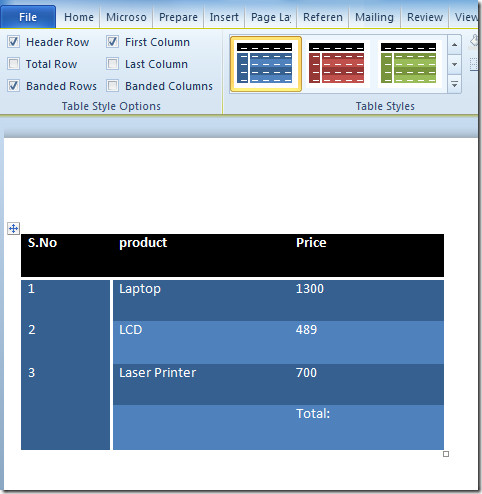
If you want to give it a better look, select the table, and two new tabs will appear on the ribbon Design and Layout. You can change the design by navigating to the Design tab and select the suitable style for the table from group Table Styles. In Design tab, it includes a number of table styles. Clicking the style will quickly apply it over your table. It also allows you to choose custom table colors and shades from Shading drop down menu, present alongside the table style gallery.

Click on the style you want to apply it over the table.
From Layout tab, you can customize the generic layout of the table, from the Cell Size group, select the size of the cell, from Merge, you can use the suitable option to merge cells, from Rows & Columns, you can insert a new row or column into the table. From Table group you can insert gridlines, and view properties of the table.

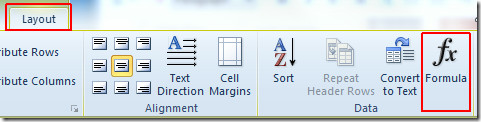
Now we need to calculate the total Price of the products, click the cell Total in the table, and click Formula from Layout tab, as shown in the screenshot below.
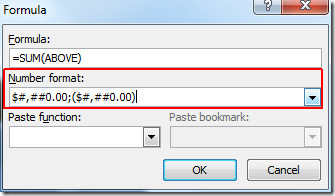
Upon click, Formula dialog will appear. Under Formula, =SUM(ABOVE) is automatically inserted, this can evaluate the sum of all the above values. From Number Format drop down list select one which includes dollar sign, as we are dealing with currency values, click OK to continue.
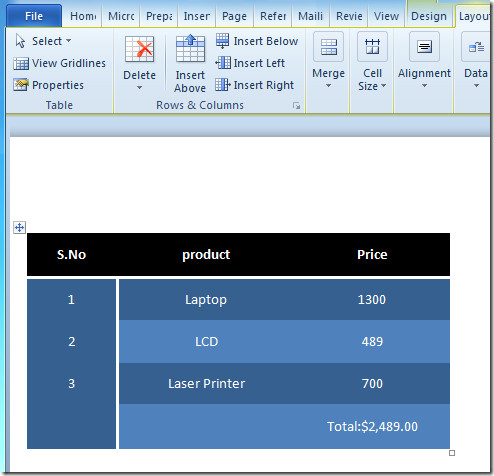
Upon click, it will show the sum of values.
You can also check out previously reviewed guides on How to Add dictionary in Word 2010 & Indexing in Word 2010.

OK
sad
sad sad sad sad
u should say sorry
boi
That is sad
I know right
own up coreyyyyyy
creepy
Hello My brother
sad
my bum hole is sore
How I can give Closing sign below to number like = in word file ?????
I need to subtract and can not find the difference anywhere.
Im trying to add a formula to a table that is in a form. In Column A there is a price list which does not change and can not be edited. In Column B I have inserted Control boxes to type in when the document is protected as a form. In column C, I want to times A * B, but It doesn’t read the control box.
Is there a way around this?
thanks
thank you
Unfortunately, the above did not work w hen I tried to add my column of figures. I got weird messages like “syntax error,” zero values aren’t legal, and other baffling messages. The best that came up was the sum of 2 in the cell immediately above. I also tried to use the autosum button, and that gave me “formula failed.” I tried selecting all the cells which I wanted to add, but no luck there, either. I have previously used the autosum as well as formulas in other documents, and everything worked just fine. I am really stymied and have wasted a lot of time on this when I just should have added the numbers in my head! But it is work hours, and I didn’t want to make any mistakes!
Suckz me hairy cock u ugly bastards!
tbh u 4ll 5uck
this be gooood
trollllllllllllllllllllllllllllllllll
trollllllllllllllllllllllllllllllllll
trollllllllllllllllllllllllllllllllll
trollllllllllllllllllllllllllllllllll
trollllllllllllllllllllllllllllllllll
trollllllllllllllllllllllllllllllllll
trollllllllllllllllllllllllllllllllll
trollllllllllllllllllllllllllllllllll
trollllllllllllllllllllllllllllllllll
trollllllllllllllllllllllllllllllllll
trollllllllllllllllllllllllllllllllll
trollllllllllllllllllllllllllllllllll
trollllllllllllllllllllllllllllllllll
trollllllllllllllllllllllllllllllllll
trollllllllllllllllllllllllllllllllll
trollllllllllllllllllllllllllllllllll
trollllllllllllllllllllllllllllllllll
trollllllllllllllllllllllllllllllllll
trollllllllllllllllllllllllllllllllll
trollllllllllllllllllllllllllllllllll
trollllllllllllllllllllllllllllllllll
trollllllllllllllllllllllllllllllllll
trollllllllllllllllllllllllllllllllll
trollllllllllllllllllllllllllllllllll
trollllllllllllllllllllllllllllllllll
trollllllllllllllllllllllllllllllllll
trollllllllllllllllllllllllllllllllll
trollllllllllllllllllllllllllllllllll
trollllllllllllllllllllllllllllllllll
trollllllllllllllllllllllllllllllllll
trollllllllllllllllllllllllllllllllll
trollllllllllllllllllllllllllllllllll
trollllllllllllllllllllllllllllllllll
trollllllllllllllllllllllllllllllllll
trollllllllllllllllllllllllllllllllll
trollllllllllllllllllllllllllllllllll
trollllllllllllllllllllllllllllllllll
trollllllllllllllllllllllllllllllllll
trollllllllllllllllllllllllllllllllll
trollllllllllllllllllllllllllllllllll
trollllllllllllllllllllllllllllllllll
trollllllllllllllllllllllllllllllllll
trollllllllllllllllllllllllllllllllll
trollllllllllllllllllllllllllllllllll
trollllllllllllllllllllllllllllllllll
trollllllllllllllllllllllllllllllllll
trollllllllllllllllllllllllllllllllll
trollllllllllllllllllllllllllllllllll
trollllllllllllllllllllllllllllllllll
trollllllllllllllllllllllllllllllllll
trollllllllllllllllllllllllllllllllll
trollllllllllllllllllllllllllllllllll
trollllllllllllllllllllllllllllllllll
trollllllllllllllllllllllllllllllllll
trollllllllllllllllllllllllllllllllll
trollllllllllllllllllllllllllllllllll
trollllllllllllllllllllllllllllllllll
trollllllllllllllllllllllllllllllllll
trollllllllllllllllllllllllllllllllll
trollllllllllllllllllllllllllllllllll
trollllllllllllllllllllllllllllllllll
trollllllllllllllllllllllllllllllllll
trollllllllllllllllllllllllllllllllll
trollllllllllllllllllllllllllllllllll
trollllllllllllllllllllllllllllllllll
trollllllllllllllllllllllllllllllllll
trollllllllllllllllllllllllllllllllll
trollllllllllllllllllllllllllllllllll
trollllllllllllllllllllllllllllllllll
trollllllllllllllllllllllllllllllllll
trollllllllllllllllllllllllllllllllll
trollllllllllllllllllllllllllllllllll
trollllllllllllllllllllllllllllllllll
trollllllllllllllllllllllllllllllllll
trollllllllllllllllllllllllllllllllll
trollllllllllllllllllllllllllllllllll
trollllllllllllllllllllllllllllllllll
trollllllllllllllllllllllllllllllllll
trollllllllllllllllllllllllllllllllll
trollllllllllllllllllllllllllllllllll
trollllllllllllllllllllllllllllllllll
trollllllllllllllllllllllllllllllllll
trollllllllllllllllllllllllllllllllll
trollllllllllllllllllllllllllllllllll
trollllllllllllllllllllllllllllllllll
trollllllllllllllllllllllllllllllllll
trollllllllllllllllllllllllllllllllll
trollllllllllllllllllllllllllllllllll
trollllllllllllllllllllllllllllllllll
trollllllllllllllllllllllllllllllllll
trollllllllllllllllllllllllllllllllll
trollllllllllllllllllllllllllllllllll
trollllllllllllllllllllllllllllllllll
trollllllllllllllllllllllllllllllllll
trollllllllllllllllllllllllllllllllll
trollllllllllllllllllllllllllllllllll
trollllllllllllllllllllllllllllllllll
trollllllllllllllllllllllllllllllllll
trollllllllllllllllllllllllllllllllll
trollllllllllllllllllllllllllllllllll
trollllllllllllllllllllllllllllllllll
trollllllllllllllllllllllllllllllllll
trollllllllllllllllllllllllllllllllll
trollllllllllllllllllllllllllllllllll
trollllllllllllllllllllllllllllllllll
trollllllllllllllllllllllllllllllllll
trollllllllllllllllllllllllllllllllll
trollllllllllllllllllllllllllllllllll
trollllllllllllllllllllllllllllllllll
trollllllllllllllllllllllllllllllllll
trollllllllllllllllllllllllllllllllll
trollllllllllllllllllllllllllllllllll
trollllllllllllllllllllllllllllllllll
trollllllllllllllllllllllllllllllllll
trollllllllllllllllllllllllllllllllll
trollllllllllllllllllllllllllllllllll
trollllllllllllllllllllllllllllllllll
trollllllllllllllllllllllllllllllllll
trollllllllllllllllllllllllllllllllll
trollllllllllllllllllllllllllllllllll
trollllllllllllllllllllllllllllllllll
trollllllllllllllllllllllllllllllllll
trollllllllllllllllllllllllllllllllll
trollllllllllllllllllllllllllllllllll
trollllllllllllllllllllllllllllllllll
trollllllllllllllllllllllllllllllllll
trollllllllllllllllllllllllllllllllll
trollllllllllllllllllllllllllllllllll
trollllllllllllllllllllllllllllllllll
trollllllllllllllllllllllllllllllllll
trollllllllllllllllllllllllllllllllll
trollllllllllllllllllllllllllllllllll
trollllllllllllllllllllllllllllllllll
trollllllllllllllllllllllllllllllllll
trollllllllllllllllllllllllllllllllll
trollllllllllllllllllllllllllllllllll
trollllllllllllllllllllllllllllllllll
trollllllllllllllllllllllllllllllllll
trollllllllllllllllllllllllllllllllll
Can I reference another cell in a functions, like in Excel. I want to enter a date then have each successive date change. Is this possible? In Excel I would enter =A2+1. A2 represents the cell that I would enter a date.
So . . . just confirming. Format Painter can’t quickly fill table cell? Agggghhhhh!
I need to complete my mail merge – can’t get the formula to work that places the dollar sign, commas & periods in the number entries. Help?????
How do you show the codes that were used? In Excel, you use Control toggle, what is it in Word?
I need to enter the formula for “Qty x Unit Price” for a line total on an invoice. I’ve go the sum on the line but cannot get it to calculate the qty times the unit price
In word Im trying to get this chart to do averages and keep getting Syntex errors.
I do =Average(B4:C4:D4)
COLEMAN
DEVELOPMENT CORPORATION
New Employee Orientation
Name
Quiz 1
Quiz 2
Quiz 3
Average
Mary Castillo
88
74
90
Patrick Donahue
92
86
84
Angela Herron
78
66
72
Jason Kepler
84
76
80
Teresa Miroshi
76
82
78
Thomas Newton
96
98
94
Desiree Pollock
84
68
80
so easy , so good ….. thanks
How do you format each cell to show decimal and or $ sign. Format painter won’t even copy the formula format indicated in the final figure. (Sum – format)
I have the same question and have just spent 30+ minutes looking all over the internet! How do I see the answers to the questions in this forum?
You did what my college prfoessor and college book couldnt tell me to do in an hour, in just a few seconds. Thank im tired of this world overcomplicating shit
I need to subtract and can not find the difference anywhere.
Useful article! But I need an autosum — that recalculates the sum if one of the values changes. Not very useful without that feature.
Just a note to those that just want to simply click on a button and auto sum anything in table, simply go to File > Options > Customize Ribbon.
Under the ‘Choose Commands From’ dropdown box, change it from ‘Popular Commands’ to ‘All Commands’.
Scroll down until you see the command ‘Sum’ and select it.
On the right side, you can add a new group where ever you want the Sum button to go. I just make a Sum entry in my main tab section.
After making your custom group on the right, simply add the ‘Sum’ command from the left to the one you just made on the right.
You are all set, a simple sum button right in your ribbon. 🙂
This works – cheers it’s made it so much simpler
In Word 2010 what is a table within a table called?
Great – but how do I give it a title, that I can then reference in (for example) a list of tables
Great info. Can nested formulas be used in Word 2010 tables to conditionally set the content of a table cell?
i have a list of numbers in my table. i would like the numbers to line up. i am using parenthesis () to denote negative numbers. although i have it right aligned, the closing parentesis moves the number over a character and then the numbers aren’t lined up. any help?
Have you tried creating a decimal tab?
Hi Yep this helped with the basic.
I’m just enquiring what formula’s would work when making a purchase order. So I want to multiply the quantify of products with unit price equalling total Price.
If i can get assistance with this one then I can play with the formula to add and subtract Sub Total, tax and delivery fee and equal total.
Hi Yep this helped with the basic.
I’m just enquiring what formula’s would work when making a purchase order. So I want to multiply the quantify of products with unit price equalling total Price.
If i can get assistance with this one then I can play with the formula to add and subtract Sub Total, tax and delivery fee and equal total.
thanks a bunch! microsoft online support did not help at all.
You have to redo it every time you update a value? This is going to cause a lot of problems for a lot of people who are expecting to change the numbers and the total automatically updates.
That is NOT auto sum. You have to redo it every time you add an entry. Office took out the auto sum feature.
Although it won’t automatically re-add the total if you change a number, but if you put your cursor on the total, and right-mouse click and hit “update field”…it will total it again.
If you select all (Ctrl + A) and then press F9, it will update all fields at once
A problem I am having is that I creat a simple 1 line table of 5 rows, but while typing the content Word just adds a 6th row that even goes out of my page. What is going on?
This was SOOO much help!! Thank you kindly!!
This is right on! Thanks…