Android ROM Manager
Are you an Android enthusiast who loves to install custom ROMs and mods on your Android device? Tired of having to manually manage all your recovery, ROM and mod installations by rebooting into recovery and manually flashing zip files, followed by cache wipes? We’ve got some great news for you! Those days are over when you had to search for the ROM, download it, transfer it to your Android device, and finally install it yourself like that. Free app ROM Manager can now do it all for you, with a lot more. Being a simple app, ROM can be downloaded directly into your phone and installed. Features of this app include recovery, ROM management, backup and restore, and utilities.
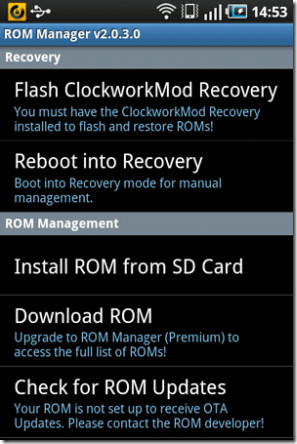
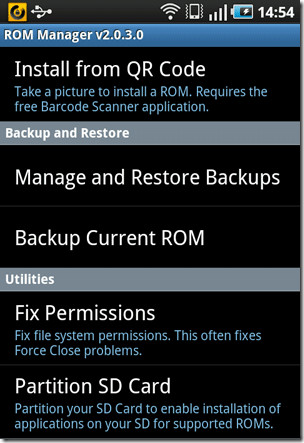
Developed by the same guy Koush who has brought us the famous ClockworkMod recovery, ROM Manager is basically an app that lets you download ROMs directly on your rooted Android phone, and set them up for automatic installation from recovery without having to boot into recovery yourself even. You simply select the ROM to install from its available list of ROMs, or specify a zip file of your own choice, and it will ask you if you want to wipe data or cache as well. Once you have made your choice, you can sit back and relax as ROM Manager automatically boots your device into recovery, installs the ROM, wipes data, cache or both if selected by you, and then boots back into Android. You are not limited to ROMs, but may also install other recovery flashable zip files of themes, hacks, mods or apps. To sum it up, if anything can be flashed from recovery, you can set it up for flashing via ROM Manager without having to do so manually.
In addition, if you don’t have ClockworkMod recovery installed already, ROM Manager can automatically download and install the latest version of it for your phone. All you have to do is tap the ‘Flash ClockworkMod Recovery’ option and then confirm your phone’s name/model. Once recovery has been flashed, ROM Manager also allows you to boot into recovery.
In addition to recovery or ROM flashing. ROM Manager lets you take full backups of your phone in a similar way, and manage or restore the backups you have already taken, partition your SD card, check for updates to your currently installed ROM, and update your ClockworkMod recovery if a newer version is out there. It does all these in recovery by rebooting, but eliminates the need for you to do anything in recovery mode yourself.
There are many ROMs featured in ROM Manager and countless others keep on being added periodically. All-in-all, it is a handy app for anyone with a rooted device. The free version supports all the above features and is ad-supported. The premium version gives you access to more ROMs, more versions of recovery and some other features, for a price. You can install ROM Manager on your phone directly from Android Market using the link given below.
Download ROM Manager for Android

I keep trying to download and it just won’t. I downloaded the premium version and when I open it, it says i need the free version but it doesn’t exist in the market anymore. can someone help? Please
I just installed ROM MANAGER 4.8.0.2 and I can’t flash ClockworkMod Recovery…
I have an error message saying : download failed CHeck your internet connection, SD card with enough space and installed.
What do you suggest?
My Rom is Gingerbread 2.3.4 XXJVQ
I have encountered the same problem. Have you found a solution?
I have a Droid X same issue
Phone in question is rooted Samsung Captivate with stock AT&T 2.1 OS.
I have the same issue and concern as ron_droid my Captivate with the AT&T stock 2.1 ROM is doing exactly what he describes and I don’t want to flash until I know I have a backup. Anybody have an answer?
problem; look in Manage and Restore Backups and there is nothing there after back up is done.
Captivate Phone that was rooted with odin 1click
FIRMWARE 2.2
baseband version 1897UCJI6
KERNEL VERSION 2.6.32.LEE@SEP-11 #1
BUILD NUMBER FROYO.UCJI6
from what I can read I need to flash the stock os using odin before I can use rom manager to flash new custom rom, true? could that unroot phone?
Do not to want to flash until I have back up of existing.
I installed ROM Manager 3.0.0.7 and I used it to flash ClockworkMod Recovery. I get the menu, so it appears to have installed correctly.
When I go to Backup Current ROM and click OK, it reboots my phone. Is that supposed to happen?
I look in Manage and Restore Backups and there is nothing there.
I am too nervous to flash new ROMs if I can’t successfully backup my current.
Any advice?
A few years late on this, but it’s cool.