Apps Uninstall Batch Uninstalls Multiple Android Apps
There are hundreds of useful apps out there in the Android Market. What if you have installed many of them only to find your phone with low disk space? Uninstalling the apps through the conventional method, by navigating to Settings > Applications > Manage Applications, is one good way of doing it. Otherwise, you may also use the popular AppBrain app to uninstall all unneeded apps. There is however one downside of using both these methods, they do not allow bulk uninstallation of apps. Apps Uninstall can ultimately solve this problem. Not only the app lets you uninstall unwanted apps in bulk, but also supports a built-in search and sort tool to offer a greater degree of user convenience as well.
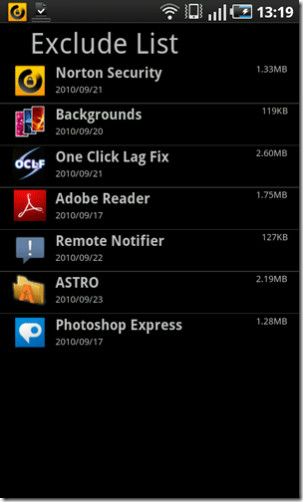
It must be mentioned here that App Uninstall is not the only or the first app of its kind in the market, but if you’re looking for a rather simple solution, it might be right up your alley. The app shows the basic details of all the applications installed with a search bar on the top for quick search. The size and date it was installed is shown right beneath the application name. To exclude an app, simply tap and hold and hit exclude. Moreover, to make sure it has been added to the exclude list, press menu button and check the exclude list. Items added to the Exclude list can be revisited upon user discretion. For this, just hit Menu > Exclude List.
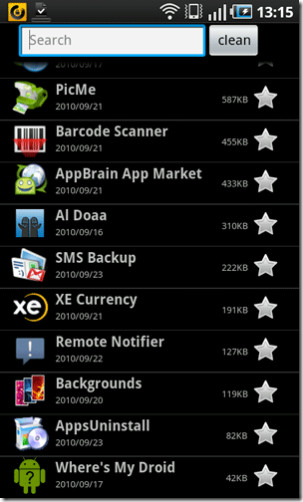
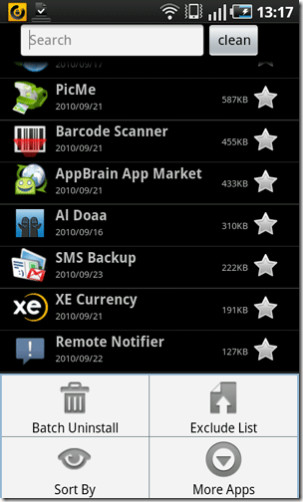
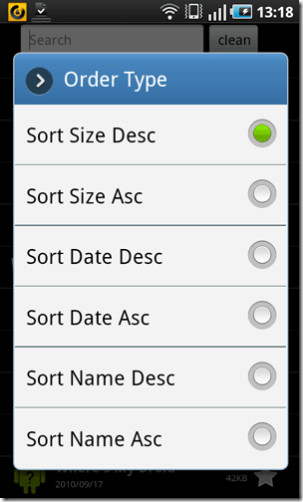
Applications can be sorted by size, date and name in descending or ascending order. On the top, batch uninstall can be done by tapping the star right next to the application name. More Apps on the menu bar will take you to the Android Market.
A decent app to quickly uninstall multiple unrequired applications in one go. However, it must be mentioned here that, running a batch uninstall operation does not mean that the task will be carried out without any user intervention whatsoever. Instead, each time a new app is to be uninstalled, you are prompted by Easy Uninstall to confirm the operation. Nevertheless it is a safe way to have your apps uninstalled right before your eye, instead of learning later on that one of your important apps got uninstalled as a part of a slight mistake on your part. Easy uninstaller was successfully tested on Samsung Galaxy S.
Easy Unisntaller is available in the Android Market as a free app, and can be downloaded via the link provided below.
