Get 50 GB Free Cloud Storage On Box From Any Android Device [How To]
Popular online storage service Box recently announced that it would be offering a mammoth 50GB of free cloud storage space to all mobile users who register for a new account using their Android-powered LG smartphones till March 31, 2012. As per the announcement, the offer is currently only available to LG users, but Sony Ericsson devices too will be included in the offer soon. But what if you don’t own a device by either manufacturer, and yet want to avail said offer? The folks over at XDA have carved an effective method of grabbing the offer via any rooted Android device regardless of its manufacturer and model. Read on past the break to know how.
As mentioned above, the method requires your device to have root access. To learn more about rooting, you can go through our collection of root guides for Android devices.
Needless to say, once you’ve successfully register for a new account with Box using this method, you will be able to access the entire 50GB of allocated space from anywhere, and not just your device.
Assuming your device is rooted, all you need is a root-level file explorer (e.g. Root Explorer) installed on your device that can help you with modifying the read/write permissions of the build.prop system file. Provided you’ve chosen Root Explorer, here’s how you should proceed:
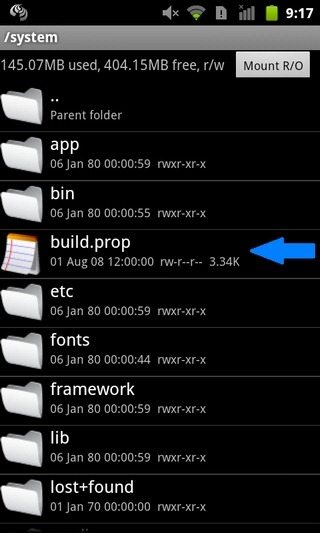
1. Launch the explorer and navigate to /system
2. While staying within said directory, mount r/w mode
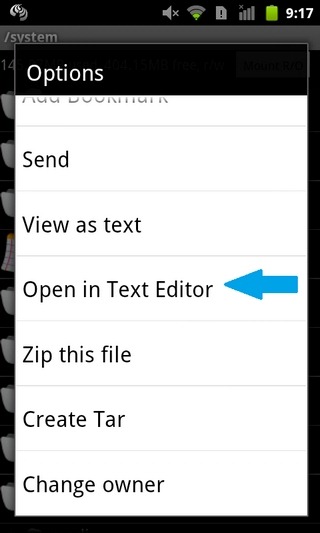
3. Long press the build.prop file, and select Open in Text Editor option from the context menu
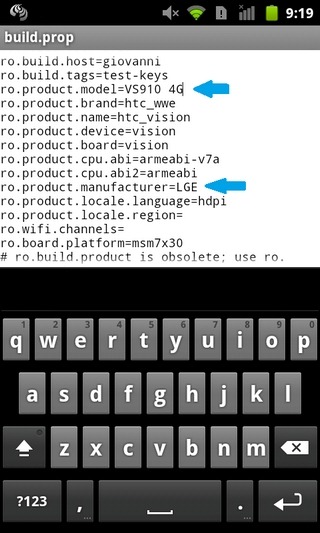
4. Locate and modify entries pertaining to your device’s manufacturer and model as follows:
ro.product.model=VS910 4G
ro.product.manufacturer=LGE
5. Once done, save the file, exit the editor and reboot.
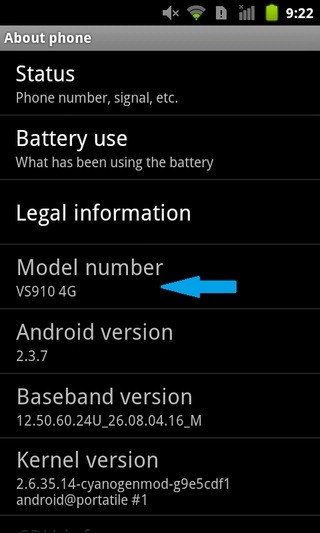
6. After rebooting your device, confirm the changes made to your device’s model. For this, navigate to Menu > Settings > About Phone. The Model number should read VS910 4G.
7. Next, download the official Box client from the Android Market (link provided at the end of post), register for a fresh account, and voila! You should now have 50GB of online storage space on Box, as confirmed by the dialogue box that appears on the welcome screen. You can also confirm your total allocated space on Box from within the mobile client’s settings screen (Menu > Options).
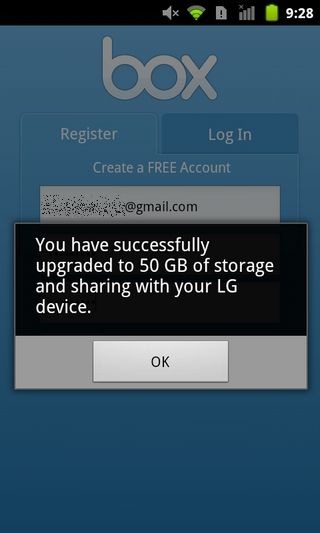
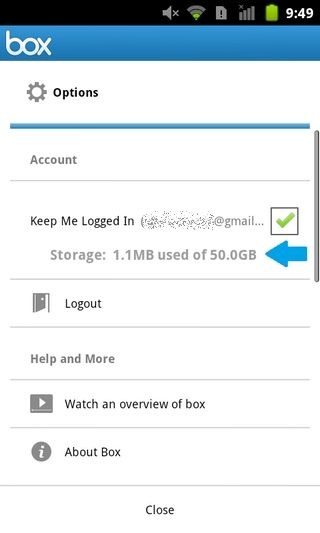
Once you’re done with the procedure, you can replace the modified values within the build.prop file with the original ones by following the same procedure. An easy way is to delete the modified build.prop file and rename the original backed up file (build.prop.bak) that Root Explorer creates automatically every time you edit the system file.
[via XDA-Developers]

Thank you!!
tawkle IS FREE SAFE AND SECURE
WWW.TAWKLE.COM
This is just amazing,
Worked on Samsung Galaxy S.
Thanks alot
This is just amazing,
Worked on Samsung Galaxy S.
Thanks alot
Android app sucks! you cant upload folders; you cant upload more than one single file at a time; you have to select the file, click upload and confirm and that for every single file !!! it would take years to upload a folder full of pictures, USELESS !!!!!!!!!!!!!!!!!!!!!!!!!!!! UNINSTALLED !!!!!!!!!!!!!!!!!
it works on Samsung Galaxy S2 (I9100)
In English we call it stealing. It’s plain and simple no matter which way you look at it, It’s taking from box.net what they only offer to genuine LG owners.
Hey, could I do it a second time but using sony ericsson settings??
Totally worked on my milestone XT720 !.Gift for the New year ,Tks a lot
Just awesome… I already had an account on Box and forgot.
I have HTC Desire with MIUII rom. Just modified as taught above, and yes, its Vola :D..
Thanks a lot
Done everything, checked on System preferences, deactivated my box account, created a new one from different email from my android phone, but still no upgrade option in Box… how can i get the 50gb?
If your phone isn’t rooted, you can use this little app to do the same thing.
http://forum.xda-developers.com/showthread.php?t=1413382
Better hurry though, the offer expires on 12/31. =)
There’s an app that will give you the extra space without root or modifications. It’s much easier!
Check it out on XDA:
http://forum.xda-developers.com/showthread.php?t=1413382