Volume Step Lets You Customize The Volume Level Jumps In iOS [Cydia]
If you are a perfectionist, and really picky about how you listen to your favorite songs on your iPhone, iPad or iPod touch, then Volume Step is a Cydia tweak which is tailor-made for you. Most of us have been there when the perfect volume for a song is somewhere between two steps, and hitting the volume down key once can either makes the sound too low, or turning it one step up proves to be too much. This tweak for jailbroken iOS devices will let its users customize the way volume keys affect the volume. It is also helpful if you just want to save a few extra taps, and make volume controls more simplified, so that a single press is enough to get the volume on full level.
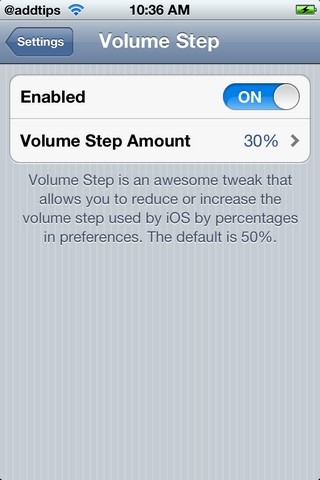
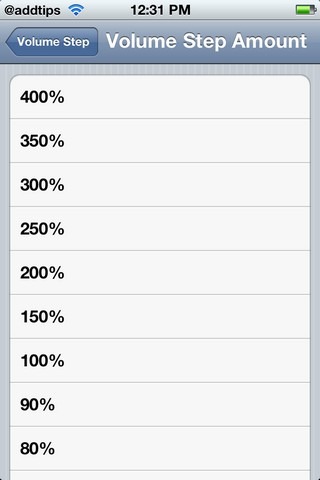
Volume Step is a free tweak, which can be downloaded from the Big Boss repo in Cydia. Once it has been successfully installed, there won’t be any new added icons on your Springboard. The tweak works through the Settings menu, and can be found there under the Extensions tab. There are just 2 options in Volume Step’s menu; Enable and Volume Step Amount. After you have enable Volume Step, you are ready to modify the step amount. If you choose an amount which is less than 100%, it will take more than one tap to move through a single step, while selecting a higher level will make you jump through multiple steps with a single press of the volume button. Default setting is at 50%, while the steps themselves range from 30% to a massive 400%! Having your iPhone’s volume step set at 400% will mean that the volume levels will just be divided into 3 steps, and you will be able to quickly alternate between very low, normal and very high.
The functionality offered by Volume Step might be too particular and insignificant for some people, but for no cost at all, it can come in handy every once in a while. If you analyse your phone usage, you are sure to find out that you usually have a few favourite volume steps, and the rest remain unused most of the times. Thus, you can choose a higher volume step, and eliminate all non-relevant steps from the volume control bar. It has to be mentioned here that the Volume Step tweak does not interfere with the App Switcher and Music app volume slider in any way, and just acts on the hardware volume buttons.
