Auto Organize & Sort Large Files Before Backup With Capacity
How many hours have you wasted calculating the file sizes and trying to find out if they will fit in the spare CDs or DVDs you have lying around? Most of us make backup of all important files to the DVDs before formatting the hard drive and some users love to organize their files by date and file type. The procedure of manually calculating and organizing the files is usually quite tiresome, until today.
Capacity is a nifty little portable application that makes organizing the files as easy as possible. Just select drive or directory that you want to backup, select if you want to move or copy the target files, finally select the sorting criteria, and hit Go.
It will automatically sort the files according to the defined criteria. It can sort by file size, by month created, by month modified, and by file type. A perfect app for everyone who wants to make a clean backup without confusing themselves later.
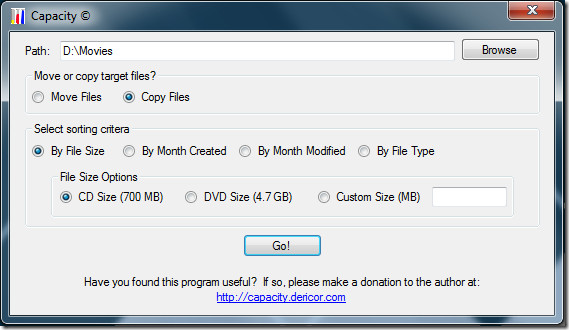
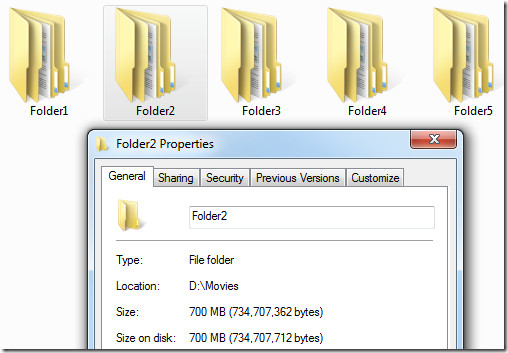
At first we choose ‘By File Size’ option and selected the ‘CD Size’, the result can be seen in the screenshot below. Note the file size of each folder is exactly 700MB, you can however always define a custom size(in MB).
Next, I tried sorting by ‘File Type’ and result was brilliant as you can see in the screenshot below. Each folder contains files of one extension only, the pdf folder contains all pdf files, the exe folder contains all exe files, and so on.
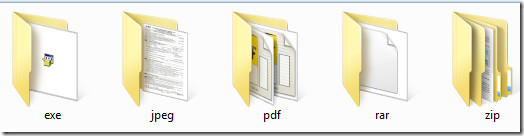
The application automatically searches for the file types in each and every sub-directory and arranges them in perfect order. The move or copy option needs a little explanation, if you choose copy, all original files will remain intact and a new folder will be created where you will find all files neatly sorted ready to be backed up. The move option will move all files to the new folder(depending on your sorting criteria), thus they will no longer remain in their original location.
Our only wish is that there was a build-in progress bar since organizing large files can take some time and there is no way to keep check on the progress. Nevertheless, the app is brilliant and a must have.
Since it is a portable tool, it works on all versions of Windows, including the latest Windows 7 operating system.

If looking for this. Search ‘capacity dericor’
Link points to a different application of same name. Please provide an alternate link. I would love to try this. I tried to search on google with no avail..
I supose there is many things to do better, maybe in other versions.
Thanks anyway.
please tell me more about this application tool. What are the reasons of creating this tool?
who proposed this application?