Automatically Mute Speakers On Lock [Windows]

If there is one hotkey I hit frequently in the workplace, that would be be Win+L to lock the computer. It is not surprising how important it is, every time a user gets up from the computer, locking the system is the first thing to do. Even though we should be praising the Windows team for this awesome little feature, I would rather do the opposite due to lack of options. Locking is a good practice but what if you want the sound to be muted automatically when the system is locked?

You don’t want the music to continue blaring in the headset and don’t want to disturb co-workers with notifications alert sound(if speakers are enabled). Muting the sound is something I have to manually do before locking the system and unmute the sound again later. This looks like a normal procedure at first glance but after a while, specially when you lock the computer multiple times a day, it becomes quite annoying.

Mute On Lock is a small system tray tool that will automatically mute the sound when the system is locked and unmute the sound again when logged in. It can also help in muting and unmuting the system sound quickly with a hotkey.
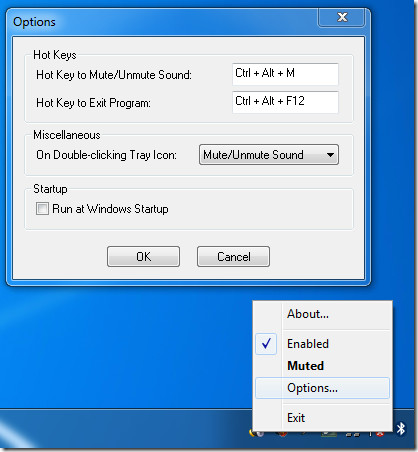
Mute Speakers On Lock

If you don’t want the speakers to be muted on lock, simply click Enabled from the system tray context menu to disable it, clicking it again will enable the app again. You can select the hotkeys for both mute/unmute sound and exiting the program from Options. You can also choose what action to perform when the system tray icon is double-clicked; Mute/Unmute Sound, Enable/Disable Effect, or Show Options.

The app also comes with a portable version and works on Windows XP, Windows 2003 Server, Windows Vista, Windows 2008 Server, and Windows 7. Both 32-bit and 64-bit OS are supported.

Download Mute On Lock

Note: You must run the app in Windows XP compatibility mode when using in Windows 7. This is the only way it would work.

  • Share this article!

    • Digg this!
    • Bookmark on Reddit
    • Bookmark at Delicious
    • Stumble this!
    • Share this post at Facebook
    • Tweet this!
    • Share on Yahoo! Buzz
    • Add AddictiveTips to your Technorati favorites
    • Share on Friendfeed
This entry was posted in Windows and tagged , , . Bookmark the permalink. Post a comment or leave a trackback: Trackback URL.

6 Trackbacks

  1. [...] Mute on Lock is a free download for any version of Windows, though readers should note that you might have to use the Windows Compatibility Mode feature set to Windows XP to get it to work properly on Windows 7. Mute on Lock [SuperUtils via Addictive Tips] [...]

  2. [...] on Lock [SuperUtils via Addictive Tips] Tagged:keyboard shortcutsportable [...]

  3. [...] Mute on Lock is a free download for any version of Windows, though readers should note that you might have to use the Windows Compatibility Mode feature set to Windows XP to get it to work properly on Windows 7. Mute on Lock [SuperUtils via Addictive Tips] [...]

  4. [...] Mute on Lock is a free download for any version of Windows, though readers should note that you might have to use the Windows Compatibility Mode feature set to Windows XP to get it to work properly on Windows 7. Mute on Lock [SuperUtils via Addictive Tips] [...]

  5. [...] Mute on Lock is a free download for any version of Windows, though readers should note that you might have to use the Windows Compatibility Mode feature set to Windows XP to get it to work properly on Windows 7. Mute on Lock [SuperUtils via Addictive Tips] [...]

  6. [...] is also available.Download MonitorESThis app can be used alongside a previously reviewed app, Mute On Lock.var linkwithin_site_id = 40104; (function () { var elem = document.createElement('script'); [...]

Post a Comment

Your email is never published nor shared. Required fields are marked *

*
*

You may use these HTML tags and attributes: <a href="" title=""> <abbr title=""> <acronym title=""> <b> <blockquote cite=""> <cite> <code> <del datetime=""> <em> <i> <q cite=""> <strike> <strong>


More in Windows (5 of 5 articles)