Clear Past Notification Icons In Windows 7
A few days back I covered a tool called Tray Cleaner that allowed users to remove all past notification area icons, but sadly there was some trouble using it in Windows 7. It did not remove the icons completely. So today I am going to share with you another method that has been tested to work.
This method requires editing the Windows Registry. If you’re using Windows 7, type regedit in Start Search, right-click it to select Run as administrator to launch Registry Editor.
Now, navigate to the following key from the left sidebar:
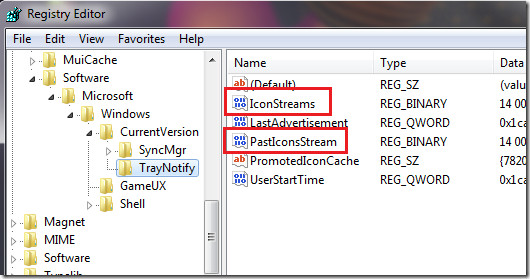
HKEY_CURRENT_USER\Software\Classes\Local Settings\Software\Microsoft\Windows\CurrentVersion\TrayNotify
From the main window, delete both IconStreams and PasteIconsStream.
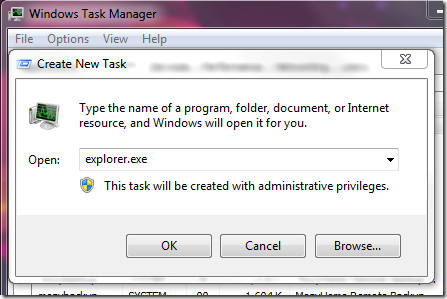
Now hit Ctrl +Alt + Del to open Task Manager and kill explorer.exe process. Once done, go to File > Run, enter explorer.exe and hit Enter, this will start explorer.exe again.
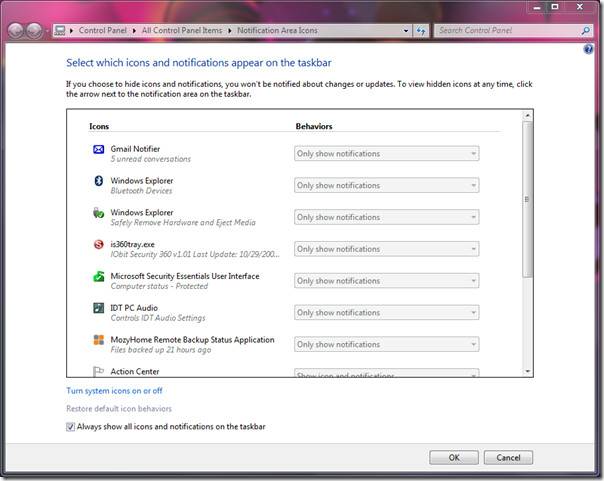
Now right-click the clock in the system tray and hit Customize notification icons. You will see that all past icons have now been removed.
For those who don’t know what are past notifications? Go here to learn about it. Enjoy!

Still works in Windows 11 !
Thanks a lot !!!
Thank you so much.. this saved me a major headache… all this time I could’ve done this instead of system restore.. You Rock!!
thank you very much 🙂
It works just great
Thank you!!! Excellent , it works great in Win 7 64-bit. Just do not close Task Manager after the explorer.exe process is stopped, go back to applications and hit new task button. Then write in the window that pops up explorer.exe and hit ok. DONE 🙂
In my view the “Tray Cleaner” is a useless tool and it is a bad one to install on any computer!
thanks so much man, now i got my keyloggers entry removed ^___^
You are a genius. Thank you so much. Arregato.
Thankyou 🙂 great heLp !! :*
The registry method worked perfectly in my Windows 7x 64 bit Home Premium. Thank you to the original poster.
Also works for Windows 8 (in desktop mode) but you do not need to restart explorer.exe as it automatically restarts for you.
FYI, slight typo in above: Should read PastIconsStream not PasteIconsStream.
Thanks heaps!
nice it worked thank you
I tried this and it worked perfectly. This is a great site and I have no doubt that I’d be returning here when faced with technical difficulties.
Can anybody, tell. why the hell. i need to download “Zoom Downloader”, when i got my own download program, i mean, if very every-site as it own download program, i have more bloody download program, an MS windows program file’s
THX!
Regedit works perfectly not bad..Try it….
Thank You . This registry tip worked.
wow! this works! I found this via Google.
This is the simplest and best instructions that i have came across. You are the first one that i have even typed a review. Cant help it, but i need to give you a pat on the back. You are even better than Microsoft, they should hire you!
Works great! Thanks man!
WOW ITS WORKED THANKS i tried so many but didnot
but the process given by u is FENTASTIC
thank you so much
I have windows 7 sp1 64bit OEM. I found the two registry entries at: Computer\HKEY_Classes_Root\Local Settings\Software\Microsoft\Windows\CurrentVirsion\TrayNotify.
Thanks very much it works great
“Now hit Ctrl +Alt + Tab to open Task Manager”
Do you not mean “Now hit Ctrl +Alt + Del and open Task Manager”?
Thanks … It Worked For Me 🙂
Thanks … its work … thank you
many thanks to you. I always wanted to do this but never found any solution for it. good work
verry verry good i got cleaned thanks buddy
Thanks man…this is what I wanted to do 🙂
Thank you very much! This is exactly what I needed!
This does NOT allow removal of the UNNECESSARY desktop icon !!
thank you very much man i searched whle day how to doit and now i finally found i wil save this page for future if i forgot
TrayNotify is not listed on my registry.
I found the TrayNotify and did the instructions step by step. When I type explorer on Run the notification list box doesn’t show up. Libraries box shows up instead.
It Works!, Thanks!.Finally those tiny bothersome icons are gone!
after killing explorer.exe process (windows7 x64)the start menu disappeared…so i couldnt use the run–explorer.exeworkaround:- using windows task manager — application tab — click new task and type explorer.exe and click OK…
I use RocketDock (free) in 7-64 Ultimate. I keep a shortcut there for Kill Explorer:
C:WindowsSystem32taskkill.exe /f /im “explorer.exe”
and another shortcut for Explorer
C:Windowsexplorer.exe C:
Since the launcher survives the explorer process shutdown, one click and I’m back.
To summarize, one click out, one click back, in a blink.
By adding the C: to the Explorer shortcut, it will open the lame default file manager in the root
drive if it is already active. Leaving it off will open in the lame Libraries instead.
It does the job.Unfortunately it deletes all icons, so we must have to customize their behaviors again.It solved my problem, so, thank you so much!
works tnx
Excellent hint!!Works great on Windows 7!Finally i could get ride of the unused icons that have been removed from my system!Thanks and great job!!
I did it, it works great. But now I can not turn on the Action Center notifications. It just remains off, grayed out. Did I end up deleting it or something?
Just ran the steps on Win 7 Professional 64-bit to remove an icon that remained after the program was uninstalled. Worked perfectly….thanks!!!
Great many thanks… Worked a treat in Windows 7 Home Premium
I did it in Windows Vista.It works!Thank you!!!
It works just great :)Thanks for the tip!
It works just great :)Thanks for the tip!
Windows7 change this address value in registry not like in WindowsXP Thank you very much ^_^
Windows7 change this address value in registry not like in WindowsXP Thank you very much ^_^