Desktop Panorama: Preview & Manage Multiple Virtual Workspaces
One can easily get distracted if there are a lot of applications open on the desktop, in conjunction. As most of the people don’t have the luxury to use dual or let alone triple display setups, this can be a major problem. The other way is to get a bigger screen, which provide more screen real estate, however, large panels in 2650×1600 resolution still cost an arm and a leg. To cope with this, Virtual desktops comes in handy. Virtual desktop allow the user to have one application in focus at all times, without having to close the applications not currently under use. They provide a clutter free environment, where each virtual desktop comprises its own set of windows. Earlier, we have covered a few virtual desktop applications that let you create multiple virtual desktops on your computer screen, for example, desktop management application WindowSlider and mDesktop, which can create up to 10 virtual desktops. Desktop Panorama is another virtual desktop application that we found and thought to share it with you guys. It allows you to move Windows in a virtual workspace, and provides you with a preview of your complete workspace. The nifty application lets you expand the desktop, drag windows to and from the desktop, and arrange them. More on Desktop Panorama after the jump.
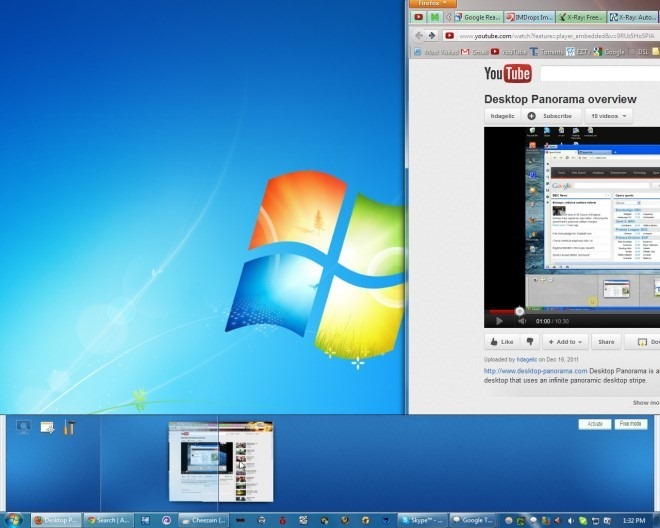
We have seen many scrollable virtual desktops coming up on the internet, but they all have one problem – you don’t know which application is open at what spot once you scroll away from it. Desktop Panorama provides you with a scrolling virtual desktop, and gives you a preview of all the scrollable space, enabling you to easily get to the required application. You can grab the application windows in the preview bar and move them left or right, allowing you to arrange them in your desired position.
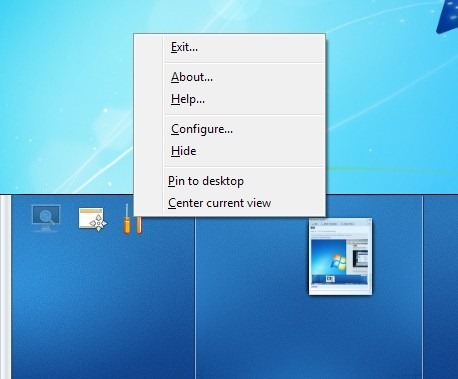
Right-clicking on the preview pane allows you to access settings such as Exit, Configure, Center Current View etc.
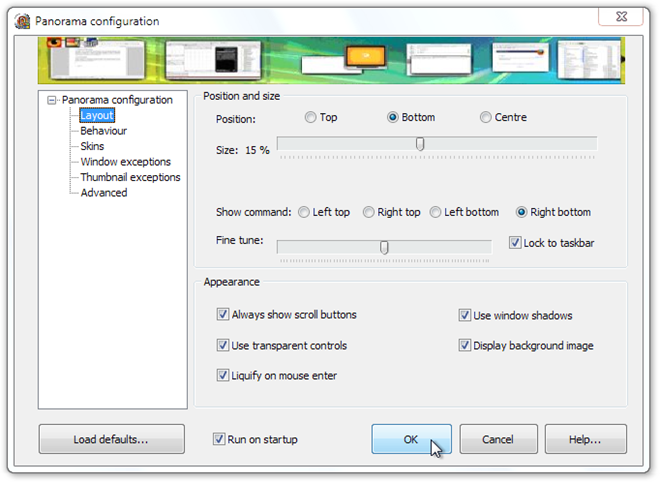
Select Configure from the right-click menu to access Panorama Configuration window. It allows you to specify Layout, Behavior, Skins, Window Exceptions, Thumbnail Exceptions and Advanced settings.
Watch the following video to get a detailed review of the application.
Overall, Desktop Panorama is a great application. If you have small screen or single display setup, and often find the need to work with different windows simultaneously, then its worthy of a try. The application works on Windows XP, Windows Vista and Windows 7.

…and you can also drag the application directly to the screen and from the screen; forgot to say that in that video…
ofcourse it’s like same windows sidebar
thank you for all
Option for VERTICAL POSITION please ! We have 16/9 & 16/10 screens !
Thanks.
Yes… That would be useful; I didn’t count on vertical position because it was supposed to be on auto-hide only (screen-corner triggered) and “pin to desktop” was added later. We’ll do it in some 1.x version but it’ll take some coding.
Great ! Thank you !