Disable Autorun For Removable Media In Windows 7
Most malware applications spread because of the Autorun feature, which automatically executes a file mentioned in the autorun.inf file located at the root of any removable device like USB. Also, the Open folder to view files option can be easily used to run any unwanted file or executable, and thus in this way there is a risk of your computer getting infected.If an Autorun script includes some malicious code to gain administrative privileges of the system, it may not only damage the OS, but also delete your personal files and folders. It is recommended to disable auttorun behavior for USB drives / external hard disks to prevent system from such harmful attacks. In this post, we will guide you through the process of disabling Autorun behavior in both Windows 7.
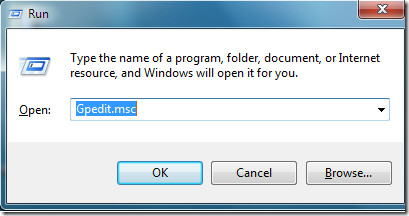
All you need to do is to launch the Run dialogue box by pressing Win + R, then type Gpedit.msc and press Enter.
The Local Group Policy Editor will be launched.
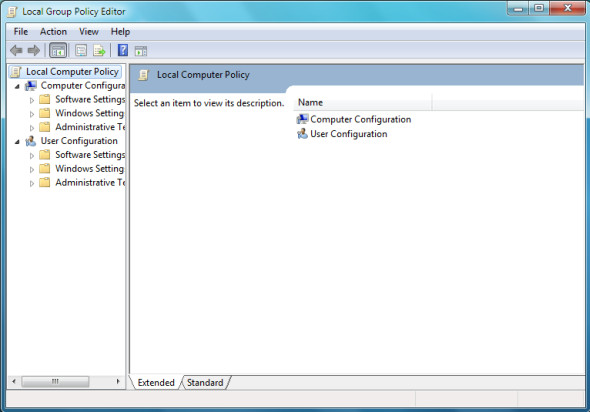
Now navigate to Computer Configuration > Administrative Templates > Windows Components.
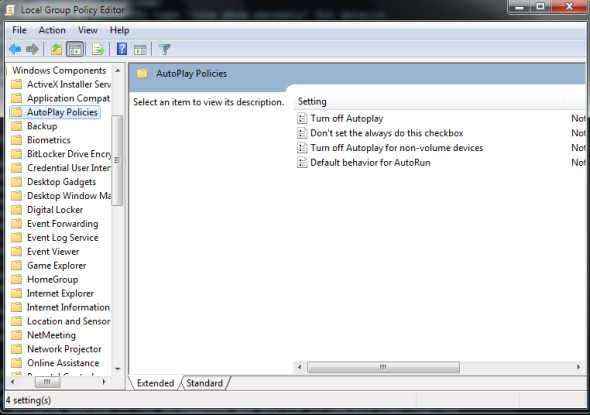
Locate the Turn off Autoplay option, then right click it and choose the Edit option.
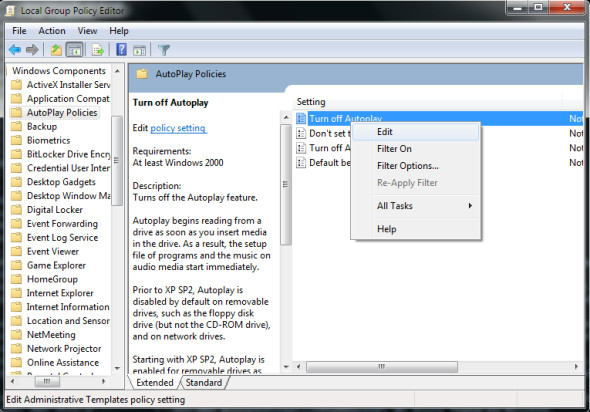
On the next step, click the Enabled option.
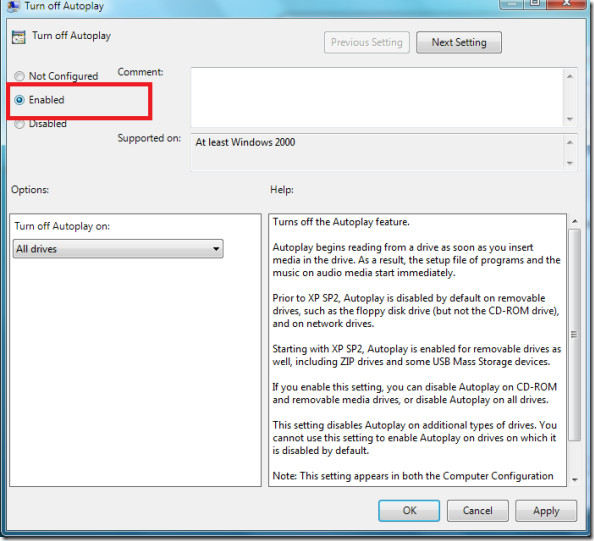
Click the Apply button to complete the configuration. Make sure to select All drives from the drop down menu of the Turn off Autoplay on option,to disable Autorun on all drives. Enjoy!

The title is misleading. AutoRun and Auto Play are two different features.
Not all WIndows 7 editions have gpedit.msc program like in Home Premium edition. 🙁
thank you very much… sir.. u save my neck!!!!!!
nice tut.
Thanks a mil, that worked for me!.
most probably Gpedit.msc wont work on Windows Home Edition
thanks
I didn’t see anyone mention that the title of this article reads “Disable Autorun…” while the directions instruct you how to disable ‘Autoplay’, which is a different feature. To avoid adding a link in this comment, try searching “autoplay and autorun” on the microsoft support site for an explanation of the difference.
There are a lot of posts for disabling Autoplay in Windows 7, but not Autorun.
Thank You……………
Thanks !
Yay!
Yay!
Thanks…much appreciated!
Thanks…much appreciated!
Thanks man…
i found something else..i finished your tutorial ad plug in mu usb drive..and autorun appeared again and than i went to control panel to deactivate all autorun options.
my question is: Did i really turn off my auto run options because it was still on when i finished this tutorial?
Thanks in advance…
done..thanx
thanks……
it’s very easy tips
thanks for great tips
@idiot.. well said. hehe
it works just fine. nice job.
It don’t work in Windows 7 Home Premium. Do you pathetic creatures not test the stuff you recommend. Guess what, I won’t waste time visiting this crap site again. Pass that on to your advertisers.
well if it doesnt work for you that’s mean ur the only idiot around here..
if u read this post and tried it, means that u dont know how to do it…
i m using windows 7 but i cant open group policy. i followed the given rules. but it don’t work. at first i press the winkey +R. then a little window open. i wrote Gpedit.msc and press Enter. when i press the Enter it geve me a message as “Windows Cannot find ‘Gpedit.msc’.Make sure you typed the name correctly and then try again.”
thanks
thanks alot dude i just installed win 7 and i forgot how to do that!!
Thanks for the detailed step-by-step instruction and screenshots.
One more step towards a safer Windows 7 computing. Complementing DEP, SEHOP, LUA, AppLocker, AntiVir resident AV and a couple of on-demand malware scanners.
m very interest and happy about this advise thank u so much on this site.
Hope u success all time can can post all everything that student and all of people have some problem relate of this like me.
\
best regards
Sopheaktra_Uth
thx a lot.
it worked …..
GPEDIT is not present in Home editions.
But what GPEDIT does is simply edit the registry.
In the following link you will find how to do this on the registry
http://support.microsoft.com/kb/967715
it exists. Start, then type gpedit.msc
Not in Home Premium edition!
I can't find it either. From my understanding Gpedit.msc was only found in the Professional or higher version of XP. So it will be very likely not available to Home Premium users of Win 7 and Vista.
please use this :
1. Win + R
2. type “autorun”
3. disable what you want
That didn’t work in my new updated 64-bit Home Premium edition. 🙁
That doesn’t work. Typing in autorun in run command is not a proper command.
i cant find gpedit in search form…
Thanks very much for this tip… I was wondering how to ?