Enable All Macros In Excel 2010
Macros are disabled by default in Office 2010(Word 2010, Excel 2010, PowerPoint 2010, etc) for enhanced security. Enabling Macros is easy but Microsoft Office team has hidden it deeper inside Options.
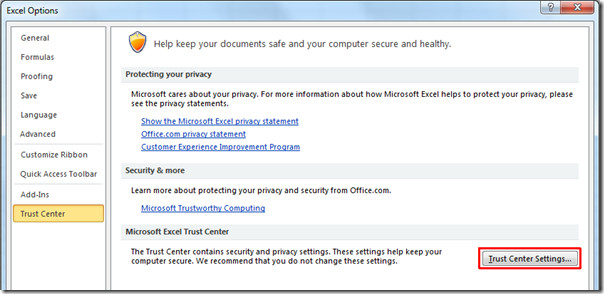
First click the File Menu(Office Backstage) and select Options from the left sidebar. In options, select Trust Center from the left sidebar and click Trust Center Settings button on the main window.
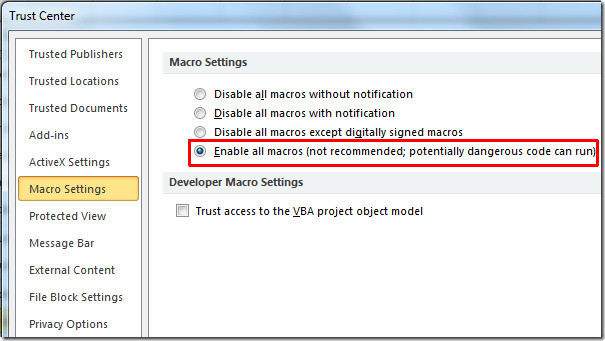
Now in Trust Center Settings dialog window, select Macro Settings from the left sidebar, choose Enable All Macros option and hit OK.
It’s that simple. From now onwards Excel 2010 won’t bother you anymore about Macro security. It is recommended that you use this option only when you are installing trusted add-ins and opening trusted documents. If an unknown dangerous macro code runs, then it could corrupt your Office 2010 installation or give you other sorts of problems.
You can use the above procedure to enable macros in Word 2010, PowerPoint 2010, Outlook 2010, etc.

Thanks! On Excel 2016 is working!
I make a enable macro sheet with expiry but
my client when open this sheet open after date of expiry because its macro setting
is a disable, he change enable macro to disable macro and open my worksheet
I have used object but that is not work in
other pc. Coding is here-below:
Coding:
Dim ChangeReg as object
Set ChangeReg =
CreateObject(“WScript.Shell”)
ChangeReg.regwrite “HKEY_CURRENT_USERSoftwareMicrosoftOffice12.0ExcelSecurityVBAWarnings”, “1”, “REG_DWORD”
Please Solve my problem.
Not working. My options are blocked, I can’t select them!!!!!
When I went to the above steps I got my macro Settings, All radio buttons or disabled. How can I enable these options, please suggest
Very helpful
Thanks
I wanted Word (and even Excel) not to display that message when I open my Word with my own
macros. In my Word 2007 it was everything ok, but now in Word 2010 everytime I
open even a blank document it shows that yellow bar. I know it can be different
because in my Word 2007 I recorded several macros and it doesn’t
“alert” me of the risk, even though in the Trust center > Macro
setting I set “Disable all macros with notification”. Someone can help me?
When I go to Trust Center Settings, all of the options on your screen do not show up on mine. Macro Settings is not an option on the left hand side. Any suggestions?
Thanks for your help.
This did not work for me. When I went back in Word my macros were missing.
BN, you need to close the program and reopen after enabling.
Thank you.
thank’s
Ugh. So they decided that querying the user was too scary or something? Very annoying that the code that I’ve just written in the program won’t run. Kind of insane, more than annoying.
Yep. Bryan is echoing my Excel 2010 issue exactly. When editing an existing sheet to adapt it for new uses or circumstances, there is a need for being able to disable for editing and enabling for testing, IMO, of course. Is there an add on or extension or something else that can make testing/editing easier?
sir,
I make a enable macro sheet of username & password but my client when open this sheet open with out username & password not run macro because its macro seeting is a disable so i have no change its pc in macro securities other i change its securities so he know this suspense and he change enable macro to disable macro and open my worksheet without password so i not opened this sheet without username & password and no change seeting in macro securities please help me
Interpunction, heard of it?
Microsoft is awesome with their online training. We just upgraded and haven’t taken the time for classes. You are available to get us through our daily tasks.
Thanks so much!!!!!!!!!!!!!!!!!!!!!!!! 🙂
Allowing all macros to run automatically is a potentially dangerous move. The user needs to be sure of the source of the code or else potentially malicious macros could run. Never use this option but create a Trusted Folder (see http://technet.microsoft.com/en-us/library/cc17…) and only put workbooks that you are sure are safe in it. These workbooks will then open without the alert.
LOL. Are you just repeating the macro warning that Windows gives you?