Extend Windows Desktop Without Buying A Second Monitor
Do you want more space than what you are getting on the default monitor? GiMeSpace Desktop Extender does just that and saves the user from having to buy multiple monitors to fulfill their needs.
The free version of the app allows users to navigate horizontally, which means on moving the mouse to the right or left side of the monitor you get lots of extra space. In layman’s term, your desktop is extended horizontally in both directions.
While it was originally developed for Windows XP, integration with Windows 7 is seamless. It does not in any way alter the Aero Snap feature of Windows 7.
The space can be extended to a larger extent and in case you are lost, launch the GiMeSpace Control Panel from the system tray and click to where your windows are located. This is a great way of navigating between different windows located in the extended desktop.
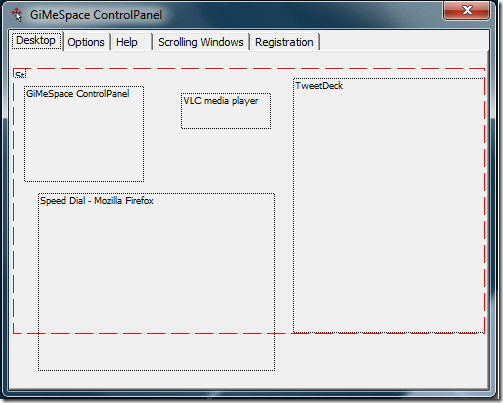
The best part is that your taskbar and the desktop icons remain in the original position while you move horizontally across the desktop. You can also choose to move vertically or in both directions, but this feature is available in paid version only along with a bunch of extra features.
Watch the low quality demo below which is recorded by the developer in Windows XP.
It works seamlessly with both 32-bit and 64-bit versions of Windows.
Download GiMeSpace Desktop Extender

A month of using GimmeSpace Desktop Extender has given me a real headache, literally. Fortunately, I’ve figured out how to produce a pan-and-scan virtual desktop in Windows 7 with ATI Radeon video cards.
Thanks to the spouse of a friend who is a hardware engineer at a company that must remain nameless, I have learned how to set up a pan-and-scan virtual desktop in Windows 7. It took some experimenting, but his suggestions eventually worked. I am writing this in Windows 7 with a pan-and-scan virtual desktop.
First, here’s the technical basis. Microsoft caused the problem when it created the Windows Display Driver Model (WDDM) for VISTA and now Windows 7. It’s Windows 98SE all over again where Microsoft disabled the ability to create a pan-and-scan virtual desktop in order to encourage consumers to buy two monitors.
WDDM disables this capability. However, WDDM is only the default system for graphics in Windows 7 and VISTA. The old Windows XP Display Driver Model (XPDM) is still present in Windows VISTA and and Windows 7. The key is that you must “force install’ the Windows XP display driver for your ATI card (and I would bet this would work with NVIDIA-based cards as well). The Windows XP display driver uses the XPDM graphics system that’s still within Windows 7 and VISTA. You must install only the display driver. Do not install the Catalyst Control Center (hereinafter called CCC).
This approach works if your monitor is connected via VGA or DVI. It did not work for me when I connected with HDMI.
Note that this is not quite a fine a pan-and-scan virtual desktop like you can get in Windows XP using the CCC to set it up. The virtual desktop is not quite a wide or tall as what I could get in XP. But it beats a static desktop for me and maybe for you as well.
Doing this will disable the Aero graphics in Windows 7 because they use the WDDM graphics system. I can live without the “visual candy” of Aero, even though it really did look nice. But I’ll sacrifice good lucks for functionality any time — when it comes to a computer.
Here’s how to do it if (1) you are installing Windows 7 and have not yet installed ATI CCC, and (2) if you have already installed Windows 7.
This is a step-by-step guide, probably more detail than most readers need.
1 — If you are just installing Windows 7 and haven’t installed ATI Catalyst Control Center for Windows 7 yet.
Step A: After you’ve installed Windows 7 and your Internet Security program, download from ATI the Windows XP driver for 32 or 64 bit Windows. I recommend that you find the 10.4 version of the Windows XP driver since I know it works. More recent versions may work, but I have not tested them. To get to the 10.4 version (which was released in late April 2010) follow the steps to find the Windows XP drivers for your ATI card. This will get you to a screen with a black background for the AMD Radeon Video Card Drivers (I’ll use my card for this example). Near the bottom of the box with the drivers is a link called “Previous Drivers.” Click on the link and pick the Catalyst 10.4 choice. Go to the “Individual Downloads” and select the “Display Driver” or the “WDM Integrated Driver.” Download it. You may also want to download the ATI HDMI Audio Driver and the Avivo Package of Video Codecs. I imagine you could download the whole CCC package and use it (which is what I guess I actually did). More recent versions may work. I just haven’t tried them yet.
Step B: Go into your Device Manager (right click “My Computer” and select “Manage”). If there’s a display adapter for your video card, double click it and uninstall (and delete) the video driver that’s there. Restart Windows 7.
Step C: Run the ATI file you downloaded so that it sets up its files in C:\ATI\Support\10-4_xp32_dd_ccc_wdm_enu (that’s the subdirectory when you use the full ATI package). Cancel the installation.
Step D: Go into your file manager (Windows Explorer, Directory Opus, or other file manager) and go to C:\ATI\Support\10-4_xp32_dd_ccc_wdm_enu. Right click on “Setup.exe” and choose “Properties.” Click on the “Compatibility” tab and under “Compatibility Mode” check “Run this program in compatibility mode for” Windows XP (Service Pack 3). Also under “Privilege Level,” check “Run this program as an administrator.”
Step E: Do the same thing for C:\ATI\Support\10-4_xp32_dd_ccc_wdm_enu\Bin\Setup.exe and for C:\ATI\Support\10-4_xp32_dd_ccc_wdm_enu\Bin\ATISetup.exe. I don’t know if it was necessary, but I did something similar with C:\ATI\Support\10-4_xp32_dd_ccc_wdm_enu\Config\atiicdxx.msi where I selected running the program in compatibility mode for the “previous version of Windows” (I have a dual boot with Windows XP — I don’t know what would be available if you don’t have a dual boot set up). I did the same thing for the file C:\ATI\Support\10-4_xp32_dd_ccc_wdm_enu\Packages\Drivers\WDM\RIO\XP\atirioxp.msi
Step F: Then run the C:\ATI\Support\10-4_xp32_dd_ccc_wdm_enu\setup.exe file. You must choose a “custom” installation when given the choice between “Express” and “Custom.”
Step G: When you get to the list of items to install, check the ATI Display Driver. Uncheck Catalyst Control Center (CCC). If you install it, CCC will crash and give you BSOD whenever you run CCC. I let it also install the AVIVO codecs and the ATI Problem Report Wizard. After installation, restart Windows 7.
Step H: Right click your desktop and select “Screen Resolution.” Go to “Advanced Settings” and click on the “Monitor” tab. Uncheck “Hide modes that this monitor cannot display.” Click the Okay button. Back in the “Change the Appearance of Your Display” window, click on “Resolution.” There should be at least one choice at the top of the scale that is a higher resolution than what your monitor actually supports. Select and apply one of them. In my case, my monitor’s actual resolution is 1920 x 1200. These steps gave me a 2048 x 1536 resolution — and a pan-and-scan virtual desktop. It’s not as large the the pan-and-scan I could get in Windows XP, but it works. I can open my desktop publishing program full page and not have to waste time and energy using the scroll bars.
2 — If Windows 7 is already installed and you have already installed ATI Catalyst Control Center for Windows 7.
The only real difference from the instructions above is that you need to completely uninstall the Windows 7 CCC and the other Windows 7 ATI features that are already installed. You can open the Control Panel and pick “Programs and Features.” Scroll down to the ATI Catalyst Control Manager and right click it. Select “Change.” You can either pick the Uninstall Manager to uninstall CCC, the display driver (if possible), and other features — or select Express Uninstall ALL ATI Software. Either way, you need to uninstall all the ATI video-related software and restart Windows 7. You should also be sure to perform Step B above to make sure the ATI driver is uninstalled and deleted.
The remaining steps should enable you to produce the pan-and-scan virtual desktop.
Caution: One of my programs consistently caused a BSOD after I made these changes. It’s a freeware text editor called EditPad Lite 6.4.4. I don’t know why it would crash Windows 7, but it did so every time I ran it. So I just got another freeware text editor. Hopefully all of your programs will run just fine.
That’s it. Hopefully this procedure will work for you. Please let us all know it goes for you.
I’ve been searching everywhere (without success, so far) for a solution to my problem. I had hoped that since you folks know so much about Windows’ EXTENDED, VIRTUAL DESKTOP, that I could finally find a solution. But, there’s nothing on your web site about it.
My problem is that “suddenly” my Windows’ XP Home edition began using the EXTENDED DESKTOP, and I have no idea as to why. How do I STOP/QUIT/CONFIGURE or whatever to get my display back to NO EXTENDED DESKTOP? (I have ATI video, but it won’t let me).
ATI video cards give you the ability to set up a pan-and-scan virtual desktop, which this article calls an “extended, virtual desktop.” Your posts suggests that you suddenly got this expanded desktop and want to get rid of it.
Most likely you should open you ATI Catalyst Control Center.
Under Displays Manager, look at the “Displays Property.” Note what the “Desktop Area” is.
Under Monitor Properties, look at “Monitor Attributes.” If the “maximum resolution” is different than the “Desktop Area” under Displays Manager, you somehow inadvertently set up the pan-and-scan virtual desktop.
To eliminate the pan and scan virtual desktop and get a static desktop again, set the two resolutions to the same values. Make sure that these values are not great than your monitor’s “native resolution.” So if your monitor’s native resolution — namely what the manufacturer says its resolution is supposed to be — is 1600 x 1080, set the resolution for Desktop Area and Monitor Attributes to the same value.
For those of us who love the pan-and-scan virtual desktop for its productivity enhancing nature, be forewarned that you cannot set it up in Windows Vista or Windows 7, and that ATI’s CCC version 10.4 is the last one that lets you set it up in Windows XP. Why Microsoft would prevent this desktop extending tool from working is beyond me, except that they may be trying to force people into buying multiple monitors. Why ATI would disable it in newer versions of CCC also escapes me.
Check also Twinsplay
I am using Windows 7. My son and wife accidentally lengthened my monitor, i.e., it comes up sideways. I have figured out how to reset it, but I have to do it each time I restart the computer, whether on standby or completely shut down. There must be a way to correct this. Any help would be appreciated.