Group And Organize Program Icons In Windows 7 Taskbar With Bins
I love the fact how Microsoft puts in many new features amidst every new iteration of Windows OS. Among many great features found in Windows 7, the option to pin items to the taskbar (also called superbar) is of immense convenience. It is far more flexible than the quick launch option that was previously present in earlier Windows versions like the XP or Vista. However, if one has too many items pinned to the taskbar, it can result in a lot of clutter. A remedy to this problem has been provided by the developers of Fences with their new utility called Bins.
It is a Windows taskbar organizer which can group multiple pinned tabs by binding them together to reduce taskbar clutter. Doing this allows users to pin related items together, so they can easily identify and launch programs belonging to same group without having to pin each app to taskbar.
To consolidate multiple items together, choose the pinned item and hover it over another pinned program’s icon. For instance, you can drag a pinned program, lets say, Chrome over another pinned app, such as, Firefox to consolidate them under one hood.
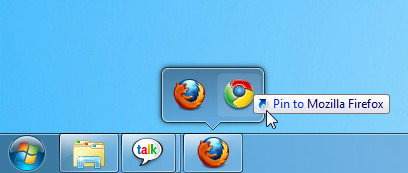
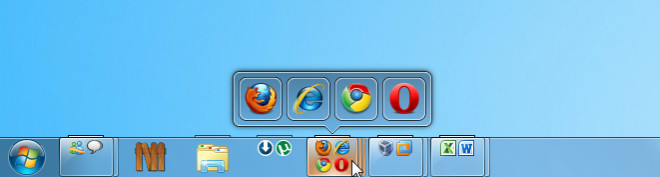
This will allow you to set multiple pinned items together in such a way that you will be able to reduce clutter on your taskbar. With Bins, you can join related or unrelated programs on the taskbar. It is immensely useful to pin related programs like browsers for easy sorting and identification of taskbar items.
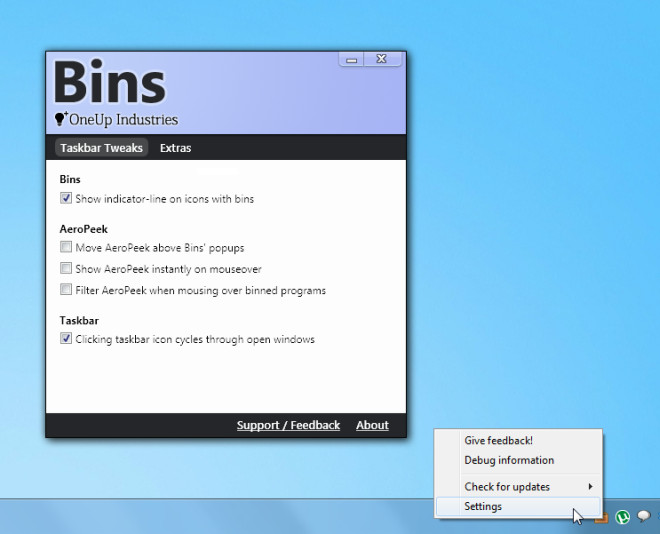
Bins sits in the system tray, from where you can bring up Settings window to configure provided options and features. The Taskbar Tweaks tab can be used to enable the indicator line on icons, and to configure Aero Peek and Taskbar related behaviors, respectively.
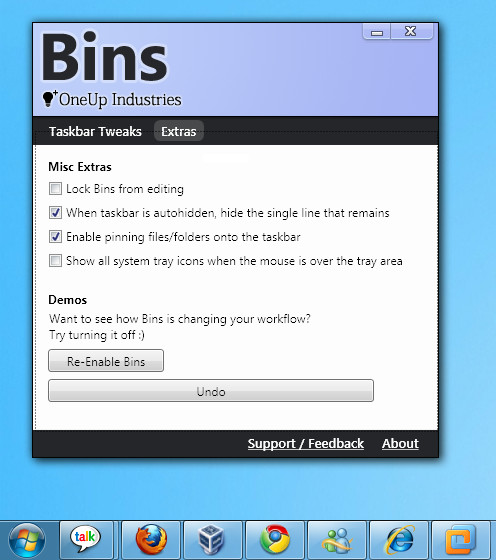
If you would like to temporarily disable Bins or get a default view of the pinned items, head over to the Extras tab and click Disable Bins Button. To restore it, simply click Undo. Here, you can also lock bins from editing, retain a single line if your taskbar is set to auto hide and view system tray icons on mouse hover.
To download Bins, you need to provide email address in order to receive a private beta invitation from the developer. It must be noted here that Bins is currently in beta, therefore users might experience some bugs and functionality related issues. However, we did not experience any problems during our testing.

What I don’t understand is, why Microsoft cannot come up with useful innovation? Why is it that tolls like this, which are so obvious, you always have to isntall separately as opposed to Microsoft thinking ahead and incorporating such features into the OS? Oh, I’m sorry, I forgot…it’s Microsoft…
I got the invite to the beta a week ago, and I’m now asking myself how I lived without it… it’s probably the best app you can install on Windows 7
StandaloneStack offers similar functionality. It’s not quite as easy to set up, but it’s freeware.
http://www.chrisnsoft.com/standalonestack
Love it!!!
How do I get mine to show mini icons just like the second screen shoot??
Drag a pinned item onto another; you can do that with multiple pinned items to get multiple mini icons.
I am not getting mini icons, i am just getting a “folder” with a single normal incon, just like screen shoot one.
See the first screenshot, the Chrome (pinned icon) was dragged over the Firefox pinned icon when Bins was running. This resulted in binding them together. Remember, your icons will only become small if they are knit with other icons, otherwise they will be of the default size.
This kind of stuff should be included with windows :/
Looks nice, but I use True Launch Bar. Love it.
http://www.truelaunchbar.com/
And what does TLB has to do with this? I mean, what Bins does is combines icons into, well, bins. No more no less. While TLB in comparison has a zillion functions and can add tons of functionality into taskbar.
Got my invite today but I noticed that Objectdock ran slowly after installing it.
I wouldn’t pay for it as it doesn’t offer that much and slightly overlaps the taskbar.
Nice idea but the more items you group the more resources it will hog.
Will keep an eye on it for improvements and depending on price and overall functionality
it might be worth it but will need improvements.
Upon reading more on their site, this is going to be a paid application! Give me a break. Not worth while even with my invite (now received – they were fast I guess).
if windows users likes this, give a thank to iPhone and iPad, yaaaay.
Only it’s better!
You now get a page saying it is in private beta and isn’t available for download 🙁
Oh sorry – forgot to mention no email with the invite now 🙁 🙁
It takes time. Upto a week to get the email. There is a reason the developer wants the app to remain in private beta. We will cover the news once the final version is launched to the public.
looks like the site http://www.oneupindustri.es/Bins/ is down… I really want to try this out
I’ve been using Bins for a few days now and I love it. For simplicity and utility it is hard to beat. I’ve better than halved the number of visible icons on my task bar without losing any access to my go-to programmes. I have the feeling that this is a definite keeper.