How To Batch Convert Text Files To UTF-8 Encoding
UTFCast is a small tool for Windows that lets you batch convert all text files to UTF-8 encoding. It can convert a directory full of text files and keep the whole directory structure intact. What is so special about UTF-8 encoding? First you need to understand about Unicode, which as Wikipedia puts it, is a computing industry standard for steady and orderly encoding, representation and manipulation of text expressed in most of the world’s writing systems. The most commonly used UTF encoding is UTF-8, used by over 50% of the global websites. Why? Because it is backward compatible with ACSII. Encoding a text to UTF-8 comes useful if you want to launch an application, website, or service to an international audience.
UTFCast comes in two versions – Express and Professional. The Express version is free that only supports UTF-8 encoding, and can handle text files up to 800MB. The Professional version costs $29.95 and supports UTF-8, UTF-16LE, UTF-16BE, UTF-32LE, UTF-32BE, UCS-4-3412, and UCS-4-2143 encoding. It can also handle unlimited text size.
The Express version will do the job for many of us while the Professional version is suitable for large companies or app developers who want to encode large text files to multiple outputs.
So how does it work? You just need to select the Source directory, Output destination, and click Start. Nothing could be more simpler than this.
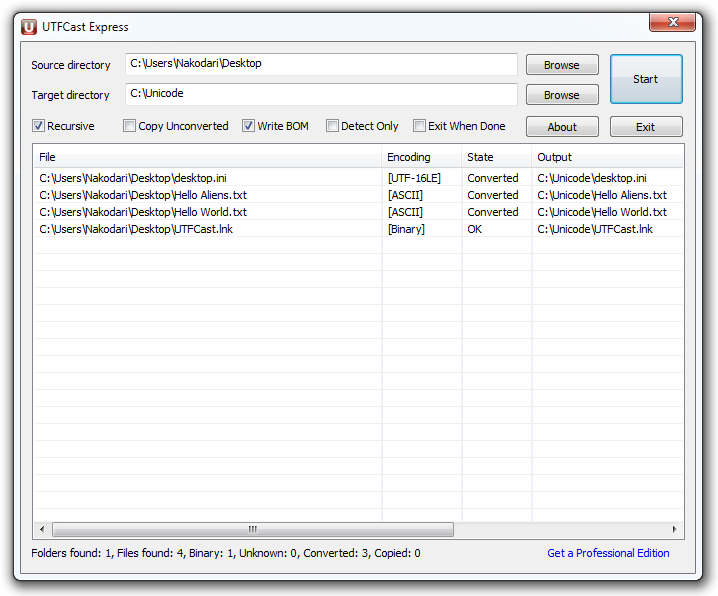
UTFCast provides you with five options which you can check before starting the encoding process; recursive mode, copy unconverted files, write BOM (byte order mark), detect only (which detects but does not convert), and exit when done – all of which are very useful. At the bottom of the application window, you will find the log about the encoding. You can see the number of folders and files found, how many were binary and unknown, how many were converted, and lastly, how many were copied. It works on all versions of Windows, both 32-bit and 64-bit.

Great, they are running time-limited promotion for the pro edition now. I just got mine two hours ago and it’s working perfectly. Just my 2 cents.
Worked great for me. Saved my day.
This program converted images files ((((
Nice piece of software
Worked great for me in finding out SQL files saved as Unicode (MS default) and convert them to ascii in a folder with over 300 files. Saved a lot of time and manual work.
You’ve got to be kidding me. it’s so trsanpaenrtly clear now!
It’s easy and simple, but not recommended to advanced users. The pro edition is so great but it’s not free.
Do not use. Corrupted every picture in my /home folder under Wine. Was a pebcac error, but still.. arrrg!
*makes angrysad face*
Henry Swanson
You can try the Professional Edition of UTFCast, it recognizes 30+ codepages and Unicode files without BOM.
You can try the Professional Edition of UTFCast, it recognizes 30+ codepages and Unicode files without BOM.
UTFCast does not recognize UTF-8-encoded Sourcefiles (if they have no BOM). “Converts” these utf-8-files as they were cp1252-encoded, resulting in corrupted targetfiles. Not very smart.
You can try the Professional Edition of UTFCast, it recognizes 30+ codepages and Unicode files without BOM.