How To Make Backup Of Your Registry In Windows 7 / Vista / XP
Did you ever forget to make the backup of the registry before making some changes in it, which led to system crash? Every time you need to make changes to your registry, you should make a backup as a precaution. Making a backup is very important and helps the user when he wants to restore the changes he made.
Exporting – Making a Backup
In order to backup your registry, follow these simple steps:
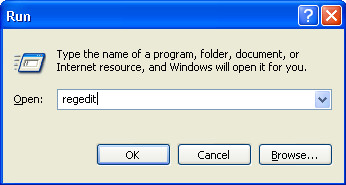
In Windows 7 / Vista: Open Start menu, type regedit in Start Search and click OK.
In Windows XP: Open Start menu, click Run, type regedit and select OK.
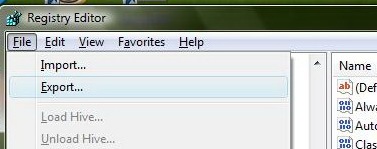
In Registry Editor go to the File Menu and select Export.
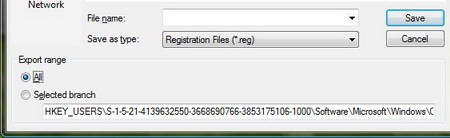
Under the export range select All.
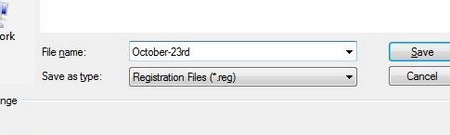
Put an appropriate file name and save as file type Registration Files(*.reg).
Importing – Restoring the Registry
In Registry Editor go to the File Menu and select Import.
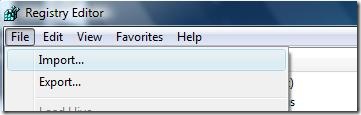
Now select the registry file(backup) that you made(using above procedure) and it will recover your settings that were before you made changes in the registry.
Comments, Questions, Suggestions, all are welcomed 🙂

so i did everything you said and my computer turned black blank HELP WHAT THE FACK HAPPENED
i’m unable to import registry help me plz
same here 🙁
now i know how i can import registry but still i have a problem, i do some mistake and then window gets curropt
i cant reuse photoshine software after 30 trial period is over…please guide me with proper solution
I have to remove trial version of myeclipse?anybody can help me?
Thanks for help…….
thanku, It helped.
Doesn’t work with TeamViewer Licensed version
sir i have used the trial period so now how can i know that what changes are made plz reply me @ nihaldubey1@gmail.com
nice
give more
keep it up
i think one more backup create as a temp base and add both backup one place anfd use it, but original reg dont touch after both expire import it
Thanks friend. Good article. Thank you.
kindly sugest wht i should do ….
Hello u r Tip regarding the “Back up of Registry an Again Storing it when the software gets Expired is Good”, I have Query i.e “We keep a Back up to our registry and store it, and we install the trail version then when the trail version get expired then again resore the Back Up, but my dought is, If i have two softwares say first s/w and second s/w, so before installing the first s/w i make the back up and save and then i install first s/w and after few days i install the second software…then again after few days my first software gets expired and i import my Back up. But this back up doesnt contain the detilas of second software….this will cause a error in second software…..
I haven’t tried this before. So I can’t say much about this problem.