How To Run Programs Automatically On Windows 7 System Startup
If you want your favorite application to start up automatically when your windows 7 login, then there is a small trick for it. We will demonstrate how you can set some applications to run during startup.
I configured the Internet Explorer to load on Windows 7 startup by going through the following steps.
First of all launch the Group Policy Editor by clicking Start, then type gpedit.msc and hit Enter. Now navigate to the User Configuration > Windows Settings > Scripts(Log on/Log off) option.
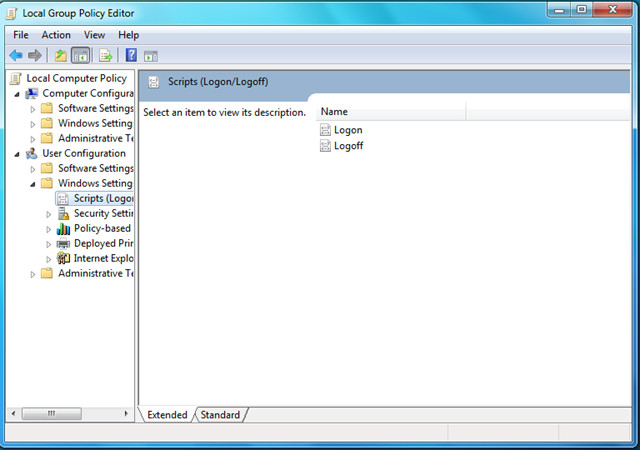
Double click the Logon option from the main window and click the Add button in the Logon Properties dialogue box.
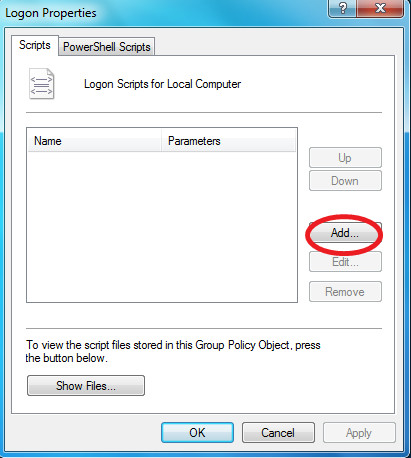
Now add the program which you wish to start up in the Script Name; this is one way to control startup apps. You can leave the Script Parameters option blank. I entered the path of IE exe here.
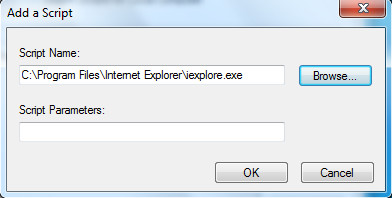
Hit OK and reboot your system, you will see that the configured program will now launch on system startup. Enjoy!

Worried about the dlinkap.local not connecting errors consuming most of your productive time? Get access to troubleshooting guides available on our website to resolve the most common errors that you face with the device. For more help on the same, you can always reach out to the team at our end.
The title of this article is misleading.
This should be titled “how to run a program automatically on windows 7 login”.
For the title to be appropriate, the commands would need to be processed before someone logs into the computer. Big difference.
I hope this works:)
The title of this article is misleading.
This should be titled “how to run a program automatically on windows 7 login”.
For the title to be appropriate, the commands would need to be processed before someone logs into the computer. Big difference.
Doesn’t work with some Windows version (e.g. 7 Home) because the group policy editor is missing.
Could it be possible to load a vbs file here which has the active setup registry keys in it, so active registry won’t be started for mandatory profiles.
Thank U
what is the command to type in the box and find out what programs run on startup?
You are the best!!!!
I try so hard to do this in Windows Embedded Standard Ver. 6.1.7600 and nothing worked out (startup folder, etc) since I found you 🙂
Thanks a lot.
It works perfectly
You are the best!!!!
I try so hard to do this in Windows Embedded Standard Ver. 6.1.7600 and nothing worked out (startup folder, etc) since I found you 🙂
Thanks a lot.
It works perfectly
Mr.. ??? u can find gpedit.msc by pressing START BUTTON and type GPEDIT.MSC in the search start button
I’m running windows 7 starter edition, and gpedit.msc is not available for this edition. Is there another way to do it instead of shortcutting the program to the start folder?
What i want to do s having the program starting without showing windows desktop.
TIA,
The TASK SCHEDULER can also be used to effectively load things in sequence and with laps of time (say 15 sec or 20 sec or whatever works for you) between each so everything loads nice and smooth. I have had the experience of the BOTTLENECK effect for having many apps and pgms wanting to load simultaneously and in fact taking more time to complete the start-up process.
i cant find gpedit.msc
Thank you for posting these instructions. I have 2 programs that will not run at startup with either the startup folder or task scheduler. These instructions got them both to run.
what’s the diff between using this and making it from the Task Scheduler?
using Task Scheduler, u can set a program/script to start at login,logout, and system startup/shutdown.
JFYI startup folder does not always work in Windows 7. Try it with HD Tune (free edition) for example or Core Temp.
Jochanan said “You can also just drag & drop a shortcut into the Startup folder in the Start Menu. That’s what I’ve always done in all versions of Windows.”
but as the right click on startup then left click on explore doesn’t actually open explorer it’s a bit difficult – any suggestions?
Unfortunately, this won’t work for Windows VPN connections (“No Such Interface Supported”)
I was wondering what the logon scripts can do for you just yesterday over at superuser.comNice to see this.
Yup that works too. But I think this method is for advanced users only who want to add programs permanently with custom parameters.
You can also just drag & drop a shortcut into the Startup folder in the Start Menu. That's what I've always done in all versions of Windows.
I was wondering what the logon scripts can do for you just yesterday over at superuser.comNice to see this.
Yup that works too. But I think this method is for advanced users only who want to add programs permanently with custom parameters.
You can also just drag & drop a shortcut into the Startup folder in the Start Menu. That's what I've always done in all versions of Windows.
I was wondering what the logon scripts can do for you just yesterday over at superuser.comNice to see this.
You can also just drag & drop a shortcut into the Startup folder in the Start Menu. That's what I've always done in all versions of Windows.
Yup that works too. But I think this method is for advanced users only who want to add programs permanently with custom parameters.