AddictiveTips


  • Home
  • Windows
  • Mac Os X
  • Linux
  • iOS
  • Android
  • Windows Phone
  • Web
  • Office
  • Tip Us

How To Strip/Remove Metadata From JPEG And PNG Images

by Nakodari on May 05, 2009
  • Windows
2

Suppose you want to upload your picture to a public profile, but don’t want to risk your privacy, what will you do? All photos have a metadata that contain broad information, such as, date taken, time taken, camera model, original photo thumbnail, and in some cases even GeoData. Such details, along with many other details in the metadata can risk your privacy, and to protect it you will have to remove the metadata from the image.

Note: Only remove the metadata from your own photos, if you remove the metadata from the photos taken by someone else, then it is a clear violation of rules laid down by DMCA. Removing metadata is not always a good idea, since such information can come handy in cases where you want to organize the photos by it’s location, date, camera model, etc.

JPEG & PNG Stripper is a free portable tool for Windows that can strip all photos(in JPEG and PNG formats) of their metadata. Just drag your photos to the main window of this app and it will automatically begin the process of removing the metadata.
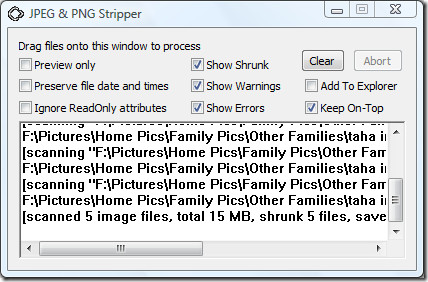
JPEG and PNG metadata stripper remover


If you are not the type of person who wants to open this app every time metadata needs to be removed, then you can enable Windows Explorer integration. Just check the Add To Explorer checkbox and close the app. Now to remove the metadata from any photo, right-click it and select Scan with JPEG & PNG Stripper from the context menu.
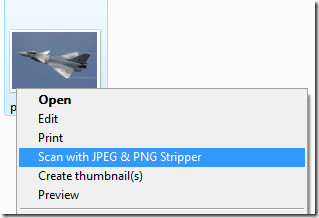
remove metadata from photos

It works with all versions of Windows. Enjoy!

Advertisement
Advertisement

Do You Like This Post?

Tweet
Email a Friend

Recommended For You

  • Batch Remove Image/JPEG Metadata With BatchPurifier Lite
  • Strip Images Of EXIF Data With Image MetaData Stripper
  • View Complete EXIF Metadata Information Of Any JPEG Image Online
Tweet

Previous Post

← Watch Live Public Webcams From All Around The World For Free

Next Post

How To Perform Benchmark Test On Your Hard Disk, USB Drive, And CD/DVD Rom →
  • Pingback: View Complete EXIF Metadata Information Of Any JPEG Image Online

  • Gize

    JPEG & PNG Stripper is good and easy to use metadata stripper, but it don’t let you selectively remove different metadata types (Exif, XMP, IPTC) like BatchPurifier LITE, which is also a freeware.

  • Pingback: What Information is Your Photo Giving Criminals?

  • http://www.facebook.com/don.kim3 Don Kim

    Batch Purifier LITE works GREAT!!! Better than the JPEG & PNG Stripper THanks to GIZE!!!!

Facebook Twitter Google + RSS Youtube

Daily articles in your inbox each day for free

Close

Join 35,000+ other readers

Popular posts

  • A Look At The New Features In Firefox 21

    The next installment of Firefox i.e. version 21 is now available. The new version brings something...

  • Unreal Commander Is The Swiss Army Knife Of File Managers For Windows

    Poor file management can lead to poor performance of your system, and can cause a...

Readers Activity

Go to top

Topics

  • Windows
  • Mac OS X
  • Linux
  • iOS
  • Android
  • Windows Phone
  • Office
  • Web

Authors

  • Sameed
  • Fatima
  • Hamza
  • Waqas
  • Zayed
  • Haroon
  • Awais
  • Michael
  • Usman

Daily articles in your inbox each day for free

Close

Join 35,000+ other readers

Facebook Twitter Google + RSS Youtube

About Addictivetips

AddictiveTips is a tech blog focused on helping users find simple solutions to their everyday problems. We review the best desktop, mobile and web apps and services out there, in addition to useful tips and guides for Windows, Mac, Linux, Android, iOS and Windows Phone. Read more...
© 2013 AddictiveTips. Hosted by Presslabs
  • About
  • Featured Articles
  • Archives
  • Contact
  • Disclosure
  • Privacy Policy
  • Apps
  • Tip Us
BACK TO TOP