How To Test Anti-Keylogger Tools In Windows
Many viruses, spywares, and trojans that infect your computer contain Keylogger functionalities. Which means that everything that you type is logged by them and passed forward to the spammers and hackers who can then steal your confidential information such as credit cards, social security number, etc.
If you are working in a bank or other sensitive corporate field then there is 95% chance that anti-keylogger software are installed in your computer. Such software prevent keyloggers from logging every keystroke and thus keep all confidential information secure. But wait, there is not only one way to log keystrokes, there are actually different hidden ways to monitor your keyboard. So how exactly would you know that the anti-keylogger software installed in your computer by the corporate staff actually works against all such keylogging methods?
AKLT(Anti-Keylogger Tester) is a free portable tool for Windows that tests whether the anti-keylogger tools installed in your computer actually works. Just run the tool and it will show seven different methods of keylogging: GetKeyState, GetAsyncKeyState, DirectX, GetKeyboardState, LowLevel Keyboard Hook, JournalRecord Hook, and GetRawInputData.
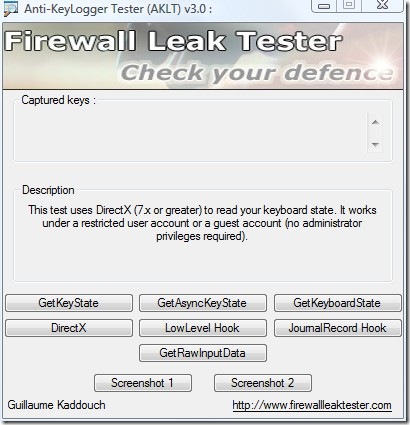
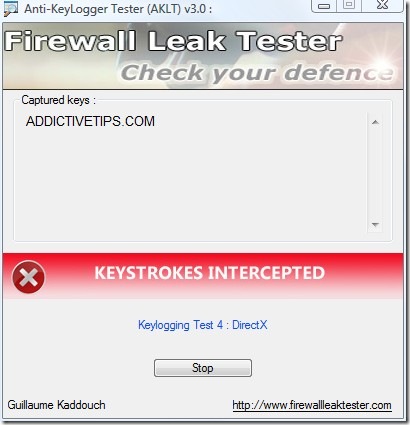
Select any one method that you want to test and start typing anything in your web browser. If a keystroke is intercepted, then it means that the anti-keylogger software installed in your computer is a useless crap and you need to buy a good one. If no keystroke is intercepted then it means the anti-keylogger actually works and your computer is safe from all types of keyloggers.
Another common way keyloggers work is to take screenshot of your computer desktop after every specified seconds. Most common anti-keylogger software calm to provide anti-screenshot functionality. There are 2 screenshot options build inside AKLT, check them one by one to see if they work.
Note: If you test it in your personal computer, all keystrokes will be recorded. Do not panic, since it is perfectly normal. If you are using a good anti-virus software and your Windows is up-to-date, then there is very less or no chance for a keylogging trojan to infect your computer.
This tool works on all versions of Windows and also supports 64-bit OS. Enjoy!

Okay, that was good to know. Thanks for info.
NEED PASSWORD FOR RAR
Download site is down 🙁