How To View Flickr Photos As Screensaver In Windows

Flickr .Net Screensaver is a free opensource tool for windows that let you view your flickr photos as screensaver. Apart from your own photos, you have the ability to display photos of your contacts, your favorites or a from a group or global tag. The feature that makes this tool worth is it’s ability to display photos that are private, but needs authentication. This tool is still under development but is very stable and requires .NET Framework 2.0  to run.

Just install this tool and it will open Screen Saver Settings with Flickr being the default screensaver.
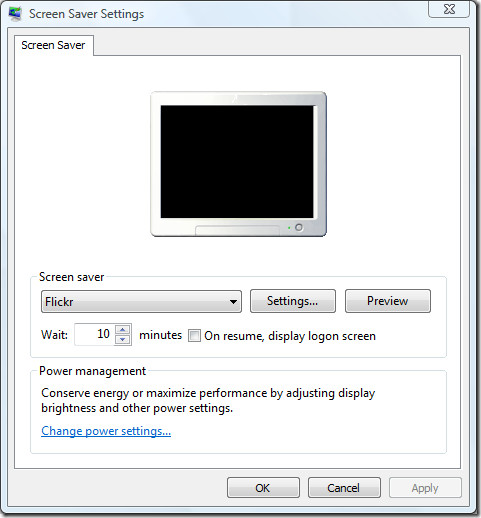
screensaver settings

To configure flickr screensaver, go to Settings. Here you can choose whether to display photos from a user, group or everyone. There are also sub-options which gives you more control on the photos you want to display.
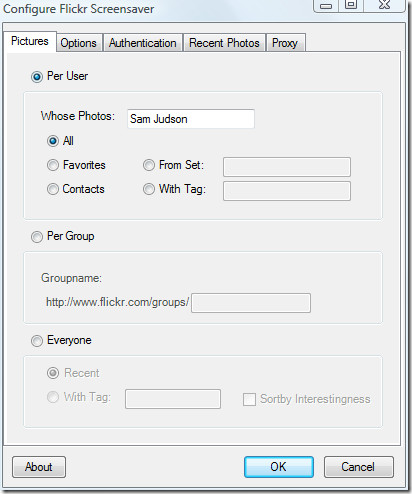
configure flickr screeensaver

To select the image size, drawing method, and delay between photos, go to Options tab.
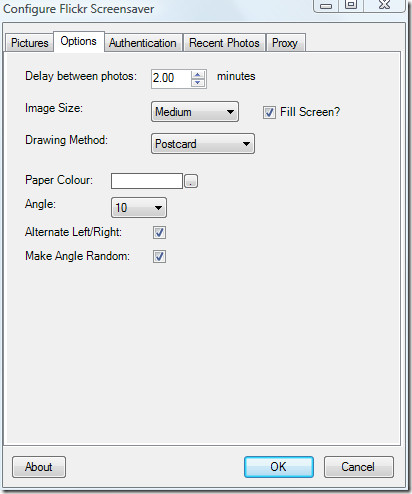
flickr screensaver options

There are three drawing methods: plain, postcard, and moving.

  • Plain – Simply display the photo, with or without its title and author.
  • Postcard – gives the photo a colored border and the ability to randomly rotate the image, giving a Polaroid/postcard look to the screensaver.
  • Moving – Moves the screen over the photo at different angles.

Below is an example of postcard drawing view.
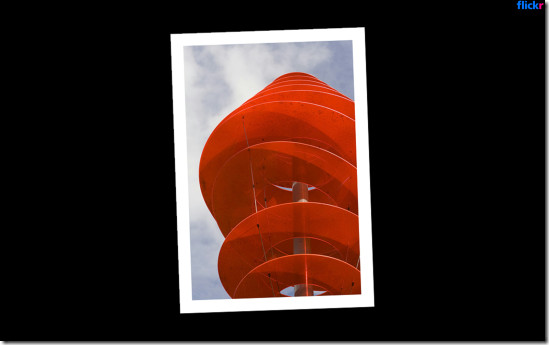
flickr screensaver

Use this tool to brighten up your desktop with more than 4 billion photos from Flickr. Enjoy!

  • Share this article!

    • Digg this!
    • Bookmark on Reddit
    • Bookmark at Delicious
    • Stumble this!
    • Share this post at Facebook
    • Tweet this!
    • Share on Yahoo! Buzz
    • Add AddictiveTips to your Technorati favorites
    • Share on Friendfeed
This entry was posted in Internet, Windows and tagged , , , , , , , , , , . Bookmark the permalink. Post a comment or leave a trackback: Trackback URL.

2 Trackbacks

  1. [...] Utiliza tus fotos de Flickr como protector de pantalla Flickr .Net Screensaver es una buena aplicación para aquellos que desean tener rotando de manera automática sus fotos subidas a Flickr. La reproducción de las imágenes en diapositivas cuenta con dos modos, uno que simplemente muestra la foto sin información del autor ni nombres, y la otra más bonita que permite desplegar las imágenes como si fueran fotos de Polaroid. Se puede configurar y personalizar los tiempos en que las imágenes se reproducen, como así también las dimensiones de las mismas. El ejecutable de la aplicación apenas pesa unos ~ 400 kb y se instala en segundos, la configuración es sencilla y lo único que requiere es tener instalado el .NET Framework. Web: Flickr .Net Screensaver ~ Visto en: Addictive Tips [...]

  2. By Windows System Information Screensaver on March 24, 2010 at 2:27 pm

    [...] of the screensavers are available. We tested it successfully on Windows 7.For more, also check out Flickr Screensaver, a tool that can display your Flickr photos as screensaver.Download UsefulSaverShare this [...]

Post a Comment

Your email is never published nor shared. Required fields are marked *

*
*

You may use these HTML tags and attributes: <a href="" title=""> <abbr title=""> <acronym title=""> <b> <blockquote cite=""> <cite> <code> <del datetime=""> <em> <i> <q cite=""> <strike> <strong>


More in Internet (10 of 10 articles)