Identify Windows Unknown Devices In Device Manager
Almost everyone has some unknown devices in the Windows Device Manager, which appears due to lack of driver installation. The biggest headache is to find out which unknown device is it? Most users will blindly install drivers of all devices, hoping that the unknown device will finally get recognized.
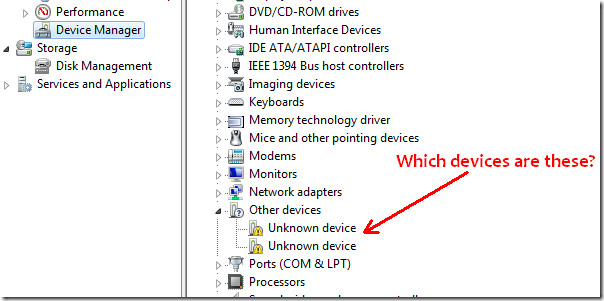
UnknownDevices is a small opensource utility which helps administrators quickly identify the actual device who’s driver needs to be installed. In layman’s term, it identifies those “Unknown Devices” that show up after Windows restart and under Device Manager.
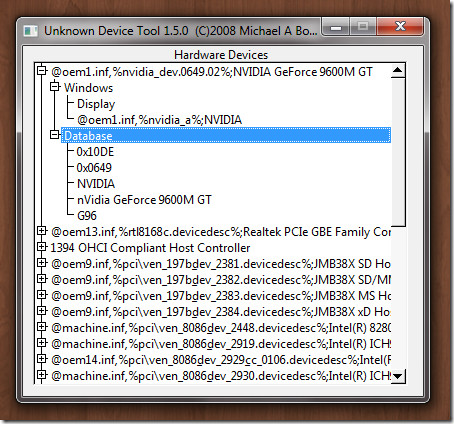
It is a portable tool and includes a custom updater as well which needs to be run manually to check for latest updates. Just run the program and it will display all Hardware Devices that are listed as “Unknown Devices” under Device Manager in all versions of Windows, including Windows XP, Windows Vista, and Windows 7.

Thank you very much
Seriously? Do you really need someone to hold your hand 100% through the whole process? Quit whining and use your head.
Thank you very much for such a beautiful tool. it has solved an issue which was on my computer for 2 years
all it does on my windows 7 x64 is list all known devices, i dont see the un known device in here
What version of the software are you using? If you are using the beta version, please click the bug report button and email me the result. If you are not using the beta version, please download it and see if the issue persists. Thanks.
Thanks, Michael, for the software and for your responsiveness!
possibly a total noob question…. but how do I use it? I’ve got 1.5.1 on Win7x64 and the devices it shows also show up with ident in Device Manager. …or did I miss a step?
thank you for any help!
Okay, the first suggestion I have for you is to use the beta version on the main page, it has a set of debugging code I can use to help you with your issue. http://code.google.com/p/unknowndevices/
Run the beta version and generate a bug report. If you email me the bug report files metiscus@gmail.com I can help determine what is going on. There were also some bug fixes made in that version that could mean the problem goes away.
What should happen is you get a list of devices, and under windows there will be nothing. When you see that, look under database and google the information that is there. Be sure to run the updater on whatever version you have before you run the tool. I actually use an online database to look up the ids so if your database is out of date and you have new hardware it may only show up correctly once you update.
Good luck. Please don’t hesitate to contact me directly if you need further assistance.
I’m the author. The version originally reviewed had some issues running on Windows 7. The software was posted on March 2009, and Windows 7 was not yet released. I didn’t know people used it or I would have updated sooner. There is a version up there now that works on my Windows 7 system. Thank you for your patience.
It does work ON Windows 7 (using version: UnknownDevices-1.5.0 or later).
It does work and Windows 7 (using version: UnknownDevices-1.5.0 or later)
Wrong, doesn’t work on windows 7. Thx~
this sux and you suck idiot, it shows empty list
Erm, downloaded, ran… did nothing. Tried running as administrator, still did nothing. Just get an empty list, even though i have well over a dozen unknown devices.