LookInMyPC: Generate Complete Windows System Profile Report

An average computer user in US will spend thousands of bucks on tech support every year, most users do not have complete knowledge on the software and hardware installed on their system. Windows 7 does a good job in displaying the basic information, for more advanced information you can use Speccy and SIW(more detailed).

LookInMyPC is another useful tool but works quite differently. Instead of showing all information in one window, it lets you select the type of report you want to generate. If you want the complete report of both hardware and software, click Check All, and then click Generate Report.
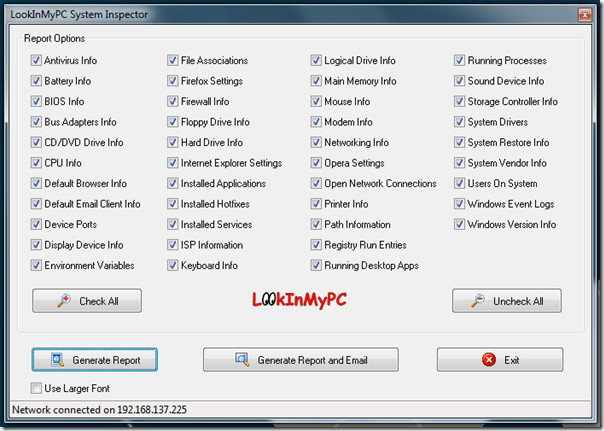
LookInMyPC

The report is generated in HTML and can be viewed in the default browser. We have posted the screenshot of the partially visible result below, you will find the full sample report in LookInMyPC website.
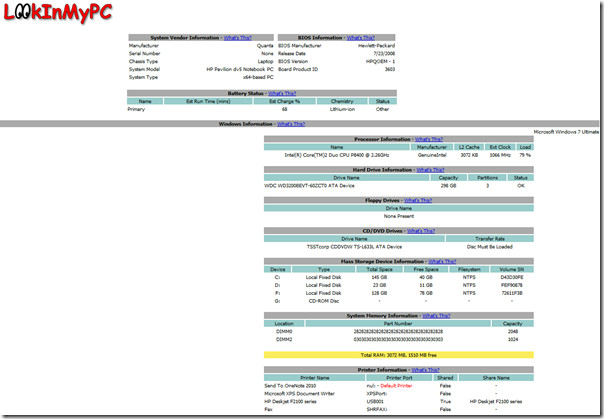
LookInMyPC report

Download LookInMyPC

Apart from Windows 7, it works on all previous versions of Windows till 2000.

  • Share this article!

    • Digg this!
    • Bookmark on Reddit
    • Bookmark at Delicious
    • Stumble this!
    • Share this post at Facebook
    • Tweet this!
    • Share on Yahoo! Buzz
    • Add AddictiveTips to your Technorati favorites
    • Share on Friendfeed
This entry was posted in Windows and tagged , , . Bookmark the permalink. Post a comment or leave a trackback: Trackback URL.

14 Trackbacks

  1. [...] [via Addictive Tips] [...]

  2. [...] LookInMyPC is designed to work with Windows 2000, 2003, XP, and Vista, but we ran it on Windows 7 with no issues. Pair this app with screencasting webapp ShowMeWhatsWrong and you’ll be the neighborhood PC go-to person iin record time. What apps and tools are already in your troubleshooting toolkit? Know of a similar solution, like previously mentioned SIW? Tell us in the comments. LookInMyPC [via Addictive Tips] [...]

  3. [...] LookInMyPC is designed to work with Windows 2000, 2003, XP, and Vista, but we ran it on Windows 7 with no issues. Pair this app with screencasting webapp ShowMeWhatsWrong and you’ll be the neighborhood PC go-to person iin record time. What apps and tools are already in your troubleshooting toolkit? Know of a similar solution, like previously mentioned SIW? Tell us in the comments. LookInMyPC [via Addictive Tips] [...]

  4. [...] LookInMyPC is designed to work with Windows 2000, 2003, XP, and Vista, but we ran it on Windows 7 with no issues. Pair this app with screencasting webapp ShowMeWhatsWrong and you’ll be the neighborhood PC go-to person iin record time. What apps and tools are already in your troubleshooting toolkit? Know of a similar solution, like previously mentioned SIW? Tell us in the comments. LookInMyPC [via Addictive Tips] [...]

  5. [...] LookInMyPC is designed to work with Windows 2000, 2003, XP, and Vista, but we ran it on Windows 7 with no issues. Pair this app with screencasting webapp ShowMeWhatsWrong and you’ll be the neighborhood PC go-to person iin record time. What apps and tools are already in your troubleshooting toolkit? Know of a similar solution, like previously mentioned SIW? Tell us in the comments. LookInMyPC [via Addictive Tips] [...]

  6. [...] LookInMyPC is designed to work with Windows 2000, 2003, XP, and Vista, but we ran it on Windows 7 with no issues. Pair this app with screencasting webapp ShowMeWhatsWrong and you’ll be the neighborhood PC go-to person iin record time. What apps and tools are already in your troubleshooting toolkit? Know of a similar solution, like previously mentioned SIW? Tell us in the comments. LookInMyPC [via Addictive Tips] [...]

  7. [...] LookInMyPC is designed to work with Windows 2000, 2003, XP, and Vista, but we ran it on Windows 7 with no issues. Pair this app with screencasting webapp ShowMeWhatsWrong and you’ll be the neighborhood PC go-to person iin record time. What apps and tools are already in your troubleshooting toolkit? Know of a similar solution, like previously mentioned SIW? Tell us in the comments. LookInMyPC [via Addictive Tips] [...]

  8. [...] LookInMyPC is designed to work with Windows 2000, 2003, XP, and Vista, but we ran it on Windows 7 with no issues. Pair this app with screencasting webapp ShowMeWhatsWrong and you’ll be the neighborhood PC go-to person in record time. What apps and tools are already in your troubleshooting toolkit? Know of a similar solution, like previously mentioned SIW? Tell us in the comments. LookInMyPC [via Addictive Tips] [...]

  9. [...] LookInMyPC is designed to work with Windows 2000, 2003, XP, and Vista, but we ran it on Windows 7 with no issues. Pair this app with screencasting webapp ShowMeWhatsWrong and you’ll be the neighborhood PC go-to person in record time. What apps and tools are already in your troubleshooting toolkit? Know of a similar solution, like previously mentioned SIW? Tell us in the comments. LookInMyPC [via Addictive Tips] [...]

  10. [...] Fonte: Addictive Tips [...]

  11. By Daily Download: LookInMyPC | IT-Networks on February 11, 2010 at 5:33 pm

    [...] Know of a similar solution, like previously mentioned SIW? Tell us in the comments. LookInMyPC [via Addictive Tips] var fbShare = {url: [...]

  12. [...] LookInMyPC is designed to work with Windows 2000, 2003, XP, and Vista, but we ran it on Windows 7 with no issues. Pair this app with screencasting webapp ShowMeWhatsWrong and you’ll be the neighborhood PC go-to person in record time. What apps and tools are already in your troubleshooting toolkit? Know of a similar solution, like previously mentioned SIW? Tell us in the comments. LookInMyPC [via Addictive Tips] [...]

  13. [...] AddictiveTips] AKPC_IDS += "2265,"; Disclaimer Before you act upon this post, please read this [...]

  14. [...] LookInMyPC is designed to work with Windows 2000, 2003, XP, and Vista, but we ran it on Windows 7 with no issues. Pair this app with screencasting webapp ShowMeWhatsWrong and you’ll be the neighborhood PC go-to person in record time. What apps and tools are already in your troubleshooting toolkit? Know of a similar solution, like previously mentioned SIW? Tell us in the comments. LookInMyPC [via Addictive Tips] [...]

Post a Comment

Your email is never published nor shared. Required fields are marked *

*
*

You may use these HTML tags and attributes: <a href="" title=""> <abbr title=""> <acronym title=""> <b> <blockquote cite=""> <cite> <code> <del datetime=""> <em> <i> <q cite=""> <strike> <strong>


More in Windows (5 of 5 articles)