MSE Update Utility [AddictiveTips Apps]
MSE Update Utility is a simple app that updates Microsoft Security Essentials when Windows Update is disabled. Windows Update service is responsible for frequently updating MSE. But once it is disabled via Group Policy Editor, MSE won’t update anymore.
Microsoft’s idea for merging the MSE update with Windows Update is perhaps the biggest downside of MSE and the only workaround until today was to manually grab the latest virus definitions. Since MSE virus definitions are updated almost daily, the manual route was quite tiresome. This is where MSE Update Utility comes in.
![MSE-Update-Utility-[AddictiveTips-Apps]](https://www.addictivetips.com/app/uploads/2009/11/MSE-Update-Utility-AddictiveTips-Apps-21.jpg "MSE-Update-Utility-[AddictiveTips-Apps]")
From the main window you can select the update intervals, there are four options given – Daily, Weekly, Monthly, or Startup. I would recommend going for either Daily or on Startup.
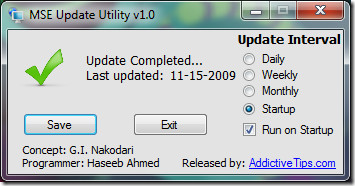
Updating the virus definitions during startup is the best way to keep the system secure. It will automatically update the definitions and notify you when they are complete.
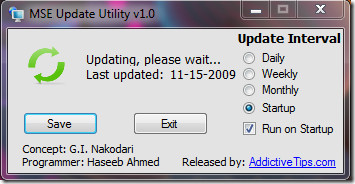
By default it is checked to run on startup, you can always uncheck this option later. MSE Update Utility is not for everyone, but if you fall in any one of the category below then it will come surely handy:
- Users in corporate office environment where the network administrators have disabled the Windows Update.
- Those having difficulty updating MSE using Windows Update due to some problem.
- When Windows Update is disabled by a virus.
Downloads:
(https://www.addictivetips.com/app/uploads/2009/MSE Update Utility v1.1.msi) MSE Update Utility Installer
(https://www.addictivetips.com/app/uploads/2009/MSE%20Update%20Utility%20v1.1.zip MSE Update Utility Zipped
Mirror for Installer (Software Informer)
Update: The app has been updated to version 1.1, various fixes have been implemented. For full details, go here. The FAQ below has been edited to better reflect the changes.
Update 2: Those users who are uncomfortable using this tool can try out a Task Scheduler method which uses MSE’s own command line utility to look for latest virus signatures.
Update 3: The app is still v1.1, but we have managed to fix the exception error. Please note that it will work only with US Short Date Format, to read more about it, go here.
Update 4: Software Informer was kind enough to feature MSE Update Utility. They’ve been added to mirrors for downloading the application.
Note: This is the first second stable release. If you would like to see some additional features, drop a comment below. It requires .Net Framework 3.5 to run.
Frequently Asked Questions (FAQs)
1. The software wont update the virus definition?
A. Please make sure that the software is run with Administrator Privileges. This has been fixed, the software will indeed update the virus definitions even if you are not running with Administrator Privileges.
2. The software wont run on startup even though I have it enabled to run on startup?
A. Please disable your User Account Control (UAC) from the control panel. Disabling UAC was quite foolish for us to say, we have fixed this as well. If you want to run an app during startup, please make sure you run the program as Administrator before checking the “Start during startup” option. You need to run the app as administrator because the app adds a key to the registry.
3. Where did the app get installed?
A. Straight in the C drive. You can now select any destination where you want to install the app.
4. The app shows the definitions have been updated but MSE still shows old definitions?
A. Exactly, MSE will actually show the updates a few minutes after the app says update complete. 😉
Special thanks goes to Haseeb Ahmed for his help in programming the app!

As it looks still not working @ 20200416 @ W7-64bit
For you kind information, this software does not updates Microsoft Security Essentials regularly. Rather, it gives following error:
See the end of this message for details on invoking
just-in-time (JIT) debugging instead of this dialog box.
************** Exception Text **************
System.ComponentModel.Win32Exception: The system cannot find the file specified
at System.Diagnostics.Process.StartWithShellExecuteEx(ProcessStartInfo startInfo)
at System.Diagnostics.Process.Start()
at System.Diagnostics.Process.Start(ProcessStartInfo startInfo)
at MSE_Update_Utility.Startup.tmrTemp_Tick(Object sender, EventArgs e) in D:Program FilesVisual Studio 2008ProjectsMSE Virus Signature Update CheckerMSE Virus Signature Update CheckerForm2.vb:line 42
at System.Windows.Forms.Timer.OnTick(EventArgs e)
at System.Windows.Forms.Timer.TimerNativeWindow.WndProc(Message& m)
at System.Windows.Forms.NativeWindow.Callback(IntPtr hWnd, Int32 msg, IntPtr wparam, IntPtr lparam)
************** Loaded Assemblies **************
mscorlib
Assembly Version: 2.0.0.0
Win32 Version: 2.0.50727.3053 (netfxsp.050727-3000)
CodeBase: file:///c:/WINDOWS/Microsoft.NET/Framework/v2.0.50727/mscorlib.dll
—————————————-
MSE Update Utility
Assembly Version: 1.0.0.0
Win32 Version: 1.0.0.0
CodeBase: file:///C:/Program%20Files/MSE%20Update%20Utility/MSE%20Update%20Utility.exe
—————————————-
Microsoft.VisualBasic
Assembly Version: 8.0.0.0
Win32 Version: 8.0.50727.3053 (netfxsp.050727-3000)
CodeBase: file:///C:/WINDOWS/assembly/GAC_MSIL/Microsoft.VisualBasic/8.0.0.0__b03f5f7f11d50a3a/Microsoft.VisualBasic.dll
—————————————-
System
Assembly Version: 2.0.0.0
Win32 Version: 2.0.50727.3053 (netfxsp.050727-3000)
CodeBase: file:///C:/WINDOWS/assembly/GAC_MSIL/System/2.0.0.0__b77a5c561934e089/System.dll
—————————————-
System.Windows.Forms
Assembly Version: 2.0.0.0
Win32 Version: 2.0.50727.3053 (netfxsp.050727-3000)
CodeBase: file:///C:/WINDOWS/assembly/GAC_MSIL/System.Windows.Forms/2.0.0.0__b77a5c561934e089/System.Windows.Forms.dll
—————————————-
System.Drawing
Assembly Version: 2.0.0.0
Win32 Version: 2.0.50727.3053 (netfxsp.050727-3000)
CodeBase: file:///C:/WINDOWS/assembly/GAC_MSIL/System.Drawing/2.0.0.0__b03f5f7f11d50a3a/System.Drawing.dll
—————————————-
System.Runtime.Remoting
Assembly Version: 2.0.0.0
Win32 Version: 2.0.50727.3053 (netfxsp.050727-3000)
CodeBase: file:///C:/WINDOWS/assembly/GAC_MSIL/System.Runtime.Remoting/2.0.0.0__b77a5c561934e089/System.Runtime.Remoting.dll
—————————————-
System.Configuration
Assembly Version: 2.0.0.0
Win32 Version: 2.0.50727.3053 (netfxsp.050727-3000)
CodeBase: file:///C:/WINDOWS/assembly/GAC_MSIL/System.Configuration/2.0.0.0__b03f5f7f11d50a3a/System.Configuration.dll
—————————————-
System.Xml
Assembly Version: 2.0.0.0
Win32 Version: 2.0.50727.3053 (netfxsp.050727-3000)
CodeBase: file:///C:/WINDOWS/assembly/GAC_MSIL/System.Xml/2.0.0.0__b77a5c561934e089/System.Xml.dll
—————————————-
************** JIT Debugging **************
To enable just-in-time (JIT) debugging, the .config file for this
application or computer (machine.config) must have the
jitDebugging value set in the system.windows.forms section.
The application must also be compiled with debugging
enabled.
For example:
When JIT debugging is enabled, any unhandled exception
will be sent to the JIT debugger registered on the computer
rather than be handled by this dialog box.
So help me to solve this issue.
Hello,
Seems this thread is quite old, but wanted to chime in as I was looking for a solution to get MSE updated daily for mine & others’ PCS. Tried out this app today , but am getting the same error as all the others . Was there ever a fix for this useful looking app?
===========================================
System.ComponentModel.Win32Exception: The system cannot find the file specified
at System.Diagnostics.Process.StartWithShellExecuteEx(ProcessStartInfo startInfo)
at System.Diagnostics.Process.Start(ProcessStartInfo startInfo)
at MSE_Update_Utility.Startup.tmrTemp_Tick(Object sender, EventArgs e) in D:Program FilesVisual Studio 2008ProjectsMSE Virus Signature Update CheckerMSE Virus Signature Update CheckerForm2.vb:line 42
at System.Windows.Forms.Timer.OnTick(EventArgs e)
at System.Windows.Forms.Timer.TimerNativeWindow.WndProc(Message& m)
at System.Windows.Forms.NativeWindow.Callback(IntPtr hWnd, Int32 msg, IntPtr wparam, IntPtr lparam)
************** Loaded Assemblies **************
mscorlib
Assembly Version: 2.0.0.0
Win32 Version: 2.0.50727.5472 (Win7SP1GDR.050727-5400)
CodeBase: file:///C:/Windows/Microsoft.NET/Framework64/v2.0.50727/mscorlib.dll
—————————————-
MSE Update Utility
Assembly Version: 1.0.0.0
Win32 Version: 1.0.0.0
CodeBase: file:///C:/Program%20Files%20(x86)/MSE%20Update%20Utility/MSE%20Update%20Utility.exe
—————————————-
Microsoft.VisualBasic
Assembly Version: 8.0.0.0
Win32 Version: 8.0.50727.5420 (Win7SP1.050727-5400)
CodeBase: file:///C:/Windows/assembly/GAC_MSIL/Microsoft.VisualBasic/8.0.0.0__b03f5f7f11d50a3a/Microsoft.VisualBasic.dll
—————————————-
System.Windows.Forms
Assembly Version: 2.0.0.0
Win32 Version: 2.0.50727.5468 (Win7SP1GDR.050727-5400)
CodeBase: file:///C:/Windows/assembly/GAC_MSIL/System.Windows.Forms/2.0.0.0__b77a5c561934e089/System.Windows.Forms.dll
—————————————-
System
Assembly Version: 2.0.0.0
Win32 Version: 2.0.50727.5467 (Win7SP1GDR.050727-5400)
CodeBase: file:///C:/Windows/assembly/GAC_MSIL/System/2.0.0.0__b77a5c561934e089/System.dll
—————————————-
System.Drawing
Assembly Version: 2.0.0.0
Win32 Version: 2.0.50727.5467 (Win7SP1GDR.050727-5400)
CodeBase: file:///C:/Windows/assembly/GAC_MSIL/System.Drawing/2.0.0.0__b03f5f7f11d50a3a/System.Drawing.dll
—————————————-
System.Runtime.Remoting
Assembly Version: 2.0.0.0
Win32 Version: 2.0.50727.5420 (Win7SP1.050727-5400)
CodeBase: file:///C:/Windows/assembly/GAC_MSIL/System.Runtime.Remoting/2.0.0.0__b77a5c561934e089/System.Runtime.Remoting.dll
—————————————-
System.Configuration
Assembly Version: 2.0.0.0
Win32 Version: 2.0.50727.5476 (Win7SP1GDR.050727-5400)
CodeBase: file:///C:/Windows/assembly/GAC_MSIL/System.Configuration/2.0.0.0__b03f5f7f11d50a3a/System.Configuration.dll
—————————————-
System.Xml
Assembly Version: 2.0.0.0
Win32 Version: 2.0.50727.5476 (Win7SP1GDR.050727-5400)
CodeBase: file:///C:/Windows/assembly/GAC_MSIL/System.Xml/2.0.0.0__b77a5c561934e089/System.Xml.dll
—————————————-
I installed the utility. when I launch the app, just the window opens with a selection of how often or when I want to update. But how do I actually make it,,,update? Like right then? It’s also giving me a .Net Framework Error. Something to do with JIT debugging. Help, please! Anyone?
I’m using on Windows 7 Pro 64-bit and get this DotNet error within a minute or so of it launching v1.1 of the utility.
See the end of this message for details on invoking
just-in-time (JIT) debugging instead of this dialog box.
************** Exception Text **************
System.ComponentModel.Win32Exception: The system cannot find the file specified
at System.Diagnostics.Process.StartWithShellExecuteEx(ProcessStartInfo startInfo)
at System.Diagnostics.Process.Start(ProcessStartInfo startInfo)
at MSE_Update_Utility.Startup.tmrTemp_Tick(Object sender, EventArgs e) in D:Program FilesVisual Studio 2008ProjectsMSE Virus Signature Update CheckerMSE Virus Signature Update CheckerForm2.vb:line 42
at System.Windows.Forms.Timer.OnTick(EventArgs e)
at System.Windows.Forms.Timer.TimerNativeWindow.WndProc(Message& m)
at System.Windows.Forms.NativeWindow.Callback(IntPtr hWnd, Int32 msg, IntPtr wparam, IntPtr lparam)
************** Loaded Assemblies **************
mscorlib
Assembly Version: 2.0.0.0
Win32 Version: 2.0.50727.5448 (Win7SP1GDR.050727-5400)
CodeBase: file:///C:/Windows/Microsoft.NET/Framework64/v2.0.50727/mscorlib.dll
—————————————-
MSE Update Utility
Assembly Version: 1.0.0.0
Win32 Version: 1.0.0.0
CodeBase: file:///C:/Program%20Files%20(x86)/MSE%20Update%20Utility/MSE%20Update%20Utility.exe
—————————————-
Microsoft.VisualBasic
Assembly Version: 8.0.0.0
Win32 Version: 8.0.50727.5420 (Win7SP1.050727-5400)
CodeBase: file:///C:/Windows/assembly/GAC_MSIL/Microsoft.VisualBasic/8.0.0.0__b03f5f7f11d50a3a/Microsoft.VisualBasic.dll
—————————————-
System
Assembly Version: 2.0.0.0
Win32 Version: 2.0.50727.5453 (Win7SP1GDR.050727-5400)
CodeBase: file:///C:/Windows/assembly/GAC_MSIL/System/2.0.0.0__b77a5c561934e089/System.dll
—————————————-
System.Windows.Forms
Assembly Version: 2.0.0.0
Win32 Version: 2.0.50727.5446 (Win7SP1GDR.050727-5400)
CodeBase: file:///C:/Windows/assembly/GAC_MSIL/System.Windows.Forms/2.0.0.0__b77a5c561934e089/System.Windows.Forms.dll
—————————————-
System.Drawing
Assembly Version: 2.0.0.0
Win32 Version: 2.0.50727.5420 (Win7SP1.050727-5400)
CodeBase: file:///C:/Windows/assembly/GAC_MSIL/System.Drawing/2.0.0.0__b03f5f7f11d50a3a/System.Drawing.dll
—————————————-
System.Configuration
Assembly Version: 2.0.0.0
Win32 Version: 2.0.50727.5420 (Win7SP1.050727-5400)
CodeBase: file:///C:/Windows/assembly/GAC_MSIL/System.Configuration/2.0.0.0__b03f5f7f11d50a3a/System.Configuration.dll
—————————————-
System.Xml
Assembly Version: 2.0.0.0
Win32 Version: 2.0.50727.5420 (Win7SP1.050727-5400)
CodeBase: file:///C:/Windows/assembly/GAC_MSIL/System.Xml/2.0.0.0__b77a5c561934e089/System.Xml.dll
—————————————-
System.Runtime.Remoting
Assembly Version: 2.0.0.0
Win32 Version: 2.0.50727.5420 (Win7SP1.050727-5400)
CodeBase: file:///C:/Windows/assembly/GAC_MSIL/System.Runtime.Remoting/2.0.0.0__b77a5c561934e089/System.Runtime.Remoting.dll
—————————————-
************** JIT Debugging **************
To enable just-in-time (JIT) debugging, the .config file for this
application or computer (machine.config) must have the
jitDebugging value set in the system.windows.forms section.
The application must also be compiled with debugging
enabled.
For example:
When JIT debugging is enabled, any unhandled exception
will be sent to the JIT debugger registered on the computer
rather than be handled by this dialog box.
Please advise if there is an option to direct this application to update MSE via the nis_full.exe which has been manually downloaded onto the local computer or local network?
That means to Not look for the udpate on the internet?
I would be very interested in this same feature. At the moment, I am able to manually download the updates, but it seems that my pc overlooks these and still hangs on trying to retrieve the update online. My last attempt (using broadband) took over 6 hours before I decided to cancel it.
I would be very interested in this same feature. At the moment, I am able to manually download the updates, but it seems that my pc overlooks these and still hangs on trying to retrieve the update online. My last attempt (using broadband) took over 6 hours before I decided to cancel it.
This is such a wonderful source that you’ll be supplying and you provide it away for free of charge. I like visiting internet websites which understand the value of giving a excellent resource for totally free.
Microsoft released MSE 2.0 last month. Will your utility still work?
Seems like I’m getting the same errors as @kyers. Any suggestions? I’m running x64 version, is it not compatible?
See the end of this message for details on invoking
just-in-time (JIT) debugging instead of this dialog box.
************** Exception Text **************
System.ComponentModel.Win32Exception: The system cannot find the file specified
at System.Diagnostics.Process.StartWithShellExecuteEx(ProcessStartInfo startInfo)
at System.Diagnostics.Process.Start(ProcessStartInfo startInfo)
at MSE_Update_Utility.Startup.tmrTemp_Tick(Object sender, EventArgs e) in D:\Program Files\Visual Studio 2008\Projects\MSE Virus Signature Update Checker\MSE Virus Signature Update Checker\Form2.vb:line 42
at System.Windows.Forms.Timer.OnTick(EventArgs e)
at System.Windows.Forms.Timer.TimerNativeWindow.WndProc(Message& m)
at System.Windows.Forms.NativeWindow.Callback(IntPtr hWnd, Int32 msg, IntPtr wparam, IntPtr lparam)
************** Loaded Assemblies **************
mscorlib
Assembly Version: 2.0.0.0
Win32 Version: 2.0.50727.4952 (win7RTMGDR.050727-4900)
CodeBase: file:///C:/Windows/Microsoft.NET/Framework64/v2.0.50727/mscorlib.dll
—————————————-
MSE Update Utility
Assembly Version: 1.0.0.0
Win32 Version: 1.0.0.0
CodeBase: file:///C:/Program%20Files%20(x86)/MSE%20Update%20Utility/MSE%20Update%20Utility.exe
—————————————-
Microsoft.VisualBasic
Assembly Version: 8.0.0.0
Win32 Version: 8.0.50727.4927 (NetFXspW7.050727-4900)
CodeBase: file:///C:/Windows/assembly/GAC_MSIL/Microsoft.VisualBasic/8.0.0.0__b03f5f7f11d50a3a/Microsoft.VisualBasic.dll
—————————————-
System
Assembly Version: 2.0.0.0
Win32 Version: 2.0.50727.4927 (NetFXspW7.050727-4900)
CodeBase: file:///C:/Windows/assembly/GAC_MSIL/System/2.0.0.0__b77a5c561934e089/System.dll
—————————————-
System.Windows.Forms
Assembly Version: 2.0.0.0
Win32 Version: 2.0.50727.4927 (NetFXspW7.050727-4900)
CodeBase: file:///C:/Windows/assembly/GAC_MSIL/System.Windows.Forms/2.0.0.0__b77a5c561934e089/System.Windows.Forms.dll
—————————————-
System.Drawing
Assembly Version: 2.0.0.0
Win32 Version: 2.0.50727.4927 (NetFXspW7.050727-4900)
CodeBase: file:///C:/Windows/assembly/GAC_MSIL/System.Drawing/2.0.0.0__b03f5f7f11d50a3a/System.Drawing.dll
—————————————-
System.Runtime.Remoting
Assembly Version: 2.0.0.0
Win32 Version: 2.0.50727.4927 (NetFXspW7.050727-4900)
CodeBase: file:///C:/Windows/assembly/GAC_MSIL/System.Runtime.Remoting/2.0.0.0__b77a5c561934e089/System.Runtime.Remoting.dll
—————————————-
System.Configuration
Assembly Version: 2.0.0.0
Win32 Version: 2.0.50727.4927 (NetFXspW7.050727-4900)
CodeBase: file:///C:/Windows/assembly/GAC_MSIL/System.Configuration/2.0.0.0__b03f5f7f11d50a3a/System.Configuration.dll
—————————————-
System.Xml
Assembly Version: 2.0.0.0
Win32 Version: 2.0.50727.4927 (NetFXspW7.050727-4900)
CodeBase: file:///C:/Windows/assembly/GAC_MSIL/System.Xml/2.0.0.0__b77a5c561934e089/System.Xml.dll
—————————————-
************** JIT Debugging **************
To enable just-in-time (JIT) debugging, the .config file for this
application or computer (machine.config) must have the
jitDebugging value set in the system.windows.forms section.
The application must also be compiled with debugging
enabled.
For example:
When JIT debugging is enabled, any unhandled exception
will be sent to the JIT debugger registered on the computer
rather than be handled by this dialog box.
I am having problems, when I try to run it, an error comes up and it says this.
When JIT debugging is enabled, any unhandled exception
will be sent to the JIT debugger registered on the computer
rather than be handled by this dialog box.
When running the install i get the following error “The cabinet file ‘disk1.cab’ required for this installation is corrupt and ccanot be used”. , if i click Error Code 2350. Even the .zip file downloads indicates it downloaded succesfully, when you double click get error msg “Compressed file is invalid”. Have tried downloading thru our internal network and via 3g connection still the same.
the update size is very big!
My name is Danfong Hsieh. I’m from Taiwan, Republic of China. Personally, I appreciate the MSE Update Utility software very much. However, your software is still not widely used in Taiwan. In order to make it more popular in Taiwan, I hope to modify the user interface of your software into Chinese Traditional version. May I ask for your authority to modify this software? And if it’s OK, could you give me the corresponding language and resource files to do it as well?
Hi,
My name is Danfong Hsieh. I’m from Taiwan, Republic of China. Personally, I appreciate the MSE Update Utility software very much. However, your software is still not widely used in Taiwan. In order to make it more popular in Taiwan, I hope to modify the user interface of your software into Chinese Traditional version. May I ask for your authority to modify this software? And if it’s OK, could you give me the corresponding language and resource files to do it as well?
great job guys
i’m using version 1.1 and it works perfect
updates on startup
one question
if i set it to update daily what would be the period between checkups for updates?
1 hour? 2h ? 4h?
please give me an answer
once again great work
Among the problems I would like to address: your SEARCH bar (once I filled in any search items) doesn't have an arrow or whatever to click on to do the search. I've moved the mouse pointer as far right as possible, so that isn't the problem. What could it be? Next issue. I cannot find on the Microsoft webpages any link to the MSE updater download. Also, even when I downloaded the MSE updater update 1.1, the product info still shows version 1.0. Finally, even though I checkmarked updating on STARTUP in both places and saved these settings in that window, MSE still does not update on startup. I still have to update manually. Your help is so much appreciated.
I get this error:http://pastebin.com/m697c7d79
Hallo,arbeitet das MSE-Update-Utility auch mit einem Proxy ?
Nakodari, Thanks for information!I have updated new version of my tool! MSE Updater v1.1Now it's:1) Downloads daily updates only (bigger updates if needed).2) It's written using clear WinAPI code. Only 32 Kb size.3) No Additional software installations (like .NET Framework) needed!4) No any fixed date format required!5) Only Task Scheduler manually setup needed.Link to download: http://gigasoftgroup.com/Content/soft/MSEUpdate…Software Update Page: http://gigasoftgroup.com/?m0prm=58&m2prm=99Contact me, if needed: julyighor@gmail.com
Nakodari, Thanks for information!I have updated new version of my tool! MSE Updater v1.1Now it's:1) Downloads daily updates only (bigger updates if needed).2) It's written using clear WinAPI code. Only 32 Kb size.3) No Additional software installations (like .NET Framework) needed!4) No any fixed date format required!5) Only Task Scheduler manually setup needed.Link to download: http://gigasoftgroup.com/Content/soft/MSEUpdate…Software Update Page: http://gigasoftgroup.com/?m0prm=58&m2prm=99Contact me, if needed: julyighor@gmail.com
I have installed the MSE update utility-Howver,I am unable to update MSE manually but upon rebooting it says I am up to date… Can I not update MSE manually when I so choose to do so?
I have tired to wait.I have created application for updating MSE without any dependencies, NO .NET Frameworks needed.It's work through wget.exe and you mast manually add it to Windows Task.I have tested it one week, stable release finished!Enjoy Peoples!Utility page: http://gigasoftgroup.com/?m0prm=58&m2prm=99Exe download: http://gigasoftgroup.com/Content/soft/MSEUpdate…Comments send to: julyighor@gmail.com
What the heck is this?!! Only a downloader for full MSE Update file that is ~44MB?!!No thank you, I can download that big update file manually if I need…
You think that MSE Update Utility work another way?I don't. You just don't see what it downloading.
Well, I think MSE Update Utility just downloads daily updates not full update!Anyway let's ask Nakodari about it…
OK, I'll wait him response to
MSE Update Utility downloads daily signature updates using Microsoft Security Essentials own command line tool, i.e, MpCmdRun.exe SignatureUpdate. The app simply automates the process rather than having to download the updates manually.
I have downloaded and installed the “MSE Updating Utility” and it is working perfectly – thank you. As it will only work with “USA Short Date” Format, I had to change this date format setting in my computer as I live in Australia and our 'Short Date' format for, say, 19th December 2009 is 19/12/2009. (The USA format is 12/19/2009.)Is is possible to provide a version of the “MSE Updating Utility” that will work for the Australian/UK 'Short Date' system? Except for this, your wonderful program reliably updates my MSE each time I start my computer.
I have downloaded and installed the “MSE Updating Utility” and it is working perfectly – thank you. As it will only work with “USA Short Date” Format, I had to change this date format setting in my computer as I live in Australia and our 'Short Date' format for, say, 19th December 2009 is 19/12/2009. (The USA format is 12/19/2009.)Is is possible to provide a version of the “MSE Updating Utility” that will work for the Australian/UK 'Short Date' system? Except for this, your wonderful program reliably updates my MSE each time I start my computer.
MSE Update Server itself is using the US short date format. 🙁 We might do something about it in the future release.
I need run this useful tool on Windows XP without installing framework.Dependency Walker says that it requires Framework v2.0.50727.Please compile this Utility without .NET Framework v2.0.50727 dependency!If you not do this, I will write same program without any dependency 🙂
Any plan to fix the .net error that pops up whenever my computer is not connected to the network? I always see this error when I wake my computer from hibernation.Microsoft .NET FrameworkUnhandled exception has occurred in your application.Unable to ping because a network connection is not available.
Thanks for the feedback. Please check back in few days, we are working on a new version which is being build from ground up.
A new version without the framework errors after standby would be fine 🙂
I would love to get my hands on your fix to this problem! I too have the error Conversion from string “11-18-2009″ to type 'Date' is not valid” and am in spain so am hoping to have less of a headache when this is installed! Thanks for the work!!
Trying this now and I get an unhandled exception message. “Conversion from string “11-18-2009″ to type 'Date' is not valid” Running Vista with UK regional settings
may i know both of yours .Net Framework version?? so tht i can work on the fix… thnx!!
I am at work so I cannot give you details right now.But I am running Windows 7 Home Premium, and I believe my .NET Framework version is 3.5 SP 1 (Not sure of the exact version nbr).Just some further info: You can 'continue' and ignore the error. The update still seems to work ok, but the error message keeps popping up repeatedly.
We are looking into the problem and will update this page with the latest version and details ASAP.
I look forward to the fix!
Yep I think my version is 3.5 as well. cheers
Yep I'm getting this too. Looks like some .NET framework error.
Hello!Sur des OS en français, les dates provoquent des erreurs car 11-18-2009 est compris comme month 18 et day 11 !
Hi —
This app is the answer to a mother’s prayer. But when I try to install it I keep getting the error message “Invalid Drive C:.” Don’t ask why, but my boot drive is N:, not C:. There actually is no C: drive on my computer. So, is there any way around this? I’m running XP Home with SP2 and all updates and .Net Framework 3.5 SP1. Please advise.
Great idea, great work. You are to be commended. I only hope my situation can be worked out.
Thanks so much.
Jim D.
Hi –This app is the answer to a mother's prayer. But when I try to install it I keep getting the error message “Invalid Drive C:.” Don't ask why, but my boot drive is N:, not C:. There actually is no C: drive on my computer. So, is there any way around this? I'm running XP Home with SP2 and all updates and .Net Framework 3.5 SP1. Please advise.Great idea, great work. You are to be commended. I only hope my situation can be worked out.Thanks so much.Jim D.
Jim, please keep checking back. We are soon releasing the latest version of app which will be much more flexible. Just wait a few days…
Its up, you can check it out 🙂
The new version is up, you can check it out!! 🙂 have Fun!
Congratulations on the First AT App 😉
I like the idea of the MSE Update Utility. Does it retrieve the udpate via a secure connection like https? Does it use some method of validating that it is the intact file that came from Microsoft?
Patrick, it is perfectly safe to use this utility since it utilizes MSE's own command line tool MpCmdRun.exe. You can read more about it here https://www.addictivetips.com/windows-tips/comma…In layman's term, this app actually updates the virus definitions just like you could do it via the command line, but with an app it becomes much more easier and automated.
I installed the MSI file. The installation went smooth, but when I try to run the app, I get this error: http://pastebin.com/m1c295c36I have the app continue rather then quit. It works. But every minute or so, the error pops up again.I'm running Windows 7 Ultimate, 32-bit..NET Framework 3.5 SP1
Hey thanks for pointing it out. I will get it fixed ASAP. In the meantime can anyone else confirm if this problem is occurring?
I face the exact same problem as well. Do you happen to have any solution regarding this?Thanks for everything.
Alright a fix for it is coming soon in the next update. You can bookmark this page and check back later.
I would say that ur missing some DLLs that are needed by the app, i would love to see some one else confirm this, coz it might be a System Dependent problem :$Sorry any for Inconvenience Caused!
This could be the case. Or perhaps I have them but they are not registered?Does anybody know which DLL's this should be?Also, installed 1.1, the exact same problem occurs.