Perform Multiple Actions When System Goes In Idle State With System Silencer
System Silencer is small nifty application to control different functions and perform list of actions when system is in idle state. The utility is designed keeping some basic functions in mind, which user may want to trigger whenever the system goes idle. You can also specify time interval after system goes idle and perform list of actions, such as; turn the monitor off, toggle different functions including; system volume, show desktop, taskbar icons, and desktop icons. Additionally, you can also specify a process to kill and run any application, whenever it found system being idle.
The usage is easy and straightforward, all aforementioned options are listed on the main configuration window. It sits in the system tray letting user easily change configurations anytime. Just enable the required options and to kill any process or execute an program, enable the appropriate option and specify application/instance path in question. Once configurations are in place, select the time interval (1-60 mins) after system goes idle. Click SAVE AND APPLY button at the bottom of the window to enable the configured options.
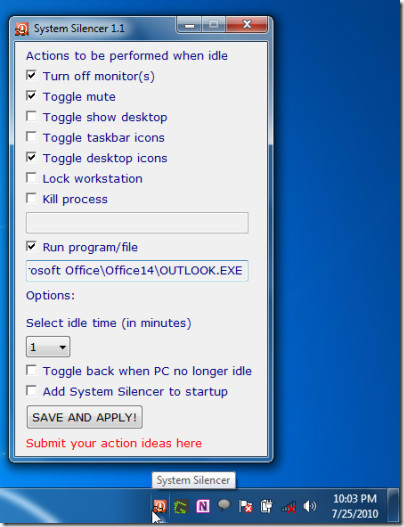
It is lightweight and a very useful tool to put system in idle state after specified time interval and perform various specified actions. Running an application, killing a process, and locking workstation are noteworthy options it offers which can be automatically triggered.
It runs on all Windows based OS, testing was done on Windows 7 x86 system.

Do you have a tool that detects when a specified desktop application goes idle (i.e. there is no mouse or keyboard activitiy with that application), and then kills that application if there is no activity?
it is nice thanks !