Quickly Find Your Computer’s Last Shutdown Date And Time In Windows
Are you are curious to find out when was the last date and time the computer was shut down? If you are monitoring when the computers in the office environment or at home were last shutdown then you might want to know the exact date and time. Many office employees do not shutdown their computers and at home heavy downloader’s might not remember when there last shutdown occurred.
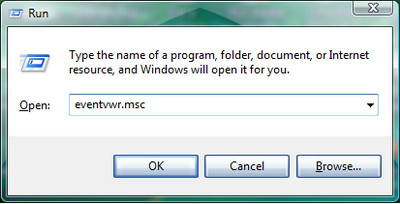
To find the exact date and time in Windows XP, click Start > Run and type Eventvwr.msc
Or in Windows Vista you can type Event Viewer in the Search Bar in Start menu.
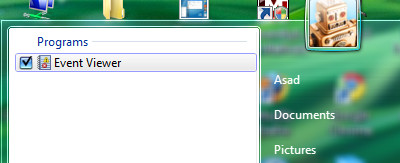
If in Windows Vista User Access Control window pops up to ask for permission, click Continue.
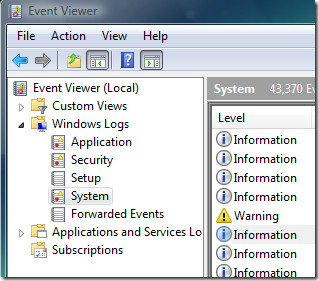
In Windows XP: Click System.
In Windows Vista: You need to double click at the Windows Logs in the left sidebar and then System.
Now to find out the last time your computer was shutdown you need to sort the results by Date, so that its easier to distinguish between the last shutdown or any other shutdown before.
Locate the most recent entry with the ID of 6006 and the Source column reading eventlog. Event viewer tags ID to every process the system performance, 6006 is an ID for shutdown, since we have sorted the event viewer in descending order to its date and time, the first 6006 ID would now determine the last shutdown time.
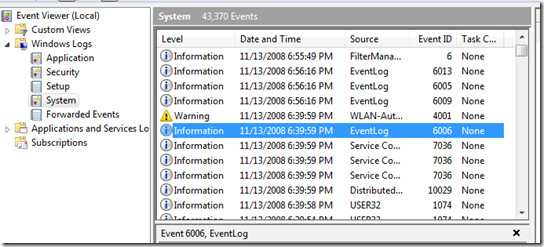
This date and time information displayed in the bottom windows indicated your last shutdown date and time. Now you can easily monitor the last time the computer was shutdown so that you can have an idea how much power was consumed when it was on idle.

how i can find wait time to kill on regedit
Thnks a lot……………………..
sweet, thanks 🙂
in last windows i cannot see last shutdown id, eventlog time
GR8 information thanks
great info, event 1074 helped find when my system was shut indeed!
Thanks a lot
a
In short,
1. Run Event Viewer (see instructions above)!
2. Choose the System log!
Windows XP: Click on “System” under “Event Viewer (Local)” folder on the Console tree on the left.
Windows Vista: Click on “System” under “Windows Logs” and “Event Viewer (Local)” folder on the Console tree on the left.
3. Open the filter dialog!
Windows Vista: Click on “Filter current log…” from the Actions window on the right.
Windows XP: From the View menu click on “Filter…”
4. Specify to only filter events with ID 1074 and USER32 as source!
In the filter dialog, type in “1074” in the Event-ID field and “USER32” in the “event sources” field (without quotes).
XP Example: http://help.artaro.eu/images/winxp/xpevt08d.jpg
Vista Example: http://i.t.com.com/i/tr/downloads/images/8-15-08-vr/8-15_Fig_E.png
5. Click OK to close the dialog and start filtering! This may take a while, depending on how many events are logged and what filtering arguments you have used.
6. Done! You should now see a complete list of all computer shutdowns or restarts, either initiated by the user or some process or device.
You may also define more specifically what type of 1074 events you want to view. You could for example specify to view only 1074 events by a specific user on a specific computer.
I hope this helps.
if this is true then someone ‘signed out’ TWICE on my laptop before i turned it on! How is this possible? I turned it off properly the night before!
thanks samir! your info is correct.
6006 can only see when i logon…
while 1074 can see when i shutdown
Thanks a lot! This helped with an investigation in my office.
Regards,
That’s wrong!
=============
The event ID 6006 with “EventLog” as source only indicates that the EventLog service has stopped. That’s it! It has nothing to do with shutting down the computer!
However! It is true that the service will be stopped as a result of sutting down the computer and terminating all processes and services. Well of course it will be stopped then! What else would you expect?!
But what you don’t realize is that just because the EventLog service stops does not necessarily mean that the computer is shutting down! In other words, you could stop the EventLog service without shutting down the computer! The first does not depend on the other!
So, I hope you do realize now that the event ID 6006 with “EventLog” as source in System log does not say much about shutting down the computer. Right?
To my knowledge, the only event ID with such a hight ID number as 6000 or above, that has to do with computer shutdown is the 6008 with the “EventLog” as srouce!
What 6008 with “EventLog” as source means is that the computer has been indeed shutdown! But it’s by no way a normal shutdown! The level of this type of log entry is not “information”. It’s a “error” type of entry. The 6008 with “EventLog” as srouce means that the computer has been shutdown UNEXPECTEDLY!
Where did you get the idea that event ID 6006 with “EventLog” as source always means that the computer has been shutdown?
That’s not true. The only similar event ID with such a hight event ID numeber that DOES mean a computer shutdown is 6008, a UNEXPECTED shutdown to be specific! Not a normal shutdown!
This is correct!
================
Now! You want to find out when a COMPUTER USER has shutdown the computer, right? What you rally want to be looking for is event ID 1074 with USER32 as source!
“As a general statement, this event records a system shutdown or restart in order for the administrators of that system to have a better understanding on how often and for what reasons the computer is shutdown or restarted. The event contains details about the process (the program) that performed this task, the computer that was affected and when applicable, the reason for the restart or shutdown. Also, the type of operation is recorded: restart when a user or an application initiates a system restart, shutdown when the system is sent a shutdown request or power off when the power button is pressed (and that initiates a shutdown).
The process listed in the event provides an important clue as to who or what initiated the shutdown or the restart. Processes related the user’s environment such as Exlorer.exe or Winlogon indicate that the shutdown was initiated by a user while other type of processes such as svchost.exe.
The comment shown in the event description is something that can be specified by the process that initiates the shutdown. For example, if an application is installed and the installer script requires a restart one may see a comment like “The Windows Installer initiated a system restart to complete or continue the configuration of “. Users of shutdown.exe command can also specify a text to be recorded as comment.”
In normal operation, nothing should ever end the EventLog program in an expected way but a shutdown (which is the only way to generate a 6006). Ever.
Bosnians are always the smartest 🙂
This doesn’t work, it’s showing that I shut down the pc about 40 minutes ago…
Just what I was looking for, thanks !!!
really helpful infos.
thanks
I can't find event ID 6.006 but 6.005 or 6.009,,thq
Thanks very much… This was very helpful
how to find system last shutdown time through commands
pls send to the mail
Grate information,
tank you
ghgfh