Recover Deleted Data, Files Or Photos For Free With Recuva
Did you accidently delete a photo from your digital camera, memory card, or hard disk? Maybe you accidently deleted an important file from your computer? In both cases, you can recover any type of lost data with a free windows utility. Recuva is a great little application that recovers all your deleted files with a single click, it even recovers the data that have been deleted from the Recycle Bin.
When you run this tool, it will start a wizard which will help you recover you the lost files, as you can see from the screenshot below, it can recover pictures, music, documents, videos, etc instantly.
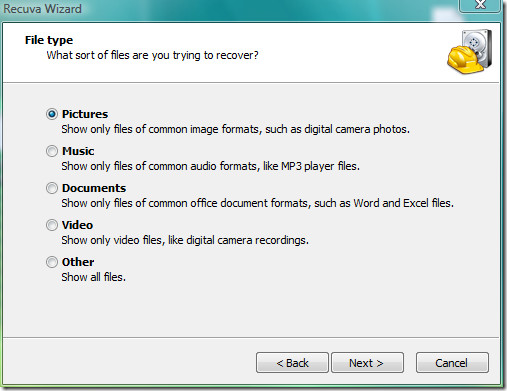
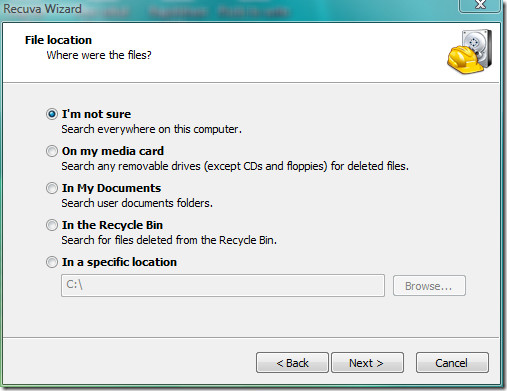
Once you have selected the file that you want to recover, click Next. It will then ask you for the location of your files from where you deleted them, choose the location and click Next.
That’s it and you will see a final step, click Start. Check the Enable Deep Scan checkbox if previous scans have failed to recover some missing files.
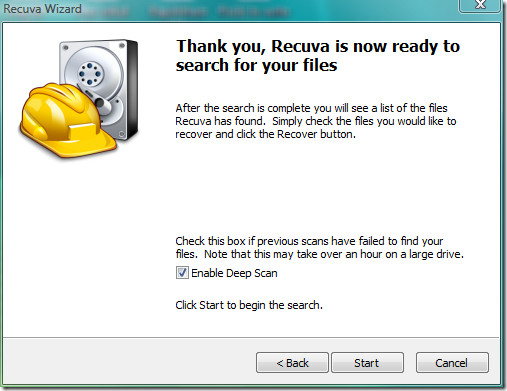
Note: Deep Scanning will take several minutes to recover your missing files on a normal hard disk.
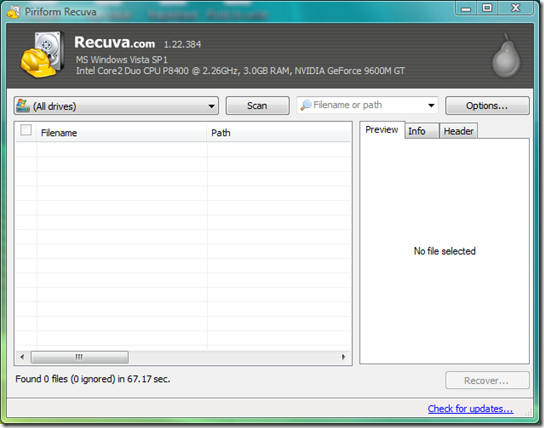
You can shift to Advance Mode by clicking the button on the top-right side. Here you will find it more easier to scan your drives, you can preview the recovered files and have tons of options which can all make recovering files a piece of cake.
Let me know in the comments, if this tool helped you in recovering your lost files. Enjoy!

Recuva can be used to recover lost data from android phone, if you lost data from your android phone, you can also use MobiKin Android Recovery to recover the data.
It would help if the program was free, like a trial offer or something. This program is not helpful at all.
Fantastic little program!
Saved my ass after deleting some files by a mistake.