Remove Blocked Files And It’s Locking Processes From Windows
Last year, we reviewed an app called Unlocker that can unlock any locked file instantly. To unlock a file, it kills the Windows process that is trying to lock it. But not all files are locked by Windows processes, some files could be locked due to a malware. So if you are using Unlocker, you will only be able to kill the malware process, but cannot delete it. What will you do to delete the locking process(process created by malware) from the hard disk?
LockHunter is a free tool for Windows that is quite similar to Unlocker but with a twist. It integrates itself to the Windows Explorer right-click context menu, just right-click the locked file and select ‘what is locking this file?’ and it will show you the process that is locking the file.
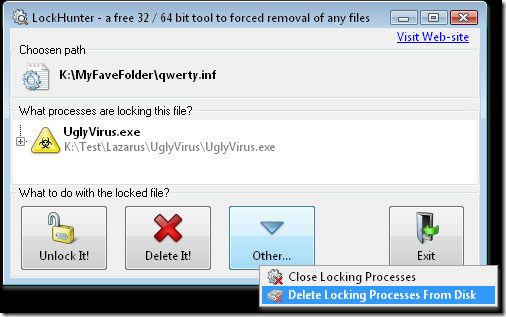
To unlock the file, click Unlock It, to delete the file click Delete It. If you want to delete the process that is locking the file, go to Other and then select it from the list as shown in the screenshot above. To kill the process, select Close Locking Processes.
Note: Make sure the process that you are deleting is a malware and not a Windows file. Deleting an important Windows file can result your operating system to become corrupt. If you need to fix blocked EXE files on Windows 10, there are additional steps you can take to prevent legitimate files from being flagged.
It works with Windows 2000, XP, 2003, and Vista. It comes in two versions, one for 32-bit and other for 64-bit operating systems. Enjoy!

Never had this problem with windows before Windows 7. Too bad 7 isn’t supported.
This really helped. I lost the ability to save pictures to My Photos. I could only save to the desktop. I just went to C:/users, right-clicked administrator and selected properties, then unchecked and rechecked full control, and hit apply. I got a few pop-up messages that I needed to confirm because “access is denied.” When the files had all been confirmed, I selected “ok” and I had full access again. Must be a glitch or something.
This is just F K I N G Microsoft. Those dumps do not know how to write a software. You would have an administrator role or be administrator but it is still asking administrator privilege. I am the admin idiot. All dump by MS. Does anybody recall a single software by MS bug-free ever?
i found the sorce of y its not working if you want to know then you have to send me 3 dollors to know. ok bye.
Hurrr Durr nice try slick willy
I just tried to install LockHunter, but I can’t because of not having proper permissions! Back to hunting..
i cannot create any folder …….. on my desktop in windows 7. Anyone can you help me?
access to my computer has been denied, can’t change ownership of computer can’t access file and download from microsoft
can somebody help Please
Branko Tomas
949-689-1166
I tried this, but “SYSTEM” is locking my folder and this program cannot remove it. It’s just an iTunes folder so I know it’s non-essential…help? 🙁
im having the same problem. I just got my laptop, so i know this isn’t an old program that’s blocking it, but when i double-click the iTunes shortcut on my desktop, i am informed that I don’t have permission to view/open it. have you found a solution to your problem yet?
I want to ask. this for windows 7. I opened the computer management, then the user’s settings, I click on administrator, then the property, at least the end of the tab, the column contents for localpath, I am content “C: \ ‘.
then I am ok. Drive C is not accessible or access denied. how to restore access c drive anymore. thanks
I have the problem with blocked files, many thanks for LockHunter
I can't unlock a specific folder in Win7. It's under WindowsWinSxS. Anyone know how to unlock WinSxS?
Microsoft Security Essentials identifies TrojanClicker:Win32/Yabector.B as contained in unlocker v1.8.8. (http://www.microsoft.com/security/portal/Threat…)
My brother, I have just tested both utilities and LockHunter is no where near as effective as unlocker. I tested this on up to 9 files, and each time unlocker was able to unlock and delete the file where LockHunter failed. I guess your review must have been on respective previous versions of both utilities. So, you need to revise the review to be current.
My brother, I have just tested both utilities and LockHunter is no where near as effective as unlocker. I tested this on up to 9 files, and each time unlocker was able to unlock and delete the file where LockHunter failed. I guess your review must have been on respective previous versions of both utilities. So, you need to revise the review to be current.
Does NOT work for my problem
Somehow on just one of my desktops, pdf downloads from a certain database provider are locked. Unlocker is able to delete them, whereas LockHunter, which I just used, does NOT detect any locking process and neither is able to delete the file!!
Curiously if I open the pdf in acrobat and save it again as save as, the new (same) file behaves “normally” i.e. can be deleted.
any suggestions would be more than welcome
thanks in advance
Paul
I think you read this post wrong
Well, unlocker also has explorer right-click integration, so i’m not quite sure what the “twist” really is… 😉
Well, it allows you to delete the process, apart from killing it. That’s the real twist!
Since I wrote this post in a hurry, I forgot proofreading. So the line that you read sounds a bit confusing, unless you read the whole post. =)
My brother, I have just tested both utilities and LockHunter is no where near as effective as unlocker. I tested this on up to 9 files, and each time unlocker was able to unlock and delete the file where LockHunter failed. I guess your review must have been on respective previous versions of both utilities. So, you need to revise the review to be current.
thanks and +1 to everythin this guy said