Run Internet Explorer 9 Without Addons In Safe Mode
Internet Explorer 9 has a complete overhaul but like other browsers, it is also prone to crashes. Most of the crashes takes place due to add-ons. Users who are facing constant crashes might want to start IE 9 in safe mode (add-ons disabled). There are three ways in which you can start IE9 in safe mode.
Method 1
Create a shortcut of Internet Explorer 9 on the desktop. Right-click this shortcut and go to Properties. Now add -extoff next to the Target path and hit OK.
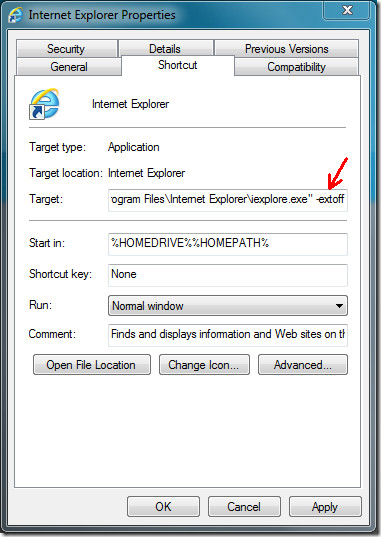
Now double-clicking this IE 9 shortcut will always open Internet Explorer in safe more, i.e, with add-ons disabled.
Method 2
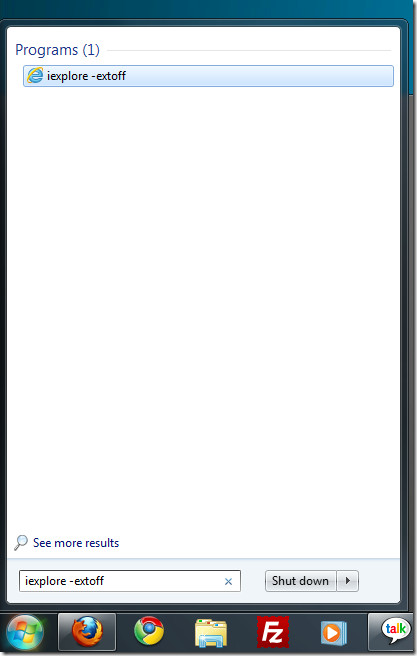
Type “iexplore -extoff” without the quotes in Start Search and hit Enter.
Method 3
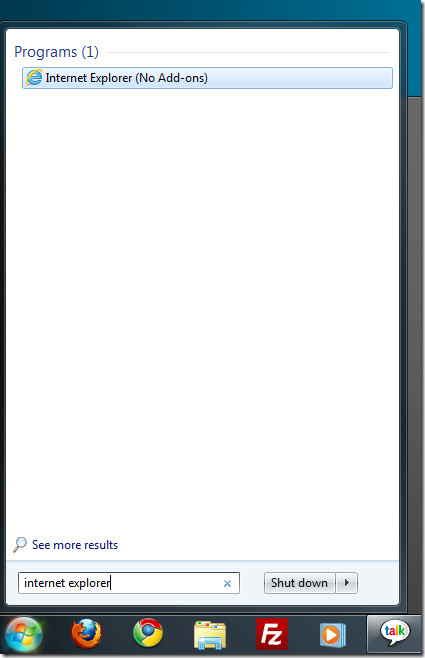
This is the most simplest method. Simply type Internet Explorer in Start Search and you will find the one which can run without the add-ons.

hi this is useful – thanks.
if you copy and paste the “–extoff” from the article, just remember to swap the symbol from – to – otherwise it can paste the wrong symbol.
copy this instead:
-extoff
Thanks I think it is helping on iE-11. My problems started when upgrading to Win-8.1, it required a new office 2013 and then this Ie-11. I will not upgrade any of my other computers due to the immense headaches. Good Luck all