Search Files & Folders Using Extended Filters With SearchMyFiles
Usually, there are thousands of files stored in our computer, and looking for something in that big a stash is something very hard if you have to do it manually. A better, more efficient way to look for a file is to use a search tool. When searching for files or folders, setting up the proper filters plays a very vital role in quickly locating the required file or document. The default Windows search function is a bit limited when it comes to adding multiple wildcard entries, and setting up filters for including and excluding multiple formats from the search. SearchMyFiles is a portable file searching application for Windows, developed by Nirsoft, with multiple searching modes, including Standard Search, Duplicate Search, Non-Duplicate Search and Summary Mode. It allows you to search for files in multiple, user-selected folders and exclude folders from your searches, while performing system wide searches. The application lets you apply separate wildcards for files and sub-folders, as well as add specific extensions to exclude from the search. Other filters include file size, recursive search, attributes, file time and maximum number of results. The search results can be saved and exported in HTML format for later viewing.
When you search for a file using the Windows Explorer search, most of the times, even the search brings back hundreds of results. It means that you have to look through this list again to open the required file. Compared to the default Windows search function, SearchMyFiles contains a lot more options for narrowing down your search.
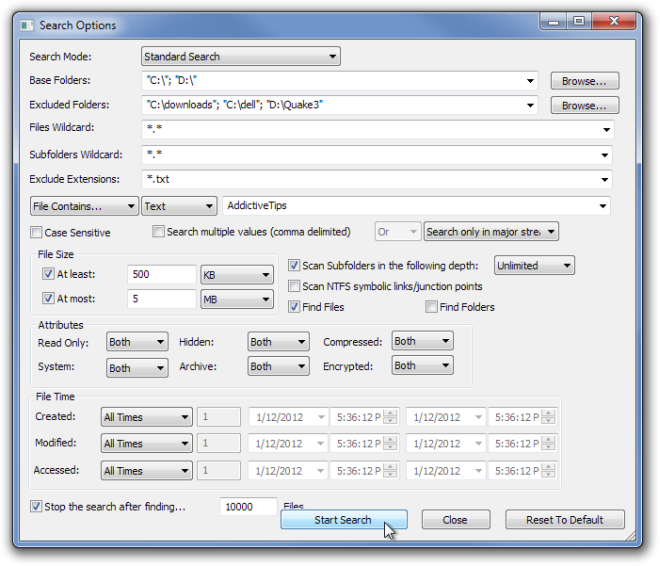
To search for a file or folder, select the Search Mode, Base Folders, Excluded Folders, and the required Files Wildcard, Subfolders Wildcard and Exclude Extensions. Then, enter the Text or Binary that you want the application to find or don’t find, and enable/disable case sensitive search. You can set filters for Minimum and Maximum File Size, enable/disable Recursive Search, select to search files containing particular Attributes, define the Created, Modified and Accessed File Times and specify the Maximum Number of Search Results. Once all settings are done, click Start Search.
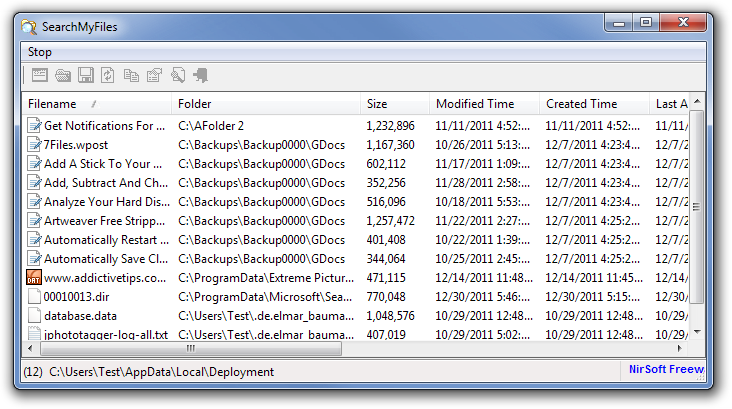
Once the search is complete, the SearchMyFiles window lets you perform various functions such as Save list, Generate Reports, mark Duplicate Files, set Summary File Size Unit etc. The list of search results displays each file with detailed information, such as its File name, Folder path, Size, Modified Time, Created Time, Last Accessed etc.
SearchMyFiles works on both 32-bit and 64-bit versions of Windows XP, Windows Vista and Windows 7.
