Share Wireless Internet Connection In Windows 7 Without Ad Hoc
Last year we explained how you can create your own wireless ad hoc connection in Windows Vista, the same steps are applicable in Windows 7 as well. Last month we covered a tool called Connectify which help turn your Windows 7 into a virtual WiFi HotSpot. Using Connectify was much more secure, faster, and easier than to simply create an Ad-Hoc Connection.
Today we found another great app called Virtual Router. Like Connectify it turns your computer into a virtual WiFi Hotspot allowing others to connect to your computer and use the internet. Virtual Router somewhat blends better in Windows 7 when compared with Connectify.
Just enter the Network Name, select a Password, choose the connection that you want to share and hit Start Virtual Router.
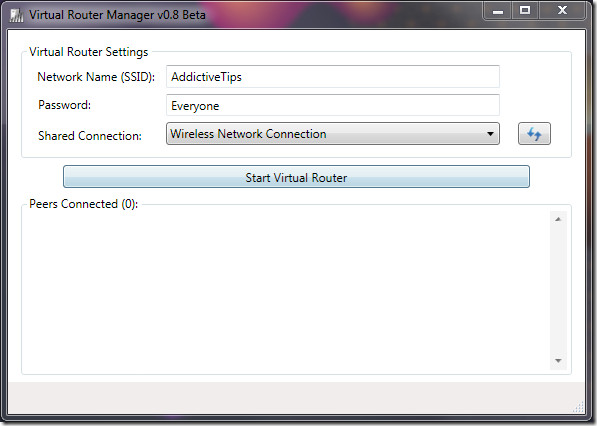
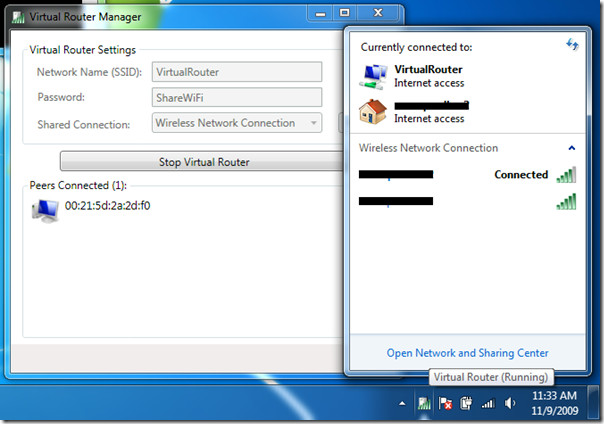
Once done, you will see all other computers that are connected to your WiFi under Peers Connected. The screenshot below is taken from developer’s page.
It works on Windows 7 and Windows Server 2008 only because they have a new build-in Wireless Hosted Network(also called Virtual WiFi) technology. It uses WPA2 Encryption which is part of Virtual WiFi technology to provide maximum security. This encryption cannot be turned off.
How is it different from Ad-Hoc? There are various reasons, Ad-Hoc is best suitable if you are connecting two computers and can be used to even share files, while using tools such as Connectify and Virtual Router only share the internet connection with multiple number of computers.
From the technical point of view multiple computers can connect to your ad-hoc connection but that will result in slower internet connection speed. Fully utilizing the build-in Virtual WiFi technology helps in faster connection.
The app is written on C# and is hosted at Microsoft CodePlex. Enjoy!

crazy question, but for my purposes I need to not use a password and make it unsecured. Anyone know how to do that. Nether this app nor using cmd seems to give me the option to make in unsecured.
Awesome. Flawless!
thanks a lot but > i have a question please help me.
evry time i press “start virtual router ”
i got this msg error
” the group or resource is not in the correct state to perform the requested operation”
thank you so much,it’s work perfect
hey how did u do this
Hi its failing as below, please help…
Hi its failing as below, please help…
Thanks for the share, man! But it doesn’t work with my updated
windows 7 wireless adapters no matter how I set. Errors kept coming out.
Until I tried this tool –
Virtual Hotspot, a new one, then problems solved perfectly. So happy I
am. 🙂
Works perfect! Thank you man.
great app 4 thumbs up… now my PC can act as a Repeater in my home wifi.. Good Job Dev..!!!
get the same problem of not connecting,just disabled all my wifi network which i have created for internet sharing, and it starts working…
works perfectly….try it.
Great app, works perfect
thisisbadbero
I’m connected right now using Wireless USB Broadband, but no choices for where to get internet connection. That’s why Virtual Router Could Not Be Started. Crap!
i have USB broadband and i can’t get virtual router going as my shared connections field is blank and nothing coming up…….
“Virtual Router sucks” – why?
“It is 100times better than virtual router” – how?
well for starters Doesn’t Work At All!
“Virtual Router could not be started!”
Virtual Router sucks. Better try for CONNECTIFY. It is 100times better than virtual router.
This is better than Conectify, it allows for GRE Encapsulation while Conectify doesn’t.
Useful for connecting to VPN’s through a shared connection.
Same problem with me : “virtual router could not be started” 🙁
Hi,I've already install Virtual router manager software, but can not start (Virtual router could not be started!). I am using win7 ultimate. Could you please help me to solve this problem?Thanks.
LOL Does not work with updated windows 7 intel pro wireless adapters! Gives error.
LOL Does not work with updated windows 7 intel pro wireless adapters! Gives error.
LOL Does not work with updated windows 7 intel pro wireless adapters! Gives error.