Shoot-out: Dropbox vs. SugarSync
Backing up files in the cloud has become an activity that has been made sufficiently intuitive to actually improve productivity. Easy-to-use automatic backup clients like Dropbox, Live SkyDrive and Mozy give people easy backup or synchronization facilities. SugarSync is another player in the folder synchronization segment, allowing you to have your files available on all your computers, as well as online. A direct comparison between SugarSync and the better-known Dropbox is the crux of this article.
Plans
It appears as if SugarSync is really focused on keeping as close to its competitors as possible. For starters, the free plan is – as with Dropbox – 2GB by default. One can invite someone or be invited, which will give you both an extra – as with Dropbox – 250MB, up to – as with Dropbox – a 5GB max (you might get 5GB extra instead of max. 5GB in total, but that wasn’t at all clear). However, when we have a look at the (individual) payed plans, SugarSync does a lot better than Dropbox: for $119.88 a year one can get 50GB for Dropbox, while you get 60GB for $99.99 at SugarSync. A year of Dropbox’s Pro 100GB plan will cost you $239.88, but no more than $149.99 for SugarSync’s services. In short, when you need lots of space, it’s quite expensive for both services, especially compared to Google’s current rates (which does NOT include such a backup client, though), but between the two SugarSync is significantly cheaper.
Installation
After registration – in which you get a nice username.sugarsync.com subdomain – we see the first difference between Dropbox and SugarSync: Dropbox supports Windows, MacOS as well as Linux where SugarSync lacks the latter. However, SugarSync is well-represented in the mobile segment: Dropbox has an iPhone application, but SugarSync tops that with support for iPhone, BlackBerry, Android and Windows Mobile. This gives SugarSync a significant advantage.
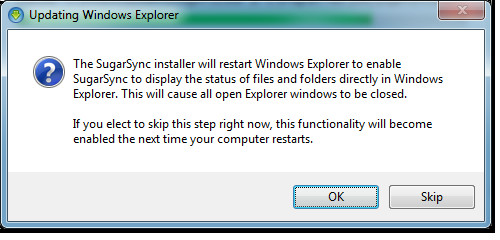
During the installation, I found it quite elegant that SugarSync gives a warning before it momentarily closes Explorer in order to load SugarSync’s Explorer extension. This extension will point out per file and folder whether it is synchronized (similar to Dropbox’s Explorer extension). Last time I checked, Dropbox doesn’t give this message on installation, something that’ll lead to a loss of all opened Explorer windows without any warning. With SugarSync, you can even choose to skip loading its extension for the moment.
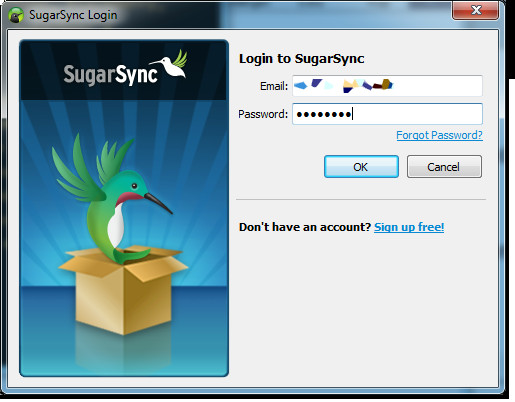
The sign-in screen with a nice hummingbird or robin gives a Twitter-like appearance, and the icons/avatars you can choose for registering and identifying your computer are quite childish, but sufficient.
Configuration
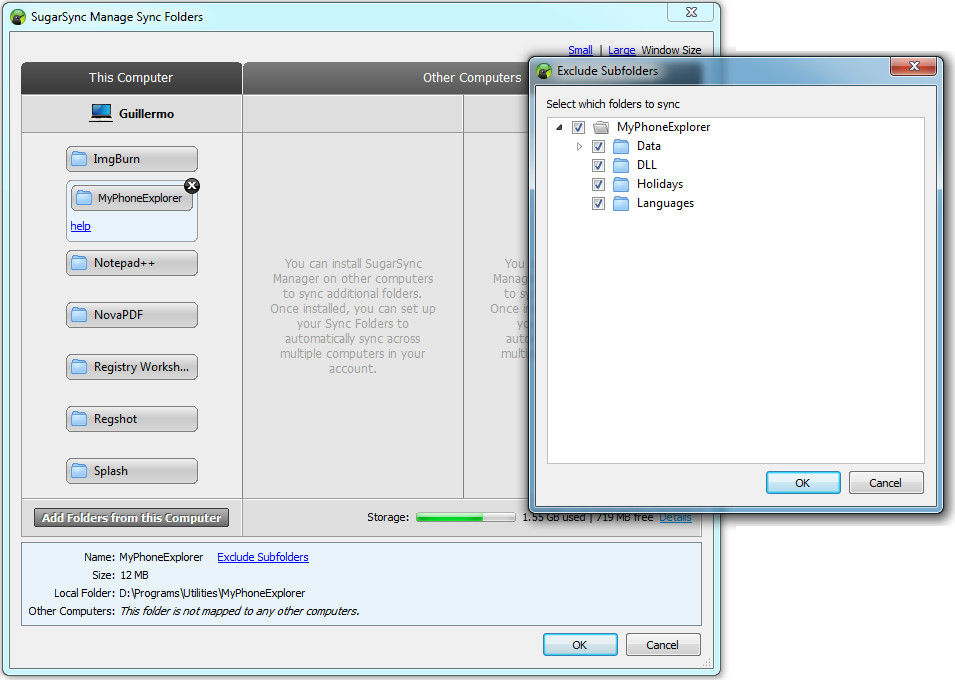
SugarSync allows you to sync more than one folder between a number of computers. You can set up per system which folders need to be synchronized. In addition, the Magic Briefcase sort of works like the Dropbox folder: whatever you put in there will be synchronized between all your computers. This gives SugarSync a whole lot of extra versatility compared to Dropbox, something I consider to be a significant reason to choose for this service.
Most of the Manager software is worked out into more detail in the web interface: the selection of the folders to be synchronized is the spearhead of the whole, apart from a slider to select the bandwidth usage (low, medium, high). Overall the upload speed was quite low. On specification of the folders, it would have been even better if one could group the selected folders under virtual folders/groups, instead of the current presentation of all folders in one flattened structure.
Resources
While uploading for the first time I was quite shocked by SugarSync’s resource usage: on average over 280MB of memory was used and my C2D 2.4GHz was used for 30-50% by the Manager process. Luckily this was only due to the initial indexing of all files in the selected folders. CPU usage on upload dropped to less than 2%, memory usage however stayed the same. Upon a restart, this dropped to 25MB, though, but it it did rise again over time (up to about 60MB during testing). Dropbox uses – primarily due to its Python framework – about 56MB of RAM on start-up/while indexing (on an x64 version of Windows 7), increasing slightly on syncing, but over time it can drop to about 27MB. Dropbox’s CPU usage is somewhat more than SugarSync, that might be because of its differential file synchronization and compression method.
Versioning
Versioning is implemented nicely in both services, although significantly different. Quoting the Support page: “SugarSync automatically backs up the last 5 versions of a synced file. Only the current version of a file counts against your storage quota.” This, however, is only the case for a paid plan. Free plans allow for 2 versions per file. Dropbox takes another approach, saving an infinite amount of versions for all your files, but only for 30 days. If you want to extend this indefinitely, you have to add the Pack-Rat extension to your paid plan. What’s best of course entirely depends on your own behavior: if you save your files after every little change, SugarSync’s version management might not be enough, whereas if you’re saving sparingly and like to have an older version around for longer than 30 days to fall back on, it might turn out to be better. In addition, you can put a particular version of a file inside SugarSync’s Web Archive.
As with Dropbox, you’ll get a nice overview of the latest changes (additions, removals and updates of files and folders), although Dropbox’s grouping of events and full history logs is a significantly better implementation.
Extras
In addition to folder synchronization, SugarSync has quite a few interesting other features. For one it has a Web Archive: “A place to put copies of files that you do not want to automatically sync when you edit or delete the original version. You can use it to free up disk space on your computer by securely backing up your files remotely.”
Furthermore, there’s support for real-time streaming of music and videos to Android phones, you can create multiple photo galleries, you can directly view and share photos from your mobile, publish photos directly to Facebook and share several folders with customized privileges and then there’s that magic briefcase thingy. From the web interface you can – as in Dropbox’s – download multiple files in zip-files, send multiple files by email and access previous versions. In addition, SugarSync will send you an email message as soon as someone accessed the files you sent them, simply brilliant. With WebSync, a Java applet allows you to edit any file directly from the web interface on any computer and sync the updated file to the web and your other computers.
Dropbox allows you to run a simple website from within the /public folder, I couldn’t find such a feature in SugarSync, although that doesn’t mean the feature’s not there.
The SymLink/Junctions story
As with Dropbox, changes of files and folders inside directory junctions or symbolic links are not recognized instantly by SugarSync’s client. I suppose this is an issue linked to Microsoft’s implementation of symlinks, but either way it makes it impossible to create your own virtual folder structure inside a sync-folder: files and folders will only be updated upon a restart of the client. For Dropbox, this meant that you should put anything in the Dropbox folder and then make symlinks on the locations you originally wanted the files to be. Not a good thing. At least with SugarSync you’re allowed to choose multiple folders, but it won’t allow you to subsequently create a virtual folder structure. For some extra customizability, though, SugarSync does allow you to exclude subfolders of a synced folder.
Conclusion
Use SugarSync. It’s that simple. Dropbox lacks flexibility when it comes to folder specification (this might change in the future) and on top of that SugarSync comes with extensive mobile platform support, better sharing functionality and for more “professional” use a nicer pricing. The only BIG “but” here is that SugarSync still does not offer a Linux client.
Pros
- Does everything that Dropbox does
- Extensive support for all popular mobile platforms
- Multiple folders sync (set up individually per computer)
- Offers more attractive payed plans
Cons
- No Linux client
- Maximum of 2 computers to be linked to a free account
- Only 2 previous versions of a file saved for free accounts (5 for paid plans)
- Unpredictable memory use (can be important for those 1GB RAM netbooks)
Update: thanks to some comments below, I got some more information about the restrictions of the free plan. First, as already mentioned by caschy below, you can only backup & sync from max. 2 computers per account – with a paid plan the number of computers is unlimited.
Furthermore, I checked both versioning systems to some more detail. For that, see the ‘Versioning’ header.

SugarSync sucks, watch out for their billing policies, I tried to cancel after 2 days and they would not refund any portion of the subscription fee.
Complete piece of crap. Not only does it slow down my PC, but it COMPLETELY ignores new files. It does not see anything I have done in the last two months.
It seems blindingly obvious to me that the positive comments here are from SugarSync employees,
There is one GREAT thing about the product; it is easy to uninstall.
I agree with bill. the Support is terrible (1 to 2 weeks for a condescending unhelpful response), cancelling is impossible. These guys are running a scam site, do you really want to trust your data with them?
AVOID AT ALL COSTS!! Like the Hotel California, “You can check out any time you’d like, but you can never leave …” When the service works, it’s great, when not, it’s a nightmare that never ends. A single file of mine got stuck on their servers and they couldn’t fix it. “No problem,” I thought, “they can restore one of the five previous versions that they always keep.” Right? Wrong. After a month of e-mails (live support costs $100!!) they couldn’t find it or restore it. They’d lost everything.
Fine. I went back to DropBox, unsynced my computer, deleted my files, deleted SugarSync from my computer, and downgraded to the 5GB free account (No way to delete your own account!!!). That’s that, or so I thought.
Then they hit me with an “auto-renewal” for 100GB!!! What? They charged me for the files on THEIR server that I can’t delete by any means at all!!! Only they can delete them. I’m having to go through my bank to file FRAUD charges.
Don’t mess with SugarSync – it’s a SCAM. Do a websearch for “SugarSync” and “Scam” and you’ll see I’m not the only one …
I decided to try both. I like dropbox but it does not sync from android. sugarsync does but after installing it I have lost some of the files I synced. It was good that I had an extra copy on dropbox.
Hello,
Today SugarSync can now have a quota UNLIMITED Storage!
You start with 5GB
+250 MB if you have an iPhone / Android / Blackberry
+750 MB if you create a file and you share it (SIMPLE)
+500 MB if you register through this link: https://www.sugarsync.com/referral?rf=bqwi798vmex5t&utm_source=txemail&utm_medium=email&utm_campaign=referral
+500Mb per friends you invite after your inscription.
And you can do this an illimited number of time !
Cordially,
E. GREGOIRE
Looking for the best online backup website?
SugarSync is NOT it!! Here’s the REAL scoop and why not to choose them from someone who has:
1.Support is HORRENDOUS. They rarely get back to you, and if they do, they hardly read your question. Instead you start getting sales emails.
2. Once you start your sync, you can’t add new folders or files that have been/are being created during the forever-sync.
3. Support is greeted with autoresponders “Your question has been received. We are currently experiencing a higher than normal volume of requests and will respond to you as soon as possible.”
4. If you lost a file, and you want to search and restore just that, you can’t. You have to know exactly which folder it was. Good luck on few thousand or a few million files, right?!
5. SugarSync does not support scheduled backup.
6. As soon as you locate and call attention to all their problems and errors, they ban you from free chat, not because you’ve done anything wrong but because they want to sell their chat support. Total scam.
7. During pre-sales, you ask focused questions and they respond with canned replies or one link to their general knowledge base or manual. It’s a joke.
8. Support is completely passive-aggressive. They look down on customers and answer you “if and when” they want.
9. And GOOD LUCK CANCELLING!! Once you cancel, they ignore all your emails (they receive them, they just pretend they don’t)…AND CONTINUE CHARGING YOU EVERY MONTH !!!!!!
10. They’re obviously doing this to so many customers, we emailed them about 10-15 times that we’d already cancelled (over a period of months) and they kept sending bogus canned replies like “enjoying our service” type nonsense.
11. Ultimately, they owed us hundreds of dollars, which (I guess they figure) “no one will really notice” a charge of $25-35 per month. How many companies do this nowadays to scam everyone cancelling…even if they can get 10-20% of the suckers who miss it on their bill.
12. Of course, they make sure to keep sending you emails “if you decide to cancel, please do so before your trial has ended.” before the trial is up BUT THEN THEY IGNORE YOUR CANCELLATION REQUESTS SINCE THEY HAVE YOUR CREDIT CARD ALREADY.
SugarSync wasn’t just bad technically, it was bad customer service, bad all the way to its core. I can overlook a few technical errors etc, but this went wayyyy beyond that to big-time fraud, in my experience.
I’ve seen a LOT of other reviews elsewhere complaining of the same thing.
13. Oh yeah, and I forgot the big one: CONSTANT CRASHES on a brand new system. PLEASE avoid these scam artists.
Each time you send a CANCELLATION notice, they THINK that they’re “FUNNY”(??) to IGNORE your requests & , instead, email you back a MARKETING / SALES reply. Zero regard for customers, I think they actually look down on their customers as idiots.
It’s a money trap. Sooooooo many headaches. Spare yourself.
This article is missing another big CON (in my opinion). Sugarsync limits you to only 25mb for sharing files!! Dropbox allows you to share any files up to 1GB!! Dropbox all the way! Don’t be fooled by all the free space… for sharing your folders with others, Sugarsync sucks!
This is a great solution, far more flexible than Dropbox with many more features, and more space for free. Very reliable and fast too. Give it a try!
I have been using both dropbox and sugarsync for more than a year now and so far I am satisfied with both. Both services are useful for me, especially when file sharing and collaboration are needed in school. Both services also keep my files sync on my macbook air and my PC at home. The iPhone app of both services works great and is very handy. I only noticed one difference between the two. Dropbox syncs files faster than sugarsync.
Heres a referral for an extra 10GB storage:
https://www.sugarsync.com/referral?rf=cz57tat87zzw2
I personally have been using Sugarsync for a long time now and am more than happy. Not only are they cheaper than most of its competitors, they also offer by far the best product in the market today.
Also, if you use the following link to sign up for Sugarsync, you now get 5.5 GB of free online storage forever: https://www.sugarsync.com/referral?rf=ejjfpyq3n6nmz
DropBox’s blazing fast local sync is the killer feature, if you have multiple computers behind an NAT router.
SugarSync does not even work properly in the NAT situation.
Otherwise, I like the flexibility of SugarSync.
Good review – there are a few recent changes as of June 2011:
You get 5GB of space with the FREE version, but now there is no restriction to the number of computers you can sync/backup (up from 2).
It gives you the ability to upload and sync any folder on your computer.
It is the only service that offers such a broad device and OS support with apps for BlackBerry, Android, iPhone/iPad, Symbian, not to mention your computer!
Also if you use the below referral code you get a bonus 500MB extra on top of your Free 5GB!
https://www.sugarsync.com/referral?rf=tbtp0asbw9pt
Hope it helps someone.
We love giving away free storage! For every friend you refer to SugarSync, we’ll give you both 500 MB of bonus space. If your friend joins a paid plan, you each get whopping 10 GB storage!
https://www.sugarsync.com/referral?rf=b87n3pdti8nzf
Great review, thank you. For me, Sugarsync win this battle hands-down. I have been using Sugarsync for a long time now and am more than happy. Not only are they cheaper than dropbox, they also offer by far the best product in the market today.
Also, if you use the following link to sign up for Sugarsync, you now get 5.5 GB of free online storage forever: https://www.sugarsync.com/referral?rf=ejjfpyq3n6nmz
SugarSync registration with to 10Gb bonus, yet unlimited!!!
https://www.sugarsync.com/referral?rf=cz57tat87zzw2
get 500 mb free space with this referral link too if you want to sign up for Sugarsync.
https://www.sugarsync.com/referral?rf=fnxbojjc2fgmx
I’ve used the free version of Dropbox (for OS 10.5) for a year now and have been very happy. I signed up for Sugarsync a week ago because of its flexibility and was reasonably satisfied with the free version. Then I switched to the paid version and tried to sync a large directory (10GB). Despite leaving my computer plugged into the high speed ethernet for the past 5 days, SugarSync still hasn’t finished uploading all the files. One of the problems appears to be that every time I put put the computer in sleep mode, SugarSync loses track of which files are new (or changed) and needs to re-upload over a thousand files each time. Once or twice it also hasn’t restarted the upload when I’ve woken the computer up, and so I’ve needed to quit and restart Sugarsync to get it going again. I’d like to see if it behaves better after the initial upload is complete… if the initial upload ever completes. I’m seriously thinking about canceling my subscription and paying the extra bucks for Dropbox.
Yeah, SugarSync has everything going for it, until I want to sync up with my Mac at work — system requirements are for OS 10.5, but we have 10.4 at work and no plans for upgrade soon.
Dang it.
Thank you, I used your referral link to sign up. That gave me some extra space.
Here´s another one:
https://www.sugarsync.com/referral?rf=cgjsbw93ttdg
USE THIS LINK TO REGISTER AND GET 5GB FREE + 500MB EXTRA
https://www.sugarsync.com/referral?rf=fnr5cpira3959
Your link doesn’t work TBATBA once you go through – the one above it from MIKEY seems to!
Thanks Guys
You can get an extra 250mb of dropbox space and help me get extra space to. http://db.tt/XJvOZy1
A Good review – there are a few recent changes though:
You get 5GB of space with the FREE version, but now there is no restriction to the number of computers you can sync/backup (from 2).
It gives you the ability to upload and sync any folder on your computer.
It is the only service that offers such a broad device and OS support with apps for iPhone/iPad, Android, Blackberry, Symbian and WinMo.
On the Free version the upload/download is faster than when reviewed 🙂
Also if you use the below referral code you get 500MB extra on top of the Free 5GB or 10GB extra on any of the paid-for services!
https://www.sugarsync.com/referral?rf=byowz8gkqiyv
Hope it helps someone.
Sign up via my referral link and get an extra 500 MB: https://www.sugarsync.com/referral?rf=eph2pgrbnse6g
dropbox is best. i have 10gb of invited friend.
http://db.tt/K1arPYD
I have been using DropBox on my MacBook Air and iPhone 4 for months, and it is fantastic! I also have a MobileMe account, but Apple’s iDisk is slow and clunky, so I prefer DropBox. If you would like to use DropBox, click the following referral link: http://db.tt/6GaSNp8
Note: by using the referral link above you get an additional 250MB on top of the typical 2GB…and so do I 😉
I used sugar sync for a few months and it simply doesn’t work if you have over a few thousand files. 75% of my folders weren’t syncing and their support service wasn’t very helpful.
I sent them my log files and everything and in the end they didn’t fix the problem, they just told me to restart the whole system and start resyncing everything again! The problem kept coming back and they didn’t really want to make their system more robust.
Plus it doesn’t work on linux.
I’ve been using SugarSync for about a year now and I’m really satisfied. Very little system load compared to other similar products I’ve tried and has never once crashed.
If you sign up via my referral link below we both get an extra 500 MB if you sign up for a free account or 10 GB if you sign up for a 30 GB account or larger:
https://www.sugarsync.com/referral?rf=hvcrnjz57xeq
Pros:
Many features, very stable, easy on system resources
Cons:
Sometimes if you choose manually to move the files to all synchronizing computers (instead of just moving them to the shared folder of ONE computer and then letting SugarSync sync the others via the internet) Sugarsync creates duplicates even though we’re dealing with completely identical files (same checksums). Sugarsync renames the duplicates according to where they we’re found again so you’ll get to versions of the same file (but with different names) on your computers.
Sometimes you can circumvent this by pressing CTRL-SHIFT-R thereby ordering SugarSync to do a clean restart. But how it really works I don’t know….
Nice post Willem. IMHO Dropbox is much better since you can take it to 19 GB for free. Here is a nice step-by-step tutorial for doing so:
http://maxyourdropbox.blogspot.com/
Dropbox user of 2 years, paid for a year, just switched to sugarsync, waaaaay better. The ability to chose folders, the GUI is very well done, and the memory usage is 50% that of dropbox.
SugarSync just made a big announcement – the FREE account now comes with 5 GB of storage (previously 2 GB).
Plus, Free users can now sync an unlimited number of computers and devices!
https://www.sugarsync.com/blog/2010/11/10/get-more-free-storage/
I’ve extensively used DropBox, SugarSync and several other similar free services including Zumodrive.
I prefer ZumoDrive for a few reasons:
The computer app advantage:
You can easily set any folder on your computer, including those on your network as a linked/synced ZumoDrive folder (rather than just having a Dropbox folder).
The best iPhone app (to date):
1. It had file caching right from the start, and you specify separate memory limits for storing docs, photos and music.
2. Shared folders from other users appear in your ZumoDrive, and are cached on your iphone in the same way.
3. Easy access to all photos or music in all your linked folders with in-built media player that indexes and lists your music from all folders by album/artist etc.
4. Download several files at once, and see the download queue and progress
They also have ZumoCast now, which provides unlimited access/streaming to your all your files, music & videos, inclduing those on your network, provided your computer is switched on (this also has file caching on the iPhone app).
I’m fairly new to the concept, as I’m not someone who is on the computer a ton. We use Dropbox here at my new job and it seems very intuitive. How user friendly is sugarsync for people who aren’t techies?
Here is my assessment of Dropbox vs Sugarsync:
DROPBOX:
Pros:
-Fast uploads
-sleek intuitive interface (PC & Mac)
-website file search
-can install without admin rights.
Cons:
-Cannot sync different folders to different computers
-no online storage that isn’t synced (for files you don’t want to download with every installation),
-no $5/month plan (you get 2GB free, or 50GB for $9.99).
SUGARSYNC:
Pros:
-Advanced feature set (e.g. Password protection for folders on invites, online file editing…).
-can backup some files online without syncing them if you want,
-can sync different folders to different computers (don’t need to download everything with each installation)
-More flexible price plans ($4.99 for 30GB)
-Offers 30 day free trial (requires entering credit card details though – so don’t forget about it!)
Cons:
-Confusing/counter-intuitive interface (PC and Mac), e.g. “Manage Sync Folders” and “SugarSync File Manager” are two different things
-Clunky online interface.
-Need admin rights to install (v. irritating if you just want to sync work with home).
-No online search. If you access your files through the website, you can’t do a search for the one you want.
-Slow upload speeds.
-I’m nervous about online reviews citing bad customer service and data loss.
-Irritating emails summarizing daily activity, other services, tips, etc.
-Sugarsync for mac comes with a disclaimer saying it might occasionally be unstable.
-Free 2GB account only available through invitation by paying user.
Verdict:
For the moment I’ve gone with Dropbox on their $9.99/month plan. It’s only a minor irritation to have to download all the files you backup every time you install on a new computer, and it takes much less time than with Sugarsync anyway. Dropbox allow you to vote on features you’d like to see in the future and from the looks of it, they’re busy developing them. For example, they promise future releases will have multiple folder syncing, password protection for folders, etc. Sugarsync’s clunky interface is a time-waster; you have to use it regularly to remember quickly where the functions you want are, and, frankly, the number of reviewers saying their support is terrible is not reassuring. Dropbox does not allow me to store files online without syncing them to every installation, whereas Sugarsync does, but for that I can use Google Docs or my Fastmail account Files folder (2GB each) anyway.
If Sugarsync made their advanced functionality user-friendly, introduced non-admin installation, a search functioned and were able to reassure me that they won’t lose my data and will offer good support, I would go with them. However, I’m unconvinced this will happen soon.
Requiring admin rights for each different computer you install on seems inconvenient, but not just to me. If I want to share files with other people, and recommend Dropbox to them, they have no probs with installing on any computer. I might have admin rights to my computer, but someone I know might not have it for the machine they’re working on (e.g. at work). That rules Sugarsync out.
Dropbox look like a friendly, growing business and their slightly inflexible price plan seems worth tolerating. I have faith they will get the features I’m missing online soon to keep their growing fanbase happy. The features they’ve offered me so far have worked well and their speeds are fast. I’ve not had any problems with Sugarsync’s treatment of my data, but they’re slower and I find it amazing that a company in their position didn’t consider a search function for the files you store online with them. For the foreseeable future, it’s Dropbox for me.
I recently evaluated these two services and found the insights in your article very helpful.
The upload speed issue that sugarsync had and is mentioned a few times in the comments seems to have been worked out as when uploading a small number of 20MB files the upload times were identical to dropbox. (10 files, 3 attempts each service, ridiculous amounts of bandwidth available at the office)
There is however a place where the sugarsync system still needs a lot of work and that is when uploading a large number of small files. We are a web company and often times create new development copies of sites which while only 10-30 megs themselves, can contain thousands of files. When doing this, dropbox handled them as well as it did the 20MB standalone files. Sugarsync on the other hand seemed to have about 500 miliseconds or more of overhead for each file. As a result, some operations while small in size were taking an hour to complete as opposed to mere minutes in dropbox.
If you could get the silverstipe feature set and dropbox’s raw power that would be the service for me. Until then I’ll use dropbox, but I’m already looking to jump ship as soon as something better comes along.
Yes, it’s official, bonus space will not expire in SS.
There is really no reason not to have both systems installed and use each for what each does best as obviously there is no obvious winner.
Jay’s warning is very serious so better not to have just one backup (either SS or DB), especially if the back up system can actually erase your files.
drop box is better than sugarsync
You can share files of any size using drop box(free)
sugarsync offers >5mb for free users
In drop box: Properly unplug computers to avoid unwanted sync
I like Sugarsync because support mobile application and looks quite elegant. This stuff looks so simple and easy to use for anyone. Other importan point is Sugarsync support for real-time streaming videos and music. Thanks
I’ve used both SS and DB. While SS is easier to configure, setup and use more or less, their support is unacceptable. Basically, SS’s Tech support is non-existent or at best incompetent. With 3rd party tweaks, DB gives me EVERYTHING ss gave and more. go with DB.
Hi Guys
Just a word of warning to current and potential sugarsync users, we have lost GB’s of data when they forced the upgrade of 1.7.7 sugarsync manager to 1.8.0. Basically any data that was on a separate partition other than C: had their data totally corrupted.
Many users were affected, and they did not even take 1.8.0 off the download section of the website! Weeks of emails and support went unanswered by the indian techs. The only way we got an answer amongst users was thru the Sugarsync tech support forum (which was a nightmare to find, and you had to be a registered user to login).
I had to find old backups that were outdated by several months for our business and restore them only to find we have lost a *lot* of work, not to mention downtime. They have continually ignored our pleas to help restore the lost / corrupted data with their file versioning system.
Please stay away from them if you value ur data…and yes they can say that 1.8.2 fixed the problem but something so serious should never have happened in the first place!! We relied on them as our “backup”, but little did we know our data was getting corrupted as they were getting “backed up”!!
Hi everyone,
I have used DropBox for about 2 years now. Haven’t tried SugarSync… yet… Dropbox rocks for me. I only have 1 MB ADSL (256 Kb upload) and the speed which my files upload has always amazed me. I think I read that what makes DB so quick is that the level that the syncing occurs. DB uses Delta Encoding or Delta compression. e.g. if you are working on a 100 MB Photoshop file – say you open it and change a couple of colours then save it again. The file has now been flagged and a conventional back up system will just copy the changed file, the whole file. While this is fine is you’re backing up on a LAN but when you’re backing up to a Cloud-based system, this would take ages. You’ll find that because DB will only sync the change, it will sync in a few seconds. Does Sugarsync also sync this way? Can’t find anything about it on Google.
http://en.wikipedia.org/wiki/Delta_encoding
http://en.wikipedia.org/wiki/Dropbox_%28service%29 – here it says: The version history is paired with the use of delta encoding technology. To conserve bandwidth and time, if a file in a user’s Dropbox folder is changed, Dropbox only uploads the pieces of the file that are changed when syncing.
I’ve been using sugarsync for almost two years now and I’m 100% satisfied with the service I received. I don’t know about Dropbox (Have an account, but haven’t used it much), but to me, sugarsync is the best. I can sync my files to any computer, generate public links to files and post them on my site for download, share pictures with my family, share folders with my colleagues and what not!! You name it and I have it. Its true that the speed of upload is slow and system resources are used more, but, I’m willing to sacrifice a bit of my resources to enjoy what they provide.
Corrections to some of the replies from you guyz:
1> I contacted sugarsync’c Customer service asking why the referral bonus will be removed after January, 2011 and the reply I got was great. They say that they are revising the program and the restriction is going to be lifted. You will not loose the referral bonus you earn!!!! That’s great news for me as I have 95GB worth referral bonus ;-). They are going to announce this sometime soon.
2> You can generate public links to files and post them on your website. clicking on the link will download the file automatically. No advertisements!! The best part is, once you generate a link to a file and then you update the file, the latest update will be available for download through the same link. You don’t have to generate another link for the same file!!!!
3> There is a stop sync feature. Once you set a folder to upload from the computer, you can always remove it. Doesn’t matter if the upload has finished or not. This will not delete files from the computers.
4> sugarsync doesn’t need to be run as an administrator. You just need administrator priviliges to install the application. Once installed, you can use it anytime on any profile.
5> The upload speed restriction for the free 2 GB plan has been removed. You will receive normal speed on the free plan as well.
6> It looks like the individual plans were actually designed to be used across many computers but only single user. They rolled out a business plan which has admin functionality over the other users in the same account. From what they say, you can define permissions and restrictions for different users in the system. Check here for details:
http://www.sugarsync.com/business
Having said this, I would like to conclude saying, if you are trying to back up your files and sync them to other computers, sugarsync is the best way to do it.
cheers,
Shane
Sugarsync is now giving 3GB of space for free user through their
“sync-outside-the-box promotion”
http://www.sugarsync.com/offers/sync-outside-the-box.html
the title is kinda referring to dropbox inability to sync other folders outside their dropbox folder!
SUGARSYNC is a clear WINNER not only to its price’s versatility but also to its
Kleb, as Rogelio pointed out above, SugarSync is taking back all your “free” space after January 1st, 2011. See their term 11 in this page: https://www.sugarsync.com/referral_terms.html
Hence, their aggressive campaign to enlist new users benefits no one but them. That strikes me as pretty distasteful, and since this information is buried in fine print, it’s dishonest as well.
On symlinks. It is really quite easy to use them with Dropbox: there is mis-information in the posts above. This might also work with Sugarsync: someone with an account might try it.
One’s first impulse is to put a symlink in your Dropbox to a folder that you do not wish to move to your Dropbox. Understandable, but it doesn’t work.
The solution is quite simple. Move the folder to your Dropbox. Grit your teeth get over it. When we’re done you’ll be OK. Now create the symlink to that folder in its original location.
Dropbox is happy and works perfectly.
It looks like your files are in their original location. Any program that relies on files in the original location will work (this is the difference between a symlink and a shortcut).
You get what you want: the files can be used/accessed just as if they are in the original location. And they sync.
It seems highly likely that this should work with Sugarsync: it doesn’t know anything about the symlink–it doesn’t matter.
One thing I noticed in the small print of Sugarsync is that referral bonus space expires after a year or so, thus, if you thought you would go around paying them for 5-6 Gb of storage space think again. In early 2011 they will warn you that either you buy a plan or shrink back to 2 Gb, that’s not so generous after all. I just installed DB and I have not found the small print on this issue.
By the way, I see Google making a slow, stealth but potentially strong advance along these lines. You may be aware of Google Documents if you have a Google account (in case you don’t, you can have working documents compatible with MSOffice and OpenOffice in their cloud). Well, two recent features make GD a syncing device: 1) You can now upload any kind of file to their cloud and 2) They have an offline mode so that all you have uploaded to their cloud may also be in your HD with the same client when you are not on line (they started an offline mode with gmail and it works great). Furthermore, your Google account starts with 7+ Gb (storing mail, pictures, Documents, etc) and you can get 20 Gb more for 5 bucks a year!
Disclaimer: I am not marketing for Google, but I think there is very little they can NOT do if you give them the time.
This review, and a heap of posts below it appear to be written by Sugarsync or someone who is doing some cleaver marketing for them. The review barely mentions Dropbox, in every paragraph it basically talks about Sugarsync and then if it mentions Dropbox it's usually to explain why Sugarsync is better or at least the same. Some comments below just going “great review” and I totally agree Sugarsync is better seem pretty lame to me
This review is written totally independent, I assure you that. Furthermore, if you looked a bit further you can see that I posted some comments as well stating I have had quite some issues with SugarSync since the writing of this review. The reason I took SugarSync as basis for this review is because it is the lesser-known service, while Dropbox is the established one. I don't really see any reason for you to conclude that this review isn't impartial, other than that you might have somehow formed a bias towards this opinion from the start and looked only for confirmation of this while reading. I hope the comments stating this is a review merely refer to the level of detail.How's things in Australia? Wish I could go back, I loved it there (exchange program in Canberra traveled a bit, beautiful place to be).Cheers!
WARNING DO NOT USE SUGARSYNC! SUGARSYNC lost all of my data and could not retrieve it from their own server. This company is a joke, they held my company hostage for 2 weeks trying to find my files that Sugarsync some how deleted from my desktop! Their horribly inept techs could not figure out where my data went so they just decided not to call me back. I finally got in touch with Debbie, Sr. Director, SugarSync Customer Care and she tried to make me feel stupid and that the whole thing was my fault. Sugarsync does not care about small businesses and their customer service is horrible.
Wow, that's quite serious, sorry to hear that. well, personally I came across some problems with SugarSync as well, since this review, and I have to say that although the setup is pretty damn decent, it's too early to call this service completely mature.
READ BEFORE YOU TRY SUGARSYNC!!!!!! I can confirm what Jay is saying as I am the co-user with him on this service. There is no safe guard for inadvertently deleting folders that are uploading from your desktop to SugarSync. When I realized what I had done–(I did not want all that uploading, only selected files), being a brand new user, Jay simply deleted incoming files that he could see as he was connected to my computer thru SugarSync. This is a logical assumption as there did not appear to be any obvious way to do it from that menu box. WHen he deleted those uploading files from his computer on the other side of the country, every folder on MY desktop dissappeared! Imagine my shock and dismay. “Customer service” couldnt retrieve them after giving us 2 weeks of runaround. Further, they could not STOP the upload of the remainder of all the thousands of files that continued to upload after the first ones were inadvertently deleted by Jay. They said there was nothing they could do, just let them continue to upload. This locked up my bandwidth for NEARLY 4 DAYS!!!!! As a small business person who relies on their computer, you can only imagine what the downtime did to my business and the stress of losing those files caused me. On top of it all, Jay was charged a technical call fee of $100–which they waived. Some items for your consideration when making improvements:1. I have hi-speed DSL–not as high as in some places, but there are many unsuspecting people out there that may use this service, not realizing that if they wanted to use this as “Storage in a cloud” they would be mighty unhappy after a few days went by and their files were still uploading….It took 4 full days to upload the contents of my Desktop and Documents Folders. I shudder to think if all 4 choices were checked during set-up and my photos and music were included in all the accidental uploads.New users need to be made aware that: A. once they start uploading it may take many hours–possibly even a week to upload everything–potentially locking up their bandwidth–businesses would suffer losses as I did during that down time. B. That you cant stop the process from your end until everything is downloaded2. Obviously, the “Stop Syncing” feature was not prominent enough– either on his end, nor my end –to make it obvious that if you accidently started uploading a folder you didnt want, (or if you change your mind), you could quickly stop it.3. I am astounded that there is no safe-guard to prevent files on MY desktop from being deleted remotely by SOMEONE ELSE on the other side of the country using this service who is connected to me. A new user could easily assume (as we did) that if you cleared out incoming files, it would stop them from syncing— but how on earth would they know it would actually delete those files from MY desktop??
Jamie, I just now started using both dropbox and sugarsync so I am not yet a proponent of either service. I must say though that it does make logical sense that if someone linked to the cloud deleted files from a sync folder that they would deleted from the sync location (your computer) as well. Just bad luck from an unfortunate mistake on your part.
It is quite ridiculous though that they could not provide you with copies of the files that were deleted . Does the versioning not cover deleted files? I also agree that a stop synch feature seems almost necessary.
First impressions definitely are in line with the author of this reveiw, but it seems long term users eventually switch to dropbox for speed. I suppose only time will tell which way I go as well.
Just wanted to say that after 32 hours have not heard about my horrific experience either. I lost 100 videos in one folder…all of a sudden the folder was empt when i placed to back on my desktop. Yikes, and then because I am a female, it had to be my fault. Plus, as it was downloading everything… and i had to keep upgrading as it warned me I’d loose all my data. Not impressed. Stay away for this company. Poor service. Rude.
Yes, I guess the biggest concern is that now they refuse to acknowledge the issue and have their heads buried in the sand hoping the problem and I will just go away. The biggest rub on all of this is my employees all warned me about storage in the cloud and now they can say I told you so.
I have used Dropbox and I do like it. My only problem with it is that my internet connection isn't that fast and it is frustrating to have to wait hours to sync data between my PC and laptop when they are sitting next to each other. I am also concerned that they hold my data. I don't have anything illegal but I do wonder just how safe it is. Anyway, with that in mind I recently found a new product that does sync called broolz. The web site (http://www.broolz.co.uk) says it is still in beta but it seems it will solve my current concerns and there will be a free version too, (free is my favourite price). Has anyone tried this?
Hi guys,We need a folder sharing facility so that we can access from anywhere. The total size of many such folders in about 30GB. I understand first upload will be a pain. Which system should we look at? We are just lost.
Oh… and also, the ability to support an unlimited number of computers makes it possible to share files — almost in real time — on DropBox, not only within our company — at no cost — but also with our customers. This is great. Neither SpiderOak nor SugarSync can touch this.
We've looked at Dropbox, SugarSync and SpiderOak; all of which have similar conceptual designs, to recommend to our customers. I keep going back to DropBox. It's very simple to install and appears to be much more reliable when files are corrupted or lost. SugarSync's version capability (SugarSync free is limited to 2 and only 5 for the paid version) is totally inadequate. I save frequently to prevent data loss. With SugarSync, the last 5 versions might only represent the last 20 minutes of work. Often, a hidden file corruption — say in program code — is older than that. With SugarSync, you're out of luck. Dropbox has consistently worked for me over all of the incremental backup programs and was head and shoulders superior to programs like Mozy which typically backup daily. So, Dropbox offers simplicity, reliability and is a really elegant solution that has been invaluable to us. We have a subscirption to SugarSync but our free 2Gb DropBox account always seems to be the one we use.
Have a look at http://www.compareonlinestorage.com. You will find more information on Sugarsync and Dropbox, but also other online storage services.
Very nice review. I use Egnyte which I think is a better solution then Dropboz as well as Sugarsync. Great features and the local cloud with off line access is what sets egnyte's solution apart. Does anyone else use Egnyte?
Thanks. I had a quick peek at Egnyte, but there's no free plan, otherwise I would've reviewed it.
Great reviewMy biggest problem with SugarSync is memory usage! it goes through the roof! Also I found dropbox was alow quicker for uploading and downloading files but sugarsync options are alot better. The SugarSync website is also very unreliable for managing files very often you will find that when going inside the folder the folder is empty and you are left needing to refresh your browser window 9 times out of 10.The big problem for me with all of these services is whilst they are great for syncing between multiple computers and the cloud its still not possible with either dropbox or sugarsync to do more secure syncing. I.e if i wanted to backup files on my daughters computer using sugarsync or dropbox then in theory she could gain access to all of my synced files
Thanks for a very thorough review. I also realized that the glitch about the symbolic link the hard way, in my case, on Mac OS. This is hugely inconvenient for me… and it's disappointing to learnt hat Dropbox has the same problem, particularly because Dropbox won't be useful without symbolic links!
I'm surprised nobody mentioned that Sugarsync needs to be run as an admin, unless that has changed.I don't understand such a need and find it sloppy programming.It is the one thing which dissuaded me from it as I much preferred it to anything else I had tried.
That's what caused me to stop evaluating SugarSync. My home computer accounts don't have admin rights, and having to type in the admin password every time I wanted to run it forced me to eventually ditch it. I'd look at it again if they fixed that requirement.
Great review. I fully agree with it. Being limited to one folder like in Dropbox is pretty silly. I have been using SugarSync and I love it, especially on my Droid 🙂
MozyHome works pretty well for me – on both Mac and Windows. If you ever need it, their 2nd level support is good.Use the following link to get 20% more space (512 Mb) on a free MozyHome 2 Gb account:https://mozy.com/?code=D685JF
Both Sugarsync and Dropbox are great for syncing dynamic data. However, the advantage of Sugarsync over Dropbox is mobile phone support.
Strangely SugarSync now refrains from uploading just one single 71 bytes GIF file. I even removed all local application data (which is quite a lot, by the way, takes up quite some MB's, more than Dropbox's database). Nothing seems to get the thing uploaded. If I create a file in that folder with the same name, no problem. If I try to copy another file with that name to the same folder, no problem, everything's uploaded. But that one file just won't be uploaded…The up-/download speeds are not that impressive indeed…
The only reason I believe most users(including me) are with Dropbox is because of 3rd party apps. You will find many apps which make full use of Dropbox functionality using the API. Another reason for Dropbox's popularity is frequent reviews by top blogs and publications. Users who have GBs of data in Dropbox will feel reluctant to move to SugarSync only to get an extra feature or two.Overall, the opinions presented in this post are justified. I would personally agree with many of them.
I used both of these services for the past half year syncing between my laptop (which I leave at school) and my desktop computer at home, and I eventually switched to Dropbox only for one reason, the upload/download speeds to Dropbox servers are signifcantly faster than those to Sugarsync.As a medical student I want to have all my latest changes to Onenote uploaded quickly before I shut down and head to my next class or home, etc. Which means at the end of the day my laptop has 5-10 100MB+ files to sync, due to the nature of the Onenote notebook structure. Sugarsync was just too slow for this.This speed issue comes into play in another way too. It wouldn't be an issue for everyone, but because of the faster download rates, the Dropbox mobile app is significantly better than Sugarsync. I also work in a laboratory, so sometimes I need to access excel files of experiment data on the fly to answer emails. So the faster the better here as well.That being said if this speed issue didn't exist I would much rather use Sugarsync for all the reasons listed above in the post, just thought I'd let anyone who pushes a large amount of data a heads up.
I've tried both. While Sugar Sync's specs look impressive, in the real world, speed and reliability are the key. I wasted so much time trouble shooting multiple people's computers that were all having issues with sugar sync. In the end it was faster to just have people install dropbox and have it sync up. Dropbox was finished uploading way before sugar sync even knew it had files it needed to sync. To review, if you want cool features that you can't count on- sugarsync. If you want it to work and not think twice about it.. dropbox.!
Finally, one of the few positive feedback about how SugarSync wins over DropBox. Don't get me wrong – Both are good but SugarSync stands out more for me. Just don't understand why people want to sync just a single dropbox location (without the workarounds that is), when SugarSync can sync different folders. Resource-wise, DropBox sucks too based on my tests. Correction: SugarSync with multiple computers, just that you need to go with the paid Pro version. That is not considered as a CON, which is misleading.Nevertheless, go with what you like. You'll won't go wrong with either of these two. I don't work for SugarSync and only have a free account. Once my disk space goes beyond 2GB, I will upgrade for sure. I just don't understand why there are SO many people vouching for DropBox (I have an account too) when SugarSync is a clear winner unless you use Linux. Until DropBox has the capability to sync multiple folders, it will remain as my fallback plan. I really like this review – simply because finally, it's an accurate review of these two products. All I see from other sites is just DropBox rocks over SugarSync with no justification or reason why. Pardon me but I really feel most of the DropBox users don't know what they are talking about. This review is what a review should be all about – an extremely clear comparison. Can DropBox users comment here what feature/s it has that makes it better (e.g. LANsync but it's not important to me) than SugarSync? Just don't post “DropBox rocks”. 😀
My thoughts exactly, FairplusSquare.It's still not perfect, and after reading about the differences between version history functionality of the two services, that might be a significant reason for some to choose one of these services.And thanks for the big compliment, by the way! 🙂
Yae FairplusSquare!
I agree about this Dropbox nonsense. It’s way too expensive for what it offers and a 2gb freebie is no good to me anyway. I’ve already got an 8gb thumb-drive on my key ring! I need real backup – also music streaming is something I use far more than I expected. It’s a great feature. Has Dropbox got that? Er, not really no.
I’ve been using SugarSync for some time now and it’s very lean on system resource while giving you total choice over which folders you sync on each machine and which you don’t.
Check here for a comparison http://www.sugarsync.com/sync_comparison.html
Fair enough if you run Linux or Ubuntu, Dropbox has to be for you but if you use cloud storage systems on a daily basis for serious work you need rich and flexible features, aggressive pricing and ease of use. No contest.
SugarSync wins – hands down.
I wouldn’t be so quick to leave good ol’ dropbox.
What we need is a not a one-time-use review of the features, but someone with several months of experience comparing that.
I use dropbox for free, and being able to sync more than 2 computers, as well as share my files with dozens of colleagues is very important to me.
The downloading/uploading speed is also a very important issue. I often use dropbox between two adjustant PCs because it is just as fast than copying a file on a USB device.
If I have a sync / sharing client that is slow (as we’ve seen in the comments) I wouldn’t be able to use it as easily, for tasks such as notes sharing, and even writing code with other people. I would often save my file and put my windows in sleep mode knowing it takes dropbox merely a second to sync.
Resource wise I also like that dropbox is very light on the good ol’ PC from 2004.
We need more objective reviews, especially following periods of long use.
Big CON: SugarSync free syncs only 2 computers 😉
Good review – there are a few recent changes though:
You get 5GB of space with the FREE version, but now there is no restriction to the number of computers you can sync/backup (from 2).
It gives you the ability to upload and sync any folder on your computer.
It is the only service that offers such a broad device and OS support with apps for iPhone/iPad, Android, Blackberry, Symbian and WinMo.
On the Free version the upload/download is faster than when reviewed 🙂
Also if you use the below referral code you get 500MB extra on top of the Free 5GB or 10GB extra on any of the paid-for services!
https://www.sugarsync.com/referral?rf=byowz8gkqiyv
Hope it helps someone.