Smart PC Locker Pro: Shutdown PC After Set Number Of Invalid Login Attempts & More
Screen locks come in handy in various situations, for example, when you are working on some important files containing sensitive information, and have to leave your PC for some reason, for instance, making coffee or answering a phone call. This is even considered a mandatory task at some financial organizations, such as banks, where confidential information can be easily compromised by unauthorized personnel. Thankfully, Windows lets you lock your PC during such instances. What you can do is use the default Windows Logoff function that locks your computer screen and lets you activate it only when you enter the password. However that doesn’t let you do anything else, for let’s say, set a different wallpaper or shutdown the computer, in case someone is repeatedly entering the wrong password. To ease the job, you can take try Smart PC Locker Pro. Developed by NoVirusThanks, this nifty little portable application is designed to let you manually lock your system simply via a hotkey. In addition, it can automatically lock your system, shutdown the PC after a specified number of wrong password attempts, use a custom wallpaper, lock your computer’s CD-ROM drives and disable task manager while computer is locked. More details on Smart PC locker Pro up ahead.
The application runs completely out of sight, i.e. in Stealth Mode, making prying eyes unaware of it. Interestingly, the application’s system tray icon also gets disabled. When you run the application for the first time, you will be required to enter a password under the Locker tab. Enter the desired password, and click Save to enable it. Click Lock PC to manually lock you computer screen.
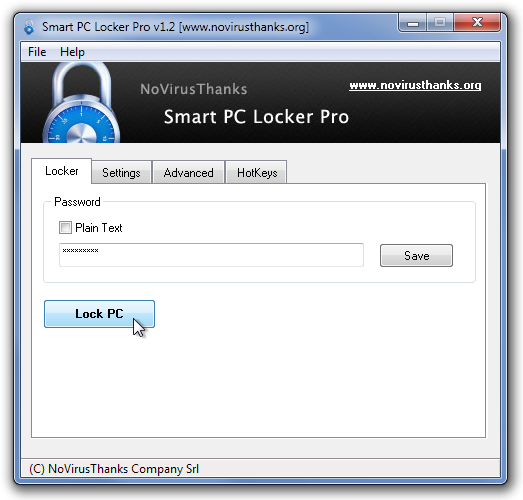
The Settings tab includes the options to specify the minutes to activate auto-lock, minutes of inactivity to turn off monitor, number of invalid password attempts to turn off PC, custom wallpaper, etc. The Advanced tab allows you to enable/disable CD-ROM and Task Manager when the screen is locked by Smart PC Locker Pro, while the HotKeys tab allows you to define custom hot keys to Lock PC and enter Stealth Mode.
![Smart PC Locker Pro v1.2 [www.novirusthanks.org]](https://www.addictivetips.com/app/uploads/2012/01/Smart-PC-Locker-Pro-v1.2-www.novirusthanks.org_.png "Smart PC Locker Pro v1.2 [www.novirusthanks.org]")
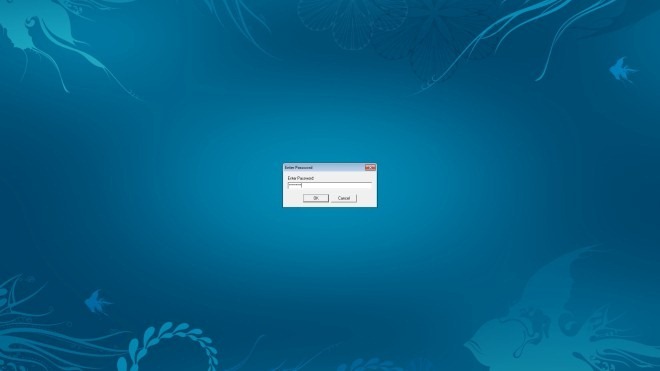
When the lock is activated, you will be able to activate it only using your password.
Smart PC Locker Pro handsomely does what it’s supposed to do, and quite a good alternative to Windows default lockscreen option. The application works on both 32-bit and 64-bit version of Windows XP, Windows Vista, Windows 7 and Windows 8.
