Uninstall .NET Framework From Windows 7
Before you proceed, you should know that we are reviewing this tool for advanced users only. We do not recommend that you should uninstall .NET Framework from your system. Most apps that run on Windows require .NET framework, without which they are rendered useless.
Before Windows 7, removing .NET Framework used to be easy since it could be done from the Add/Remove Programs. But in Windows 7 it is now included inside Turn Windows Features On or Off. To turn it off, you will need to uncheck the Microsoft .NET Framework 3.5.1 checkbox.
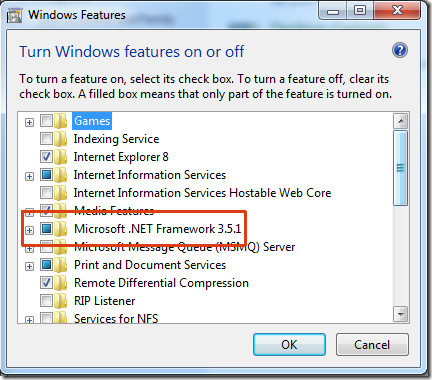
Doing it won’t uninstall it completely, rather it is simply disabled. To uninstall it you will need a 3rd party portable tool called .NET Framework Cleanup Tool. Simply run this tool, hit Cleanup Now button, and .NET Framework will be completely uninstalled from your system.
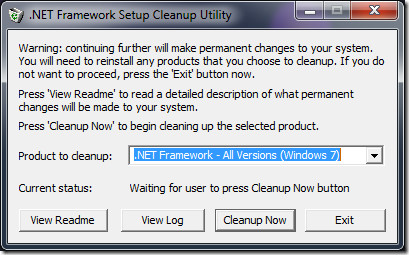
Download .NET Framework Cleanup Tool
Enjoy!

Pls tell me where to find files created by double clicking “dotnetfx35.exe” ???
ie Microsoft . NET Framework 3.5 Service pack 1 ( Full Package)
People say that folder get created in C: root ,
But in my case there is no such folder ..
but somewhere hidden , files are consuming space in C Drive
Ccleaner is not able to remove those files ..
The .NET Framework Cleanup tool worked nicely for me in Win XP, but not entirely in Win 7. The references to the diverse previously installed .NET versions dissapeared from the Windows 7 features; the tool still find traces of previous installations, namely 1.0, 1.1, 3.0 and 4.0 which will not uninstall.
Sorry Gregg,
I have to disagree with you; there are some very specific reasons why someone would want to uninstall .net completely from a Win 7 machine.
The big glaring example on the top of my mind is compatibility with VMware, particularly View and the View Agent.
View Agent DOES NOT play nicely if installed after .net – so removing .net and then installing it again after installing the agent is the official VMware method.
It has nothing to do with Linux-elitism – sounds like you should remove the chip from your shoulder.
I could not more strongly recommend against uninstalling (or, really, even messing very much with) the .NET framework on any copy of Windows.
It is so deeply embedded in Windows that if anything even remotely odd happens to it, some parts of Windows stop working right; and even experts in the .NET framework (believe me, I hired one who used to work on the .NET team at Microsoft when a client tried uninstalling part of the .NET framework and completely goofed-up his copy of Windows) can’t fix it.
Do NOT fiddle with the .NET framework. Trust me on this. It’s just not worth it. And it’s stupd, in any case. It’s the sort of thing which only a Linux-preferring, open-source-only, Microsoft-hating knucklehead who thinks it’s cool to disable certain Windows things and replace them with third-party things which s/he perceives are superior (or will at least make him/her look “cool”) in the first place.
The .NET framework doesn’t hurt anything. It’s as much a part of Windows as the desktop, or Explorer, or the TCP/IP stack. Uninstalling any part of the .NET framework, or failing to keep all available versions of it always up-to-date is just stupd. Seriously. STUPID. Those who do it, and screw things up and end-up completely re-installling Windows get exactly what they deserve.
___________________________________
Gregg DesElms
Napa, California USA
gregg at greggdeselms dot com
“It is so deeply embedded in Windows that if anything even remotely odd happens to it, some parts of Windows stop working right;”
Could you tell me, what Windows part EXACTLY requires a .NET framework? I’ve tried googling, but with no actual results. Just assumptions and myths.
“(…) and even experts in the .NET framework (believe me, I hired one who used to work on the .NET team at Microsoft when a client tried uninstalling part of the .NET framework and completely goofed-up his copy of Windows) can’t fix it.”
I seriously doubt the level of expertise of a person you hired. Or maybe…
“It’s the sort of thing which only a Linux-preferring, open-source-only, Microsoft-hating knucklehead who thinks it’s cool to disable certain Windows things and replace them with third-party things which s/he perceives are superior (or will at least make him/her look “cool”) in the first place.”
Those Linux knuckleheads aren’t so stupid, if they can completely screw up their systems, and bring them back to life without much trouble.
Wow , it did not work out at all.. Okais , im having real trouble.. any other program to recommend? (: Thanks in advance.
blaise is right, this only works with Frameworks that are not bundled with the OS. Quote from the readme tool: “The cleanup tool contains logic so that if it is run on an OS version that includes the .NET Framework as an OS
component, it will not offer the option to clean it up”
This does NOT un-install .NET 2.0, 3.0 or 3.5 on Windows 7.
FAIL (WIN7)
Thx alot !!!!!!! this helped me!